

What if your store page is clear to your team but still leaves players unsure what makes the game worth choosing? Console store page optimization starts with closing that gap, not copying a mobile marketing checklist or polishing every asset at once. Identify which details help the right players understand the experience, then adapt your presentation to each console storefront.
It’s reasonable to feel unsure where to focus when a game is headed to multiple platforms and the impact of a page change can be difficult to measure. This guide gives you a practical workflow for prioritizing page elements, adapting your presentation platform by platform, and using available evidence to assess player response. It also explains how storefront decisions fit into a digital release, including platform requirements and certification.
Ocean Media brings over 20 years of gaming-industry experience to digital console publishing. We help developers coordinate storefront decisions with the broader process of bringing your game to consoles. You’ll have a clearer path from page planning to release through a publishing pipeline aligned with your goals.
Key Takeaways
- Anchor your store page in a clear, supportable promise that helps intended players recognize the game’s appeal.
- Make console store page optimization platform-aware by comparing each storefront’s page fields, asset specifications, localization options, and measurement tools.
- Use a repeatable audit, prioritize, prepare, publish, review, and document workflow to make page improvements easier to evaluate.
- Coordinate storefront decisions with platform requirements and the wider digital release so page preparation supports your console publishing process.
What Console Store Page Optimization Should Achieve for Your Game
Console store page optimization is the process of making a game’s storefront presentation clearer and more persuasive to the players it is designed for, within each platform’s available tools and requirements. The goal is to help a potential player quickly understand what the game offers and decide whether it fits their interests. That is related to, but not identical to, mobile App Store Optimization (ASO), which is often discussed in terms of app-page assets, keywords, and store conversion. Console storefronts have their own formats and constraints, so mobile tactics shouldn’t be transferred without adaptation.
Keep the goal focused. A store page can support a player’s decision once they reach it, but it can’t replace discovery efforts, launch marketing, or game development. Nor can a stronger presentation guarantee visibility, wishlists, purchases, or sales. Those outcomes depend on factors beyond the page. Aim to make the game’s identity and appeal easier to understand, then assess available evidence to see whether a change helps.
What developers can influence on a game storefront
Start with the questions a player needs answered: What kind of game is this? What will I do in it? Who is likely to enjoy it? Page elements such as the title, description, visual assets, trailer, and feature details can each help answer those questions, where the platform offers them. A screenshot might clarify the tone or gameplay; concise copy can explain the core experience. No single field or format is universal across console stores.
Before preparing changes, review current documentation for every target platform. Platform rules determine which fields and asset formats are available, how content is presented, and what options you can use. Treat each storefront as its own publishing context rather than assuming one page can be copied over unchanged.
Why a clear page matters during a console release
Players use storefront information to judge whether a game matches their tastes, expectations, and preferred kind of experience. If the page communicates genre or gameplay ambiguously, the intended audience may struggle to recognize the game’s appeal. Clear, accurate presentation helps set expectations and gives interested players a useful basis for deciding. It’s a communication goal, not a promise of a particular commercial result.
Make the page’s claims specific and supportable. Describe the experience players can expect, and ensure the language and visuals work together rather than implying features or a tone the game doesn’t deliver. Keep storefront work connected to the full release plan: platform requirements, certification, timing, and launch activity all sit within a broader publishing journey. For that context, explore the console publishing developer roadmap. A well-considered page is one part of bringing your game to consoles, aligned with the release rather than treated as a standalone sales lever.
Build a Console Game Store Page Around a Clear Player Promise
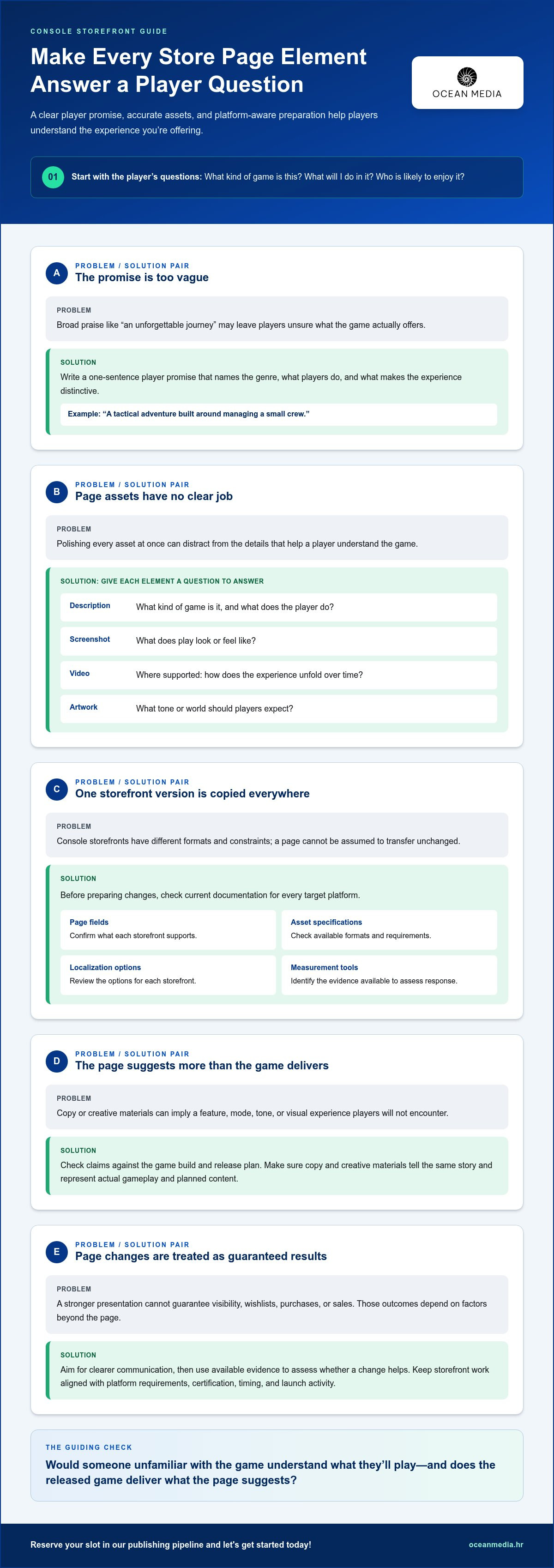
A strong storefront begins with a specific promise to the right player. Before adjusting copy or choosing artwork, define who the game is for, its genre, what players do, and what makes that experience distinctive. For example, “a tactical adventure built around managing a small crew” gives a prospective player more to understand than “an unforgettable journey.” Use console store page optimization to make that promise consistent across the page, not to inflate it.
Write a one-sentence player promise, then test every proposed line and asset against it: would someone unfamiliar with the game understand what they’ll play, and does the released game deliver what the page suggests? Check claims about features, modes, or content against the game build and release plan before publication. Audience insight also matters; Game Marketing Strategies from SAE Institute discusses understanding players as part of effective game marketing.
Turn the game’s defining experience into storefront messaging
Translate the promise into plain, vivid language. Name the genre and describe the central activity or distinctive experience rather than leaning on broad praise such as “epic,” “innovative,” or “the ultimate adventure.” Then make sure the copy and creative materials tell the same story. If the description highlights exploration, for instance, selected footage should make that activity legible rather than presenting only unrelated action.
Build a simple asset-to-question map before production. It helps your team give each available page element a purpose without assuming every platform supports the same formats:
- Description: What kind of game is it, and what does the player do?
- Screenshot: What does play look or feel like?
- Video, where supported: How does the experience unfold over time?
- Artwork: What tone or world should players expect?
Review artwork, screenshots, video, and localized presentation
Start with each target storefront’s current documentation. Confirm the supported page fields, formats, and asset requirements before commissioning or adapting materials. Select formats that fit that store and your release plan. Review every image and clip for accuracy: it should represent actual gameplay and content planned for release, not imply a feature, mode, or visual experience players won’t encounter. Document platform-specific presentation differences so one version doesn’t drift from the game’s core promise.
For regional versions, review wording and creative choices in context. A direct translation may not preserve tone, genre signals, or the meaning of a short tagline. Coordinate text and visual adaptation so the page remains recognizable while speaking clearly to its intended audience. The global console localization guide offers further context for preparing region-specific storefront presentation.
These decisions are easier to coordinate when they sit within the wider release plan. Our console publishing support for developers helps connect storefront preparation with the publishing pipeline.
Compare Console Storefront Requirements Before Choosing What to Optimize
Build your platform comparison before spending time revising assets or copy. PlayStation Store, Xbox Store, and Nintendo eShop each need their own review, based on current documentation for the specific platform and release. Console storefront capabilities differ, so verify every field, asset, localization option, and measurement method platform by platform. A tool or format available on one store is not evidence that another supports it.
Keep three kinds of decisions distinct. Platform documentation defines required and supported formats. Your creative team chooses the message and materials that suit the game. Your publisher coordinates those decisions with the release workflow, including submission and certification milestones. That separation helps you identify what you can change, what must meet platform requirements, and what belongs in the release plan.
Compare platform rules without assuming identical tools
Use a consistent worksheet for each storefront, then record the source and date you reviewed. Mark details that need verification instead of filling gaps with assumptions. Measurement methods may differ too, so establish what the platform provides for your release before planning a comparison experiment.
PlayStation Store
- Page fields: verify supported text and product information.
- Assets: record current specifications and accepted formats.
- Localization: note available language and regional options.
- Measurement: document available testing or reporting methods.
Xbox Store
- Page fields: verify supported text and product information.
- Assets: record current specifications and accepted formats.
- Localization: note available language and regional options.
- Measurement: document available testing or reporting methods.
Nintendo eShop
- Page fields: verify supported text and product information.
- Assets: record current specifications and accepted formats.
- Localization: note available language and regional options.
- Measurement: document available testing or reporting methods.
These are research categories, not claims that each store offers identical fields or tools. Check current platform documentation directly, and confirm how storefront preparation fits the wider release and certification work. Ocean Media’s console publishing support for developers connects platform-specific requirements with the digital publishing lifecycle.
Prioritize the storefronts and regions that fit your release
Start with the platforms and regions included in your release plan. For each one, map the approved page materials, required versions, and relevant language needs. Then review whether localized wording or imagery remains clear and appropriate for its intended audience. A translated tagline may need different phrasing to preserve the game’s genre signal or tone; don’t assume it will work identically everywhere.
This comparison gives your team a practical priority list: resolve platform requirements first, prepare the right version of each asset, then identify which page elements can be refined. Treat every storefront and region as its own context. A page revision or measurement result from one platform can inform your thinking, but it doesn’t automatically prove the same choice will work across the others.
Use a Repeatable Workflow to Improve Your Console Store Page
Make each page update part of a process you can repeat, not a one-off creative hunch. A focused workflow helps your team explain why a change is being made, use available evidence, and carry useful learning into the next storefront decision. For console store page optimization, start by checking the platform’s current requirements and measurement tools. Experiment options differ by platform, so don’t assume you can run a formal comparison everywhere.
Form a useful page-improvement hypothesis
A useful hypothesis connects a player-facing issue to one proposed change and an expected response. For example: “Players may not understand the game’s strategic focus from the current opening copy; revising it to describe the core decision-making experience should make the game’s appeal clearer.” Use reliable player feedback, storefront analytics, or campaign context to identify the issue. If evidence is limited, state that plainly and treat the change as a reasoned improvement, not a proven fix.
Then move through this sequence:
- Audit: Capture the live page and check it against current platform documentation.
- Prioritize: Select one player-facing issue with a clear rationale.
- Prepare: Create the revised copy or asset, then review it for accuracy and platform fit.
- Publish: Apply the approved update through the relevant platform process.
- Review: Examine only outcome measures the storefront makes available, alongside reliable supporting context.
- Document: Record what changed, what you observed, and what remains uncertain.
Review results and decide what to change next
Where the platform supports meaningful comparisons, keep the test focused on one element or message at a time. Changing several items together can make it difficult to understand what influenced the outcome. If no comparison tool is available, you can still follow the audit and review process, but don’t present a before-and-after observation as a controlled test.
For each update, record the page version, platform, region, timing, change made, and available outcome data. Interpret results in context: campaign activity or other release changes may affect what you observe. A consistent pattern can help guide the next decision; sparse or mixed evidence calls for caution, not a confident claim that the page caused a particular result. Use what you learn to choose a sensible next step, whether that’s retaining the change, refining it, or gathering better evidence.
This disciplined approach keeps page decisions connected to the broader publishing workflow. If you’re bringing your game to consoles, explore console publishing support to align storefront preparation with your release.
Bring Store Page Optimization Into Your Console Publishing Pipeline
Storefront work is most effective when planned alongside the rest of your digital release. Page copy, artwork, screenshots, and localized materials need to reflect the game accurately while fitting each platform’s requirements and submission schedule. Treat console store page optimization as part of the publishing pipeline, not as a final marketing task added after release planning is complete.
That connection matters across platforms. Your team may need to prepare different versions of page materials, track platform-specific requirements, and coordinate updates with submission and certification work. A page change can also affect other release assets, so clear ownership and version tracking help prevent teams from working with outdated copy or creative. The broader context of console game publisher responsibilities can help you understand how publishing support fits into a release.
Coordinate page decisions with release requirements
Build storefront preparation into your release plan early. Assign responsibility for checking current platform documentation, preparing materials for each target store, and reviewing final versions against the game and release content. Keep the submission schedule visible to the people shaping the page, so required revisions can be considered alongside other release tasks rather than arriving as last-minute surprises.
This doesn’t mean storefront decisions should be dictated by process alone. Your game’s player promise remains the creative anchor; platform requirements shape how that promise can be presented. A coordinated plan gives your team room to make both work together. For certification specifics, follow the relevant platform guidance as part of the wider publishing workflow.
Make the next step straightforward for your studio
Start with a concise project brief. Note what the game is, who it’s for, which platforms and regions you’re targeting, and which storefront priorities you want to address. Add the current state of your page and any reliable player or performance feedback you already have. This gives your publishing partner a useful foundation for aligning creative decisions with release requirements.
- Game: Summarize the genre, core experience, and player-facing promise.
- Release: Identify target platforms and regions.
- Storefront priorities: Describe what you want players to understand more clearly.
- Current materials: Gather the page copy and approved assets for review.
Ocean Media is a digital console game publisher that works with developers bringing their game to consoles, coordinating platform-specific requirements and the digital publishing lifecycle. We bring publishing experience to the practical decisions that connect storefront presentation with a console release, giving your studio a clearer plan.
Make Your Next Storefront Decision Count
Your next move is to turn page priorities into a release-ready plan. Decide what you want players to understand first, identify the storefront decision that can help communicate it, and bring that focus into your studio’s console release planning. A deliberate next step gives your team direction without treating any single page change as a guaranteed sales outcome.
Strong console store page optimization is an ongoing part of presenting your game to players. As your release plans develop, keep the player promise at the center and make storefront decisions alongside the requirements of your target platforms. You don’t need to solve every consideration at once. Start with your game, your intended audience, and the priorities that matter most to your release.
Ocean Media can work with your studio as you plan the digital publishing path for bringing your game to consoles. Let’s make the next step clear and move your project forward together.
reserve your slot in our publishing pipeline and let's get started today!
Frequently Asked Questions
Can console store pages be A/B tested?
Sometimes, but testing options depend on the console platform and shouldn’t be assumed from Apple’s App Store tools. Check current documentation for each target storefront to see whether it supports experiments, analytics, or page-version controls. If native testing isn’t available, review the page alongside reliable performance information and player feedback. These reviews can guide decisions, but they don’t provide the same experimental evidence as a controlled test.
How often should I update my console game’s store page?
There’s no universal update schedule; make changes when there’s a clear reason. You might revise a page when the game gains verified new content, localized wording needs adjustment, creative materials improve, or reliable performance signals point to a concern. Record what changed and why, then review the relevant storefront’s current rules before submitting materials. Above all, keep the page aligned with the game players can access now.
Does store page optimization guarantee more console game sales?
No. Store page optimization can’t guarantee sales, rankings, or visibility. Clearer presentation may help players understand whether a game fits their interests, but commercial results also depend on factors beyond the storefront. Set a realistic objective, such as making the genre easier to recognize, and evaluate the evidence available to you. Treat page improvements as one part of release planning, not as a promise of a specific outcome.
What happens if a console store page does not perform as expected?
Start by checking whether the page communicates the game accurately and whether the available information is strong enough to interpret. Revisit the intended audience, creative choices, localization, and applicable platform requirements. If you identify a specific issue, make one reasoned adjustment and record the page version and context. Then reassess using reliable data. A disappointing result can have several causes, so avoid treating one observation as a complete diagnosis.
Should my console game use the same store page assets on every platform?
Keep the game’s core message consistent, but don’t assume identical assets will suit every storefront. Platforms can differ in supported formats, specifications, and presentation rules. Check current documentation for each target platform, then adapt materials as needed while keeping them accurate to the game. For example, a screenshot set prepared for one store may require different sizing or selection for another, or a particular format may not be available there.
When should I start optimizing a console game’s store page?
Start during release preparation, while your team still has time to develop accurate copy and platform-ready creative materials. The right schedule depends on the project and each platform’s requirements, so avoid relying on a fixed lead time. Review the page as the release takes shape. Make updates when you have verified information or a clear rationale, such as a content change that affects what players should expect.
Is console store page optimization the same as mobile app store optimization?
No. Both aim to present a digital product clearly, but their storefront tools, requirements, and player experiences aren’t interchangeable. Apple’s product-page testing guidance applies to Apple’s app ecosystem, not automatically to console stores. For a console release, base your workflow on the relevant platform’s documentation. Check which page fields and assets it supports, along with the measurement options available for your specific release.


