

What if your game looks striking on its console storefront, but players still can’t tell what it’s about? Effective console storefront optimization connects a clear game promise with creative assets that meet platform requirements and fit your publishing pipeline. The challenge is deciding what to improve first and making sure every element tells the same story.
This guide gives you a practical way to review your storefront presentation. You’ll learn how to clarify the listing’s message, choose and assess creative assets, adapt materials for platform-specific needs, and build a repeatable review process. We’ll also cover how storefront work fits into the wider console publishing journey, so your presentation stays aligned with the steps involved in bringing your game to consoles.
At Ocean Media, we bring over 20 years of gaming-industry experience to digital console publishing. We work with developers to coordinate storefront considerations with platform submissions and the broader publishing pipeline. When you’re ready to bring your game to consoles, reserve your slot in our publishing pipeline and let's get started today!
Key Takeaways
- Use console storefront optimization to make your game’s promise clear and consistent. A stronger presentation does not guarantee sales or visibility.
- Identify your intended player and the game’s distinctive experience before refining descriptions, visuals, and trailer materials.
- Compare description options for how clearly they convey genre, audience, and gameplay, then check consistency and platform fit.
- Build a repeatable review workflow. Check the listing against the release build and approved creative assets before release.
- Coordinate storefront materials with digital release preparation and platform submissions as part of your publishing pipeline.
Why Console Storefront Optimization Matters Before Your Game Goes Live
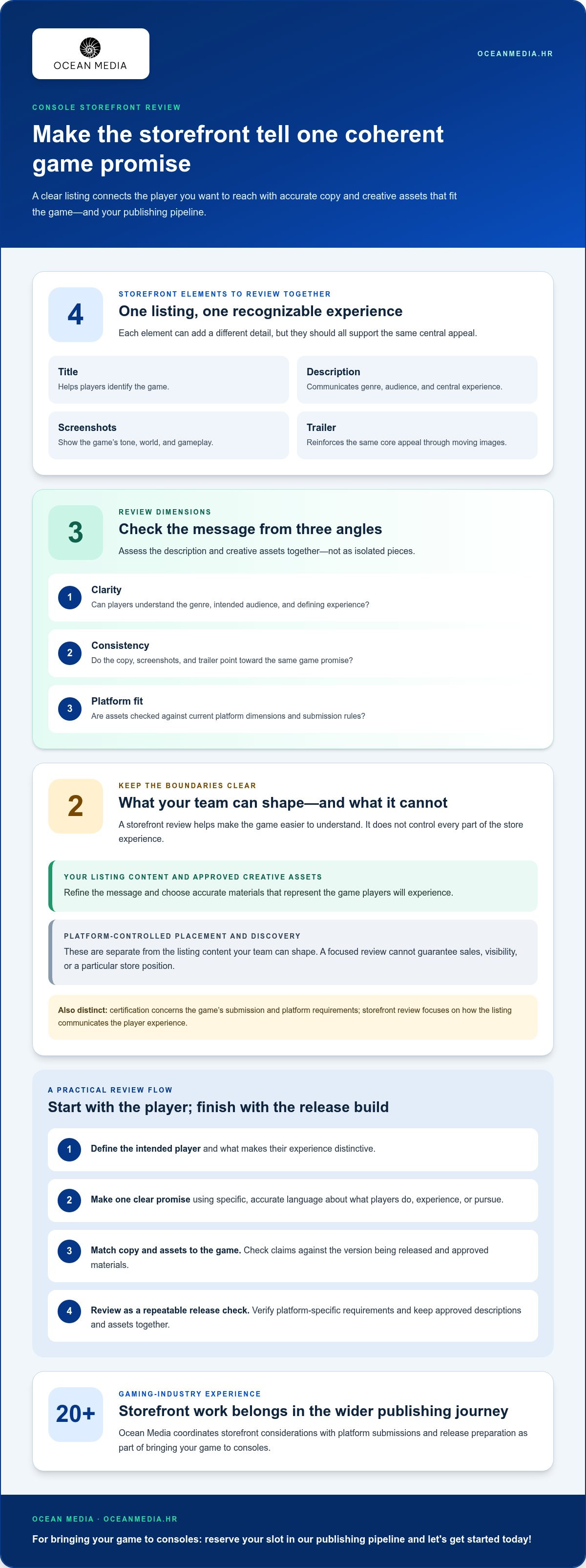
Before players experience your game’s controls, world, or story, they encounter its storefront presentation. The title, description, screenshots, and trailer shape their first impression and help them decide whether the game sounds right for them. Console storefront optimization means making those materials clear, consistent, and representative of the game.
A focused review can improve understanding, but it can’t guarantee sales, visibility, or a particular position in a store. You can shape your listing content and approved creative assets, while platform-controlled placement and discovery remain separate. Storefront review is also distinct from certification. Certification concerns the game’s submission and platform requirements; storefront review focuses on how the listing communicates the player experience.
Console storefronts are part of broader platform ecosystems. A video game console brings together hardware, software, and digital distribution, so your store page is one way players encounter a game on that platform. Treating its presentation as a deliberate part of release preparation gives your team a practical opportunity to make the game’s promise easier to understand.
What developers can influence on a console game listing
You can shape the content that introduces your game. The title helps players identify it. The short description and key messaging convey its genre, audience, and central experience. Screenshots, trailers, and other approved creative assets add visual context by showing the tone, world, and gameplay described in the text.
Review those elements together rather than polishing each in isolation. If your description emphasizes tactical combat, for example, choose visuals that make that experience recognizable. Your team can refine the message and assets, but platform placement and discovery are not simply another part of the listing you control.
How the storefront supports the game’s audience promise
Start with what you want your intended player to understand, then check that the listing matches what they’ll actually experience in the game. Consistent language and imagery reduce mixed signals. Players should be able to connect the description’s promise with what the screenshots and trailer show. That alignment helps them form a clearer expectation before they play.
Make this review part of your wider release planning. The console publishing roadmap connects storefront preparation with the broader work of bringing your game to consoles, helping your team consider how the listing fits into the publishing pipeline.
We work with developers on digital console publishing, coordinating storefront considerations with platform submissions and release preparation. Explore our console publishing support, reserve your slot in our publishing pipeline and let's get started today!
Build a Clear Storefront Message Before Polishing Its Assets
Start with the player, not the artwork. Identify who you want to reach and what makes their time with your game distinctive: exploring a strange world, mastering tactical encounters, solving environmental puzzles, or pursuing another defining experience. Use that focus to assess every line of copy and creative choice. If a detail doesn’t help the intended player understand the game, consider whether it belongs in the storefront message.
Next, express that experience as one clear promise. The description, screenshots, and trailer can each communicate different details, but they should point toward the same core appeal. A cinematic trailer paired with copy focused on strategic decision-making, for example, may leave players unsure what kind of experience to expect. Specific, accurate language is stronger than unsupported superlatives because it tells players what the game actually offers.
Shape store-page copy around the player experience
Lead with what players do, experience, or pursue. Name the genre and central appeal in concise language, then use supporting details to add character. Instead of relying on a claim like “the ultimate adventure,” describe the player’s role and a defining activity. Concrete details give readers something to picture and help distinguish your game from listings built around broad, interchangeable praise.
Check every statement against the version being released. If the copy highlights cooperative play, a particular gameplay loop, or a story focus, verify that the game and approved materials support that claim. Ask someone familiar with the build to review the text and flag language that sounds compelling but creates the wrong expectation. Consistent storefront messaging helps players understand what the game offers and what kind of experience to expect.
Make screenshots and trailers reinforce the same promise
Choose screenshots and trailer moments that show recognizable gameplay and the intended tone. Then review the assets as a sequence, not as unrelated highlights. Ask what a player might infer from the first image, what the next asset adds, and whether the trailer confirms the same central appeal as the copy. Together, the materials should tell a coherent story without making claims the game can’t support.
Before finalizing assets, verify platform-specific dimensions and submission rules in the current platform documentation. Requirements can vary, so don’t build a production plan around remembered specifications. Track approved descriptions and assets together, and make sure revisions stay aligned. This keeps your listing cohesive while connecting storefront work to the wider release process.
If you’re coordinating creative materials with the practical demands of bringing your game to consoles, our console publishing support can connect storefront preparation with the broader digital publishing process.
Compare Storefront Choices by Clarity, Consistency, and Platform Fit
When two descriptions or creative directions both seem promising, compare what each helps a player understand. A useful console storefront optimization review asks whether the listing quickly communicates the game’s genre, intended audience, and core gameplay, and whether its words and visuals make the same promise. These criteria guide editorial choices. They don’t predict sales, placement, or discovery.
Put the alternatives side by side and assess them against the same questions. “An epic journey through a world in peril” may set a broad mood, while “explore a shifting world and solve environmental puzzles” gives a clearer sense of player activity. Neither version is automatically right for every game. Choose wording that is accurate, distinctive, and supported by the actual experience and approved assets.
Choose between competing descriptions and creative directions
Ask people unfamiliar with the project to read or view each option without extra explanation. Invite them to describe the genre, likely audience, and gameplay they expect. If their interpretations differ from your intent, revise the copy or visuals. Fresh eyes can expose assumptions your team may miss after working closely with the game.
Use a simple comparison to record what you learn:
| Check | What to assess | Useful sign |
|---|---|---|
| Clarity | Does the description quickly communicate genre, audience, and gameplay? | A reader can explain the game’s central appeal in their own words. |
| Consistency | Do the copy, screenshots, and trailer support the same promise? | The assets illustrate the experience described in the text. |
| Platform fit | Does the presentation suit the intended console storefront and its current content guidance? | The team has reviewed the relevant platform documentation. |
Apply the same comparison to visual options. A dramatic landscape or character portrait can establish mood, but a representative gameplay screenshot may communicate the game’s actual activity more directly. Attractive imagery still has a role. Ask whether each asset adds useful context or leaves players to guess, and review the set as a whole rather than judging only the strongest standalone image.
Separate storefront optimization from certification work
A polished listing doesn’t replace platform submissions or certification requirements. Storefront review focuses on how the game is presented; certification is a separate part of preparing a release for a platform. Keep the work coordinated, but assess each against its own purpose. For technical submission guidance, refer to the separate console certification guide.
Our team helps connect storefront decisions with digital publishing preparation as you bring your game to consoles. Explore our console publishing support, reserve your slot in our publishing pipeline and let's get started today!
Use a Repeatable Console Storefront Optimization Review
A consistent review process helps your team catch mismatches before storefront materials move through the publishing pipeline. Treat console storefront optimization as a set of practical checks, not a one-time copy edit. These five passes give writers, creative teams, and release leads a shared path from the game’s audience promise to final approval.
- Define the audience promise. Describe the intended player and the game’s clearest differentiator in a sentence. Use it as the reference point for reviewing every listing element.
- Review the complete presentation. Read the description and supporting copy alongside the screenshots, trailer, and other approved creative assets. Consider what a player would understand from the materials as a set.
- Check accuracy against the game. Compare each claim with the build being prepared for release. Confirm that featured activities, modes, and experiences are represented accurately, and that the selected assets are approved for use.
- Assess readability and platform fit. Look for clear, concise language, then review current platform guidance for presentation and asset requirements. Keep this check current as you prepare materials for each console platform.
- Record the outcome. Capture approved versions, remaining questions, and the next action for each open item. This gives the release team a clear record to use when materials change.
Coordinate revisions without expanding release friction
Give each part of the listing a clear owner. One person can lead copy, while designated team members manage screenshots, trailer materials, and approvals. The goal isn’t to add review layers. It’s to clarify who updates each asset and who signs off when revisions affect the shared message.
Keep one current version of the storefront materials for review, and record changes and decisions in the same place. This reduces the risk of teams reviewing outdated copy or pairing approved text with superseded creative assets. If a gameplay detail changes in the build, notify the relevant owners so the description and visuals can be reviewed together.
For region-specific presentation, include language and market considerations in the same review process. Use your global console localization guide to coordinate those details with the core message, while keeping current platform guidance in view for each storefront.
Our digital publishing team can coordinate storefront preparation with platform submissions and the broader release process. If you’re bringing your game to consoles, explore console publishing support and see how we can work with you across the publishing pipeline.
Bring Your Game to Consoles with Storefront Work in the Publishing Pipeline
Storefront materials are one part of a broader digital release. Descriptions, screenshots, and trailer assets need to move alongside platform submissions and other release preparation, with the right versions available to the people coordinating each step. When these workstreams stay connected, your team can address presentation decisions as part of bringing your game to consoles, rather than treating the listing as a last-minute task.
That coordination matters because storefront content depends on accurate, approved information about the game. If a detail changes during release preparation, the listing and creative materials may need another review. Keeping storefront work visible in the publishing pipeline gives the release team a shared point of reference and helps align decisions with platform-specific submission work. It supports an organized process, not a promise of sales or visibility.
What a publishing partner contributes to storefront readiness
A publishing partner can coordinate storefront materials with the digital publishing lifecycle and platform submissions. This keeps presentation work connected to the broader release process and helps your team account for relevant platform requirements as materials are prepared and reviewed. The work is collaborative: you bring the game, creative direction, and release goals; we work with you to coordinate the publishing path.
If you’re assessing this relationship, explore what console game publishers do to understand how publishing support fits around a release. At Ocean Media, our work focuses on digital console publishing. We bring over 20 years of gaming-industry experience to supporting developers through digital releases, platform submissions, and the publishing lifecycle.
Take the next step with Ocean Media
Your next step can be a conversation about your console release goals: where you plan to publish, what stage your game is at, and how storefront preparation fits into the work ahead. Sharing those priorities gives us a useful starting point for collaboration. From there, you can approach the release with a clearer view of how presentation materials connect to the wider publishing pipeline.
We’re ready to work alongside you as you plan your digital console release. reserve your slot in our publishing pipeline and let's get started today!
Move Your Console Release Forward
Turn storefront decisions into actions your release team can own. Clarify who approves the final materials, what is ready to progress, and which decisions still need alignment with your release plan. This gives the work a clear place in your schedule and helps your team move from creative review to coordinated execution.
Keep console storefront optimization connected to the decisions that shape your release. If the game or release plan changes, make sure the right people know whether the storefront materials need another review. A publishing partner can help connect those conversations to the wider console release process, so you can move your project forward with a shared plan.
Ready to discuss your console release goals? Reserve your slot in our publishing pipeline and let's get started today! We look forward to working with you as you take the next step toward bringing your game to consoles.
Frequently Asked Questions
Can console storefront optimization guarantee more game sales?
No storefront change can guarantee more sales. Console storefront optimization helps make your game’s presentation clearer, so prospective players can better understand what it offers. Sales also depend on factors beyond the listing, including the game, its audience, release context, and platform environment. Treat changes as informed presentation decisions, then review the performance signals available to your team. Use those observations to guide future updates, not as a promise of a particular result.
What should a console game storefront description include?
A useful description tells players what they do in the game, what kind of experience it offers, and what makes it distinct. Name a specific player activity instead of relying on general praise that could fit many titles. Check each claim against the release build and the materials shown on the page. Before publishing, review current guidance for the relevant platform, since storefront content requirements may differ.
How often should developers update a console game storefront?
Review the listing when meaningful information changes, such as approved creative assets, release details, or the description of the player-facing experience. Avoid frequent edits without a clear reason, since each change creates another version for the team to manage. Record the approved copy and assets, then coordinate proposed updates through the publishing pipeline. Before an update goes live, check that it remains accurate and follows current platform guidance.
Do screenshots matter more than a game trailer on a console storefront?
Neither should automatically replace the other. Screenshots can give players a quick look at the game’s visual style and individual moments, while a trailer can communicate movement, pacing, and a broader sense of play. Consider what each asset contributes to the listing, and avoid asking one asset to carry the entire message. The right mix depends on the game and the approved materials available for its storefront.
Should console storefront text be localized for every market?
Not necessarily. The right localization approach depends on your release audience and scope. For each market you plan to reach, review whether the description and related creative materials communicate naturally and accurately to those players. Keep the meaning consistent across versions, including genre, gameplay details, and the experience being presented. Planning localized storefront content alongside wider release preparations helps prevent isolated phrases from losing context.
Who is responsible for preparing console storefront materials?
Responsibility can be shared between your development team and publishing partner. Your team contributes accurate game information, approved assets, and knowledge of the player experience. A console publisher can coordinate digital publishing work and platform submissions as part of the release lifecycle. Agree on owners for copy, visuals, and approvals early, so everyone knows who maintains the current version and how proposed changes are reviewed.
When should storefront optimization begin in a console release?
Begin once your team can describe the game clearly and has suitable materials to review. You don’t need to wait until every release detail is final to start shaping the presentation, but keep drafts distinct from approved content. As information and assets develop, revisit the listing and coordinate final versions with the rest of the publishing pipeline. Use current platform guidance when checking platform-specific presentation details.


