

A console patch is more than a build fix. A change that solves one issue can create regressions elsewhere, while platform-specific submission and review steps add coordination to an already busy development schedule. If you’re working out how to manage console game updates and patches, a dependable workflow can help protect the player experience without letting patch work derail ongoing development.
Updates need careful testing and clear timing. The challenge is making those priorities repeatable across platforms and existing content, then setting expectations with players while a fix moves through review. This guide lays out a practical path from issue triage and scope decisions to testing, versioning, submission, rollout planning, and player communication.
Publishing support can also coordinate platform-facing tasks within your broader publishing pipeline. Ocean Media brings more than 20 years of gaming-industry experience to digital console publishing, helping developers manage the operational side of bringing your game to consoles. When you’re ready, reserve your slot in our publishing pipeline and let's get started today!
Key Takeaways
- Build a repeatable workflow with clear owners from issue triage through release and monitoring.
- Choose a studio-led, publisher-supported, or hybrid approach based on your team’s capacity, platform experience, and coordination needs.
- Align scope, testing, submission preparation, and release timing when managing console game updates and patches.
- Use a release-readiness check to confirm build identity, test status, known issues, and communication ownership.
- Include platform-facing coordination in your wider publishing pipeline, then use release learnings to improve the next update.
Why console game updates and patches need a managed workflow
A console game patch is a post-release change to a game build that fixes a defect, improves performance, or adjusts how part of the game works. The general computing definition of a Patch (computing) covers changes applied to software after release. For a console game, the code change is only one part of the work.
A patch defines what changes in the game; release management defines how that change is tested, coordinated, submitted, communicated, and delivered to players. That distinction matters when you’re deciding how to manage console game updates and patches. A fix may be ready in a branch but still need an impact assessment, platform-specific preparation, and a clear plan for setting player expectations.
Teams use terms such as patch, update, hotfix, and content release differently. A hotfix often signals an urgent response, while a content release may add or change player-facing material. There is no universal naming convention across studios and platforms. Agree internally on what each label means, then keep the name, scope, urgency, and release plan aligned.
Which changes belong in a console game patch?
Group proposed work by player impact, not by how small the code change appears. This helps your team compare urgent defects with improvements and planned additions before committing to a build’s scope.
- Urgent defects: Issues that block progress, disrupt core play, or risk player data deserve prompt assessment.
- Quality improvements: Performance tuning, usability adjustments, and compatibility fixes can improve the experience without requiring an immediate release.
- Planned content or features: Additions may need their own preparation and validation. Consider the added risk before combining them with a defect fix.
Not every reported issue needs a patch. You might address a low-impact issue in a later update, clarify how a feature works, or monitor an intermittent report while gathering evidence. Record the player impact, affected systems, proposed response, and decision owner. This gives the team a reasoned basis for prioritizing work instead of treating every report as an emergency.
Why can a small change carry release risk?
Small edits can affect systems with wide dependencies. A change to a menu, for example, might affect input handling, saved settings, or platform-specific behavior. A fix involving saved data needs validation beyond the immediate bug. You’ll want confidence that existing saves still load and that the correction does not create a new problem.
Set test scope by tracing what the change could affect, not by counting changed lines. If shared code supports multiple platforms or game modes, validate the relevant combinations and existing content. Then assign owners for build review, platform-facing steps, and player communications. Your publishing pipeline can keep those handoffs visible. Ocean Media supports developers with digital console publishing and platform-specific coordination.
Release confidence comes from controlled validation and clear decisions, not patch size. Build that discipline into your workflow as part of bringing your game to consoles.
Build a console game update workflow: issue to release
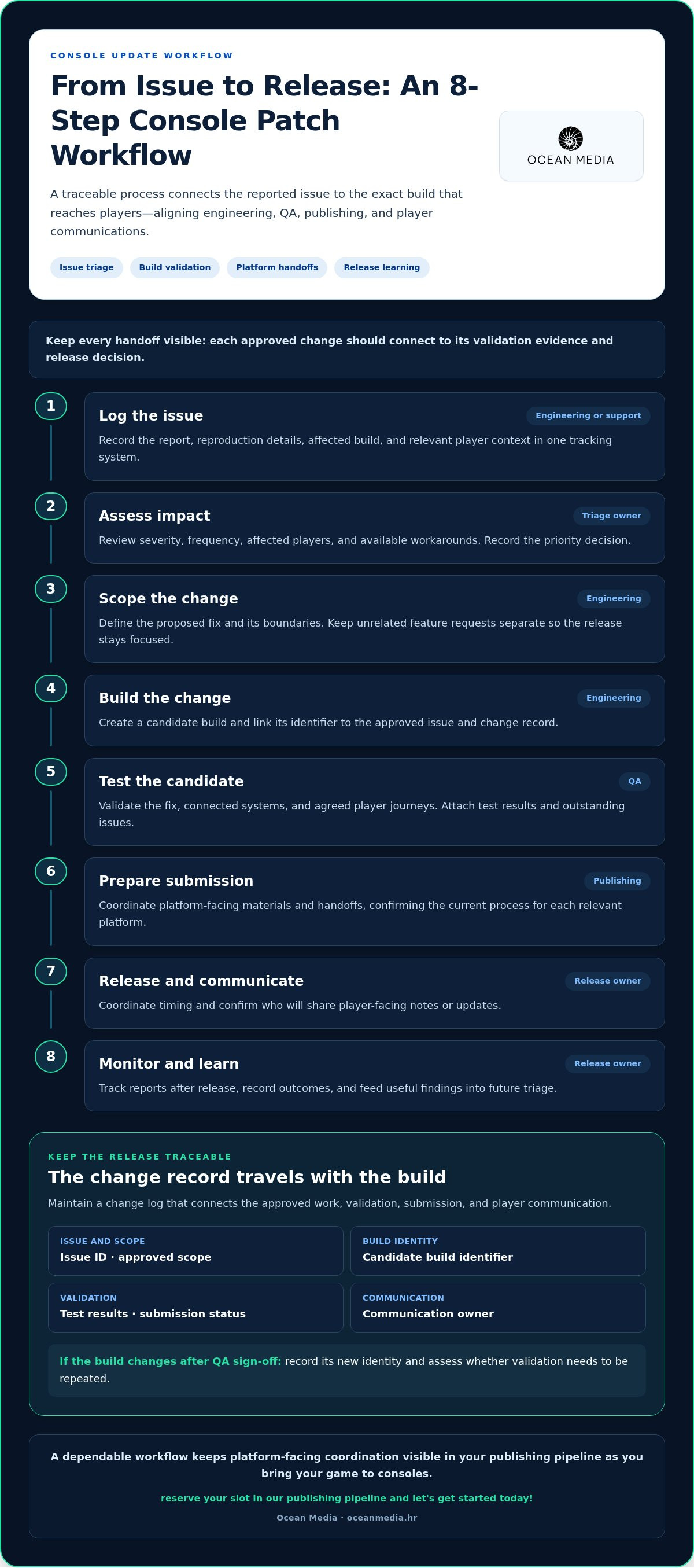
A reliable process gives each decision a clear owner and connects the reported issue to the exact build that reaches players. Use the workflow below as a shared operating record. Adapt the handoffs to your team while keeping engineering, QA, publishing, and player communications aligned. This is a practical foundation for managing console game updates and patches without losing track of scope or evidence.
- Log the issue. Engineering or support records the report, reproduction details, affected build, and relevant player context in one tracking system.
- Assess impact. A triage owner reviews severity, frequency, affected players, and available workarounds, then records the priority decision.
- Scope the change. Engineering defines the proposed fix and its boundaries. Keep unrelated feature requests separate so the release stays focused.
- Build the change. Engineering creates a candidate build and links its identifier to the approved issue and change record.
- Test the candidate. QA validates the fix, connected systems, and agreed player journeys, then attaches test results and outstanding issues.
- Prepare submission. Publishing coordinates platform-facing materials and handoffs, confirming the current process for each relevant platform.
- Release and communicate. The release owner coordinates timing and confirms who will share player-facing notes or updates.
- Monitor and learn. The owner tracks reports after release, records outcomes, and feeds useful findings into future triage.
Every release needs a named owner and a traceable build, so the team can connect each approved change to its validation evidence and release decision. Maintain a change log with the issue ID, approved scope, build identifier, test results, submission status, and communication owner. If the build changes after QA sign-off, record its new identity and assess whether validation needs to be repeated. This prevents the team from relying on informal messages or assuming that the build that passed testing is the one submitted.
Triage issues before committing a patch
Compare reports by severity, frequency, who is affected, and whether a practical workaround exists. A rare issue that blocks progression may deserve more attention than a frequent cosmetic problem, but context matters. Record the decision, accountable owner, and intended player outcome. Set a scope boundary before work begins. Urgent defect fixes should not quietly absorb unrelated feature requests that expand testing and coordination.
Prepare builds, testing, and platform handoffs
Keep the build identifier consistent across the change log, QA evidence, and submission materials. Test the changed feature, its dependencies, and previously working player journeys that could be affected. Before each handoff, verify the current platform-specific submission steps and terminology. Requirements can differ across platforms and may change. A publishing partner can help coordinate those platform-facing tasks within your wider pipeline. Explore console publishing support for developers as you plan your process.
Compare patch-management approaches for console game teams
There is no single best structure for every studio. The right approach depends on your team’s capacity, console experience, decision-making needs, and how much platform-facing coordination you want to manage internally. As you decide how to manage console game updates and patches, keep one boundary clear: engineering owns the technical fix, while publishing support can help coordinate platform requirements and release operations.
| Workflow | Team capacity | Platform experience | Decision ownership and coordination |
|---|---|---|---|
| Studio-led | Works when your team can allocate time to engineering, QA, publishing tasks, and player communications. | Best suited to teams with established console processes and knowledge. | The studio retains direct control of priorities, builds, tests, release decisions, and handoffs. Internal coordination needs can be substantial. |
| Publisher-supported | Can help when your team needs support coordinating platform-facing tasks alongside development. | A publishing partner contributes experience with platform-specific technical and administrative requirements. | The studio owns the fix and technical decisions. Responsibilities for submission coordination and release communication are agreed together. |
| Hybrid | Useful when internal capacity is strong in some areas but limited in others. | Combines the studio’s existing expertise with targeted publishing support where needed. | Shared ownership requires explicit decision rights and handoffs, so development, publishing, and communications stay connected. |
When does a studio-led workflow make sense?
A studio-led model can suit a team with the time, console experience, and internal processes to carry a patch from prioritization through release. You retain direct control over builds, testing, scope, and timing. The trade-off is that your team must also coordinate platform requirements and player communication across its own functions. Base the decision on available capacity and proven experience, not assumptions about what your team should handle.
What can a publisher-supported workflow add?
A publishing partner can connect your development decisions to platform-specific technical and administrative requirements, while engineering remains responsible for diagnosing and implementing fixes. Agree on who owns approvals, submission coordination, and release updates so shared work does not create ambiguity. This support places post-launch patches within the wider release lifecycle. The console publishing roadmap provides broader context for how ongoing publishing work fits around bringing your game to consoles.
Choose the model that gives each task a capable owner without adding unnecessary handoffs. A hybrid workflow may evolve as your team gains experience or project needs shift, so revisit responsibilities when capacity changes. Ocean Media’s console publishing support can coordinate platform-facing work within your publishing pipeline.
How to test, schedule, and communicate console patches
A release plan should make it easy to answer three questions: which build is being released, what evidence supports its readiness, and who will explain the change to players? This discipline keeps testing, timing, and communication connected instead of treating them as separate tasks. If you’re deciding how to manage console game updates and patches, document the release decision so everyone works from the same verified information.
A patch is ready to release only when its build identity, test status, known issues, and communication owner are clear and recorded. Use a short readiness check before committing to a release window:
- Build identity: Confirm the candidate build matches the one that was tested and is being prepared for release.
- Test status: Record completed checks, results, and any outstanding validation.
- Known issues: Describe unresolved issues, their player impact, and the decision to proceed or hold.
- Communication owner: Assign who prepares, reviews, and publishes player-facing notes.
Test beyond the code change
Start with focused tests of the modified feature, then check connected systems and relevant player journeys that could be affected. For example, a change to a settings screen may warrant checking that settings still save and load as expected. Validate the relevant platform configurations for the affected build and document what was tested. If an issue remains, record its severity and impact, then make an explicit proceed-or-hold decision with the release owner.
Coordinate rollout and player-facing notes
Set timing only after the build and its release path are understood. Align the proposed window with team availability, applicable platform processes, and the effect on active players, such as whether the change could interrupt a session or affect shared play. Leave room to respond to new information rather than communicating an unapproved date as certain. Confirm which team member will publish updates and where players should find them.
Keep patch notes concise and player-focused. State what changed and what players should expect, using plain language rather than internal ticket names or implementation details. Separate confirmed fixes from planned work. Do not imply that an issue is resolved until the released build includes the validated change. If notes need to reach players in multiple languages, account for that work during preparation. Our guidance on console game localization planning can help you consider localization within a global release.
Clear handoffs connect QA evidence, platform-facing coordination, and player communication within your broader publishing pipeline. For support with the publishing side of bringing your game to consoles, reserve your slot in our publishing pipeline and let's get started today!
Bring console updates into a dependable publishing pipeline
A dependable update process is a repeatable cycle: prioritize, prepare, validate, coordinate, communicate, and learn. Each stage needs a clear owner and a record that carries forward, connecting triage decisions to the build, platform handoffs, and player-facing message. This gives your team a practical way to manage console game updates and patches as part of ongoing development, not as a series of last-minute exceptions.
After release, review what happened. Did the change address the player problem? Did testing reveal gaps? Were responsibilities and updates clear across the team? Capture those lessons and use them to refine the next cycle. The goal is not to add process for its own sake. It is to make important information visible early enough for your team to make confident decisions.
What to align with a publishing partner
Set responsibilities before an update is underway. Agree who owns technical decisions, approvals, build handoffs, platform-facing materials, and player communications. Choose a shared way to track issues and release decisions, and make sure the people handling publishing coordination can see relevant development priorities. Clear boundaries matter: the studio remains responsible for the game’s technical changes, while a publishing partner can organize the related platform-facing work.
Keep the process lightweight but explicit. For example, use a shared release record to connect an issue to its approved scope, candidate build, validation status, and current decision. Agree how changes to the build or plan are communicated, too. This keeps engineering, QA, publishing, and communications working from the same release plan.
Start with a clear update plan
Before work begins, write down the essentials: which game and target platforms are involved, the current build, and the player-facing objective. Add known risks, testing ownership, and the next decision point. A plan might say that a change aims to resolve a specific progression blocker, identify who will validate affected player flows, and name who decides whether the candidate can move forward. This makes the next step clear without locking the team into unrelated work.
Updates sit within a game’s broader publishing lifecycle. Ocean Media is a digital console game publisher that supports developers with platform-specific technical and administrative requirements. That experience can help coordinate platform-facing work within your publishing pipeline, while your development team retains ownership of implementing and validating game changes. Explore developer publishing support to see how this partner role can fit your plans for bringing your game to consoles.
Start with the game, build, platforms, and player outcome you have in view. We can work with you to connect update coordination to the wider publishing pipeline.
Make your next update a stronger starting point
Your next patch can do more than address an immediate issue. It can help your team make better-informed decisions about what to prioritize, how to protect development time, and what players need from the experience as the game evolves. Treat each release as a chance to sharpen your approach, not simply close a ticket.
If you’re deciding how to manage console game updates and patches over the long term, start by identifying the update or release challenge that is taking the most attention from your team. Bring that priority into a conversation about how console publishing support can fit your project. A clear starting point makes it easier to discuss responsibilities, coordination, and the next step for bringing your game to consoles.
Reserve your slot in our publishing pipeline and let's get started today! We’re ready to help you move forward with confidence.
Frequently Asked Questions
Do console game patches always need platform review before release?
Yes, console game patches generally need to pass the relevant platform’s review or certification process before release. Submission steps and terminology vary by platform and can change, so approval on one platform does not mean another platform’s process is complete. Build current requirements into your release plan, and leave time to respond if a submission needs changes before it can proceed.
How should a studio handle an urgent console game hotfix?
Treat urgency as a reason to prioritize quickly, not to skip validation or platform processes. Confirm the issue, identify who is affected, and keep the proposed fix focused. Test the specific failure and the player flow around it, then prepare the platform handoff. Share only confirmed information with players, and avoid promising a release time until the path and timing are clear.
Can a console patch affect existing player save data?
Yes. A change to progression, inventory, settings, or save handling can affect data created before the patch, even if the change appears limited. Test with existing saves as well as fresh ones, and check that loading, saving, and relevant progression still behave as intended. If the patch changes how data is stored or migrated, document the expected behavior and investigate any unexpected result before release.
What should patch notes tell players?
Patch notes should explain what players will notice and whether they need to take any action. For example, say that a progression issue was fixed rather than listing an internal ticket number or technical implementation detail. If a related issue remains, distinguish it from the resolved fix. Keep every statement accurate to the released build, and do not present planned changes as features players can already access.
How can a team decide whether to bundle fixes or release them separately?
Bundle fixes when they’re ready together, affect related systems, and can be validated as one coherent release. Consider separate releases when an urgent, contained fix would otherwise wait for unrelated work, or when combining changes would make testing harder to interpret. Weigh player impact, dependencies, platform coordination, and the risk of introducing regressions. Record why you chose the scope so the team can review the decision later.
What should a team do if a patch introduces a new bug?
Assess the bug’s impact and identify the affected build, platforms, and player scenarios. If rollout controls are available, consider pausing further release while you investigate. Do not assume a patch can be rolled back. Capture reproduction details, compare behavior with the previous build, and decide whether a mitigation or follow-up fix is appropriate. Communicate confirmed effects clearly, then validate the next change against the new issue and the original fix.


