

If you’re asking how to get a pegi rating, start by mapping your release plan to the relevant classification route. Digital games on participating storefronts may use the IARC questionnaire, while other releases may follow PEGI’s traditional process. The right route depends on how and where you plan to distribute the game, so identify your formats, storefronts, and territories before preparing a submission.
Next, review the game version you intend to release and gather accurate information about its content. Answers about violence, in-game purchases, online features, and other content can affect the classification. This guide explains how to identify the likely route, prepare your content review, and account for PEGI’s updated criteria taking effect in June 2026.
A PEGI age rating is not the same as console approval. Rating preparation and platform submission are separate workstreams, so plan them together without treating progress in one as approval in the other. Ocean Media supports digital console publishing and helps developers navigate platform-specific submission requirements as part of bringing your game to consoles. When you’re ready to plan the wider release, reserve your slot in our publishing pipeline and let's get started today!
Key Takeaways
- To understand how to get a pegi rating, match your release plan to the relevant route: IARC for participating digital storefronts or PEGI’s traditional process where applicable.
- Review the complete game version and organize accurate content notes before completing the applicable questionnaire.
- Age categories and content descriptors communicate different information. Prepare for both as part of the classification process.
- Plan age classification alongside console submission work. A PEGI rating is distinct from platform certification and approval.
- Include rating preparation in your publishing pipeline as you coordinate the wider work of bringing your game to consoles.
What a PEGI rating means, and when your game needs one
PEGI is a video game age-classification system. It communicates the age group a game is considered suitable for based on its content. It does not assess whether the game is well made, enjoyable, or right for every individual player. For developers, that distinction matters: a classification helps players and families understand content, but it is not a quality review or a complete description of the game.
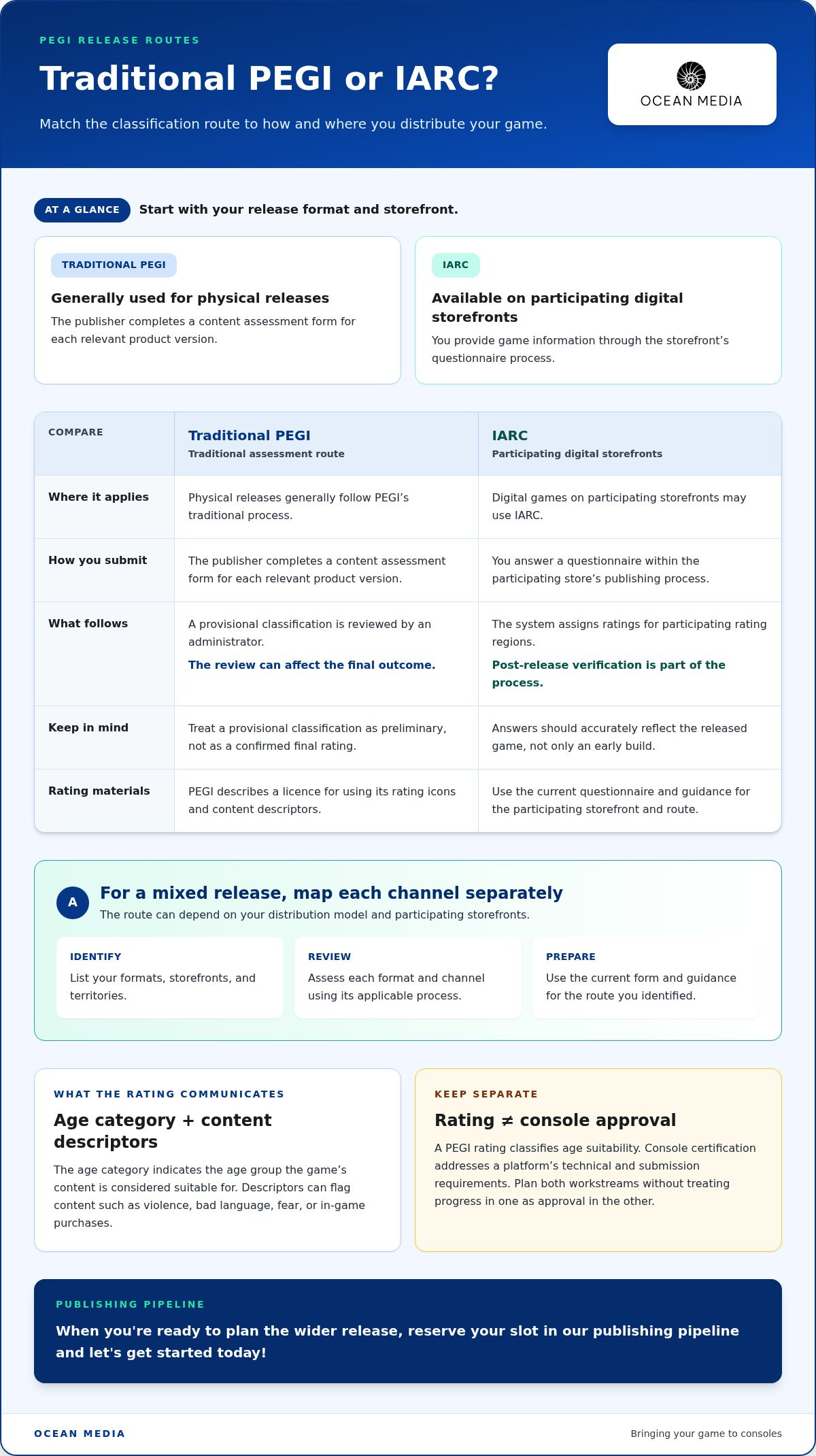
The route you use can depend on your release plan. Digital games on participating storefronts may use the IARC questionnaire within the store’s publishing process, while physical releases generally follow PEGI’s traditional process. For a mixed release, map each format and channel separately, then use the current process for each. The practical first step in learning how to get a pegi rating is to define where and how your game will be distributed.
What information does a PEGI rating communicate?
The age category gives a quick indication of the audience for whom the game’s content is considered appropriate. It is not a recommendation about a player’s ability or maturity. Developers should not choose a category to suit a marketing plan. The classification follows the assessment process and the information provided about the game.
Content descriptors add detail that the age category alone cannot convey. Descriptors can flag violence, bad language, fear, or in-game purchases, helping families understand the type of content involved. Games in the same age category may still contain different kinds of content. PEGI’s procedures can vary by distribution model while using shared criteria. For background on the system and its terminology, see the Pan European Game Information (PEGI) Wikipedia article.
Does a PEGI rating approve a game for consoles?
A PEGI rating classifies a game’s age suitability; console certification checks whether its release meets a platform’s technical and submission requirements. The processes address different questions. A rating does not establish that a game has passed platform checks or been approved for a storefront.
Keep both workstreams in your publishing plan. Manage rating information for the relevant release route while preparing separately for platform-specific submission and certification. This prevents a rating milestone from being mistaken for launch approval. If your release spans multiple regions, other systems may also be relevant; the global console game age rating guide offers an overview of regional considerations.
As you bring your game to consoles, treat age classification as one part of the broader publishing pipeline. Ocean Media supports digital console publishing and helps developers navigate platform-specific submission requirements. Keep rating preparation distinct from the work of meeting each platform’s release process.
How to get a PEGI rating: understand the assessment process
The practical answer to how to get a pegi rating starts with your release route. Identify the process that applies, complete the relevant content assessment, and follow the steps for that route. Keep the game version and distribution plan clear from the start, because procedures and eligibility can depend on the release model and participating storefront.
- Identify the route. Determine whether your release uses a traditional PEGI assessment or a participating digital storefront’s IARC process. For a mixed release, assess each channel separately.
- Complete the applicable questionnaire. Answer based on the content of the relevant game version. Use the current form and guidance for your route rather than relying on an old submission or assumptions about how a feature will be interpreted.
- Follow the rating steps. Depending on the route, the result may be assigned through the storefront process or move from a provisional classification to administrator review. Treat provisional information as preliminary, not as a final rating.
How does the traditional pre-release review work?
PEGI’s traditional process involves a publisher completing a content assessment form for each relevant product version. The answers lead to a provisional classification, which is then reviewed by an administrator. That review can affect the final outcome, so do not present a provisional result as confirmed. PEGI’s material also describes a licence for using its rating icons and content descriptors. Use current official guidance for application eligibility, submission steps, and the administrator handling a particular assessment.
NICAM and the Games Rating Authority (GRA) are review bodies within the traditional process, not separate rating systems for developers to select at will. The applicable review arrangement depends on PEGI’s procedures. Consult the Official PEGI website explaining age ratings and content descriptors alongside current application guidance, so your team uses the right definitions and materials.
How does IARC handle participating digital storefronts?
IARC is a questionnaire-based route used by participating digital storefronts. You provide information about the game through the store’s process, and the system assigns ratings for participating rating regions. PEGI describes post-release verification as part of the process, so answers should accurately reflect the released game, not just an early build or planned content. Follow the current instructions for the storefront where you intend to publish.
Record the version assessed and the information used to answer the form. This makes it easier for your publishing team to coordinate rating work with platform submissions, particularly if a release spans multiple channels. Ocean Media helps developers navigate platform-specific submission requirements as part of digital console publishing. Explore our console publishing support for developers as you organize the wider release pipeline.
PEGI for physical and digital releases: choose the relevant route
Release format is the first route-selection question because a physical edition and a digital storefront release may follow different PEGI procedures. Before you start, list your target territories and storefronts, and note whether a physical edition is part of the launch. This gives your team a practical basis for identifying the process for each channel instead of assuming one route covers every version.
Use this comparison as a starting point, then apply the current PEGI or storefront guidance. IARC is available through participating digital services, but not every digital storefront necessarily uses it.
| Release plan | Route to investigate | What to clarify |
|---|---|---|
| Physical retail edition | PEGI’s traditional pre-release assessment | Current application steps, the assessment for each relevant version, and applicable review details. |
| Digital storefront release | IARC where the intended storefront participates; otherwise, check the relevant PEGI process. | Store participation and the current questionnaire or submission steps for that service. |
| Physical and digital editions | Potentially more than one workflow, depending on the release plan. | Whether each format, version, territory, and storefront has distinct requirements. |
Which route should a console game developer investigate?
Start with your planned territories and storefronts, then note whether a boxed or other physical edition is planned. Identify the applicable PEGI process for each channel and whether a digital service uses IARC. Keep these rating steps separate from each platform’s technical submission requirements. If territories or formats change during production, revisit your route before relying on earlier assumptions.
This is the practical first move in how to get a pegi rating: define the release you’re actually preparing, not just the game in the abstract. A digital launch on one participating service may not follow the same path as a physical edition or a digital release elsewhere. Record the intended channels and versions in your publishing plan, then use current official guidance for each.
What changes when a game has physical and digital editions?
A multi-format release can require separate rating workflows. PEGI’s traditional process describes a questionnaire for every relevant product version, so do not assume one completed form automatically covers every edition. Differences in content or release format may affect what you need to submit. Requirements are not necessarily identical across platforms, territories, or versions.
Keep a version map for your team. Identify each planned edition, its distribution channel, and the rating process you’re following. Update the map if the release plan changes. This clarity helps you coordinate age-classification work with the wider console publishing pipeline. For help organizing platform-specific submission work while bringing your game to consoles, explore our digital console publishing support.
Prepare your PEGI submission with accurate content information
Reliable preparation starts before you open the questionnaire. Review the complete game version being assessed, then organize notes about relevant content so the person submitting can answer from a shared, accurate record. A trailer or selected gameplay moments may not show content found elsewhere in the game. Use the current questionnaire and PEGI guidance as your reference, since the form determines which details you need to provide.
Accurate content disclosure supports a more reliable assessment process. Your goal is not to predict a category or shape answers toward a preferred outcome. Describe the game honestly and consistently, giving the assessment process clear information to work with.
What content should your team review before answering?
Check gameplay, cutscenes, and other relevant audiovisual material against the applicable questionnaire. PEGI’s stated assessment areas include violence, sexual content, bad language, and other audiovisual content. Record what appears and where. Add context, frequency, or presentation details when the current form requests them. Keep notes factual by describing the content rather than guessing how PEGI will classify it.
For a practical review, divide the game into sections or content sources and assign someone to check each one. Include optional or less frequently encountered material where it is relevant to the version under assessment. Then compare your notes with the questionnaire’s wording before submitting. This helps your team avoid relying on memory or treating a short sample of the game as a complete review.
How can a studio reduce avoidable submission confusion?
Choose one team member to coordinate content information and keep the source notes organized. They can collect input from relevant developers and reviewers, resolve inconsistencies, and make sure answers reflect the same version of the game. If content changes between versions, revisit the answers that may be affected instead of assuming the earlier submission still describes the release accurately.
Keep a simple record of the version reviewed, questionnaire used, and content changes that prompted an answer update. This creates a clear handoff between the people reviewing content and those coordinating the submission. It also helps distinguish rating preparation from technical console certification, which follows its own platform requirements.
Accurate preparation fits into the wider publishing pipeline. For a broader view of release planning, see the console game publishing roadmap. If you’re coordinating content documentation alongside platform submissions, explore our digital console publishing support as part of bringing your game to consoles.
PEGI Rating to Console Launch: Connect Your Pipeline
A PEGI rating is one workstream in a digital console release. It addresses age classification, while platform certification focuses on whether your game meets the relevant platform’s technical and submission requirements. Coordinate both alongside release planning and storefront materials, without treating progress in one area as approval in another.
A clear plan for how to get a PEGI rating helps place that work in context. Once you’ve identified the relevant route, map its tasks against the broader console schedule. Your team can then see what information is needed, who owns each step, and where rating preparation connects to platform submission without confusing the two processes.
What should developers coordinate after identifying their rating route?
Use a shared release plan to track age-rating preparation alongside platform submission, storefront materials, and launch planning. Assign owners and keep the status of each workstream visible to the team. If the game’s content, version, or distribution plan changes, review the affected tasks so the plan continues to reflect the release you’re preparing.
Keep the distinction clear: a PEGI classification communicates age-related content information; it does not replace technical certification or establish storefront approval. Platform submission requirements remain a separate part of the launch process. For support coordinating those requirements as you plan the wider release, explore our console publishing support for developers.
How can a publishing partner support the wider console release?
Console publishing involves coordinating administrative work and platform-specific submission requirements as your game moves toward launch. A publishing partner can help organize those workstreams and show how they fit together, while rating assessments and platform decisions remain with the relevant authorities and platform holders. This coordination keeps the process structured without treating any single milestone as a guarantee of approval.
Ocean Media supports digital console publishing and helps developers navigate platform-specific requirements and certification. We work with you on the broader publishing pipeline for bringing your game to consoles, while keeping PEGI preparation distinct from technical platform review.
Explore our console publishing support for developers
Move from rating preparation to release planning
Turn your rating route and content review into a release plan with clear owners, milestones, and platform tasks. Keep PEGI work aligned with the game version you intend to publish, and revisit submission details if the release plan changes. This gives your team a practical foundation for bringing your game to consoles.
Understanding how to get a pegi rating is one part of preparing a launch. Ocean Media brings digital console publishing expertise to the wider process, helping developers navigate platform-specific requirements as they move through the publishing pipeline. You can stay focused on your game while coordinating the work needed to prepare it for release.
Ready to shape your next steps with a publishing partner? Reserve your slot in our publishing pipeline and let's get started today! We look forward to supporting your next move toward console launch.
Frequently Asked Questions
How do I get a PEGI rating for my game?
To understand how to get a pegi rating, map your planned release to its storefront and territories, then follow the current official instructions for that route. A console release and a separate PC storefront release may not share the same workflow. Keep a copy of the submitted answers with the relevant build or version details, and schedule rating tasks alongside platform work without treating either process as a substitute for the other.
Is a PEGI rating required for every digital game?
Not necessarily. Requirements can vary by storefront, territory, and distribution arrangement, so don’t assume every digital release uses IARC or follows identical rules. Before finalizing your launch plan, list the stores and regions you’re targeting and review each one’s current requirements. This helps you identify which age-classification process applies without treating PEGI as a universal requirement for all digital games.
Can I assign my game its own PEGI rating?
No. Your team supplies information about the game, but its own estimate is not an official PEGI classification. Selecting a category internally for a pitch deck or store plan does not replace the result issued through the applicable process. Use the current route-specific instructions, and make sure anyone preparing public-facing materials distinguishes a working estimate from an official classification.
How long does it take to get a PEGI rating?
There isn’t one standard timeline that applies to every game and release route. The steps and any review involved can differ, so avoid setting a launch date around an assumed turnaround. Identify the applicable procedure early, consult its current guidance for timing information, and build rating tasks into your project schedule with room to coordinate them alongside other submission milestones.
What happens if my game’s content changes after its PEGI assessment?
Review the applicable PEGI or storefront guidance when content changes, because the required next step depends on the route and version involved. If an update adds or changes content covered by the questionnaire, note what changed and which build it affects. Keep dated version notes so your team can compare the assessed game with the planned release, rather than assuming an earlier submission covers every later version.
Does a PEGI rating mean my game has passed console certification?
No. A PEGI rating does not prove that a game has passed a console platform’s technical checks or received storefront approval. Track age-classification work and platform certification as separate items in your release plan. Record the status of rating information independently from platform submission milestones, so your team can see what remains before launch without mistaking one completed task for overall approval.


