

A polished console release is more than a visual upgrade: it is a publishing decision with technical and market implications. If you’re considering the work of making your indie game look professional for consoles, ask whether that work supports a stronger release, not just whether the game can run on another platform.
It’s reasonable to be cautious. Certification, storefront preparation, and platform-specific assets all require planning. Platform approval can take several months, and unresolved requirements can delay a launch by months. Compare your game with releases aimed at similar players, then assess the requirements for each platform to understand the work involved.
This article breaks down how certification, comparable games, localization, and platform graphics shape the work of bringing your game to consoles. You’ll see what can affect the publishing timeline and how a structured publishing pipeline can help you move forward. When you’re ready, reserve your slot in our publishing pipeline and let's get started today!
Key Takeaways
- Build certification requirements and platform communication into your release plan, since approval can affect when your game launches.
- Use comparable releases to assess whether a console version fits your audience and the market you’re entering.
- Plan storefront localization and platform-specific graphics as part of preparing your game for each console.
- Evaluate performance across your target platforms and prioritize optimization work around the needs of your game.
- Consider accessibility and controller support early so the console experience feels consistent and welcoming to more players.
1. Certification requirements
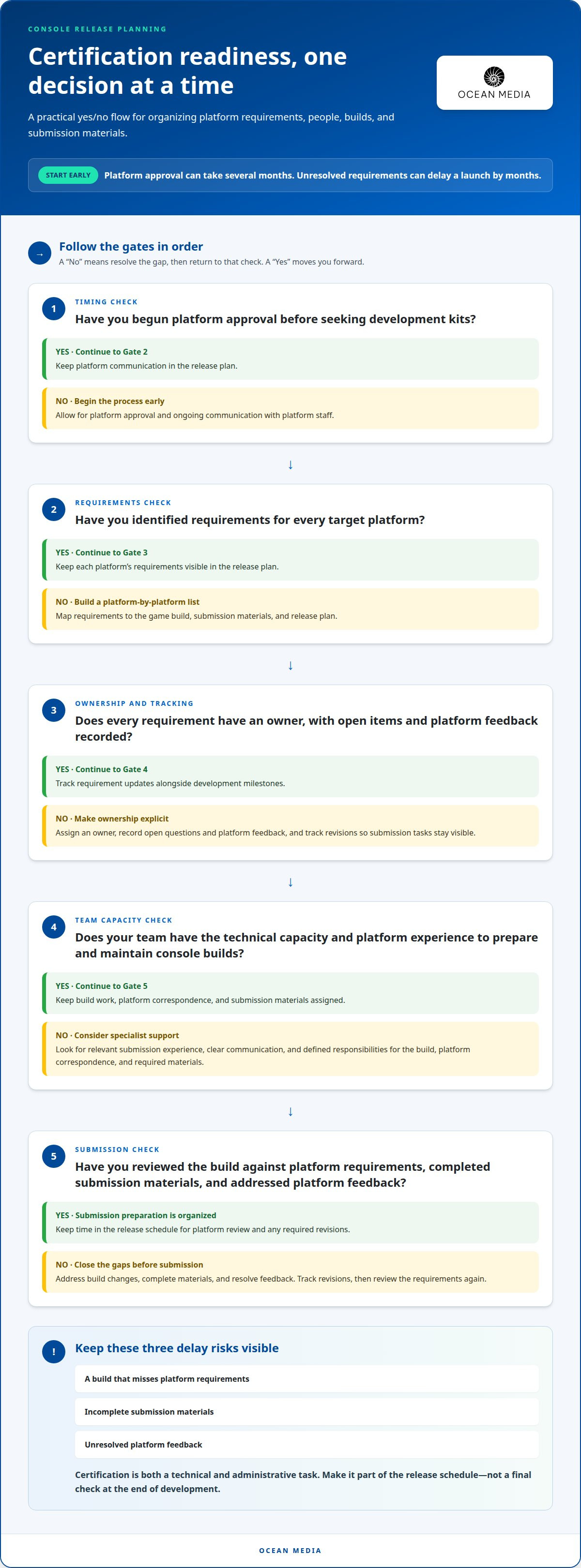
Console certification is a platform review, not a final visual-polish pass. Before obtaining development kits, a studio may need platform approval and ongoing communication with platform staff. Plan for that process early. Platform approval can take several months, and unresolved requirements can delay a launch by months. Certification planning belongs in the release schedule, not at the end of development.
Start by identifying the requirements for each target platform. Map them to the game build, submission materials, and release plan, then record requirements, owners, and open questions. For example, if a platform requests a build change, assigning responsibility and tracking the revision helps the team respond without losing sight of other submission tasks.
A console build can run well and still need work before submission. Review it against platform-specific requirements and set aside time to address gaps. Technical details and administrative preparation both matter. An unresolved requirement can affect submission and cause delays, so track open items alongside development milestones rather than treating certification as one final check.
Should you hire a porting studio, and how do you choose the right partner for your indie game? Hire specialist support when your team lacks the technical capacity or platform experience to prepare and maintain console builds. Choose a partner with relevant submission experience, clear communication, and defined responsibilities for the build, platform correspondence, and required materials.
What are common reasons console games fail certification, and how can a publishing partner help you avoid them? A build that misses platform requirements, incomplete submission materials, or unresolved platform feedback can hold up approval. A publishing partner can organize submission requirements, coordinate platform communication, and track changes through review.
Before committing resources, assess your game’s PC sales and the likely console audience. This helps you weigh the porting effort against the opportunity, rather than treating certification as an isolated technical hurdle. Even a strong candidate needs a realistic schedule for platform approval, requirement updates, and submission preparation.
Make certification a visible part of the release plan. Assign an owner to each requirement, record platform feedback, and allow time for revisions. These steps make approval easier to manage and help your team approach making your indie game look professional for consoles with both the build and its submission needs in view.
Begin platform approval early, before seeking development kits. Identify the requirements for each target platform and plan for ongoing communication with platform staff.
2. Setting realistic expectations based on comparable games
Comparable releases help you judge whether a console version fits its audience and marketplace. Start with games that share your genre, visual style, session length, and player type. A small atmospheric horror game, for example, competes differently from a family-friendly platformer. Genre alone cannot establish demand or predict release effort.
Next, consider how players encounter similar games on each platform. Compare their themes, presentation, and audiences with your own title. Nintendo Switch may suit some indie games, while horror titles might perform better on PlayStation or Xbox. Treat these platform differences as context, not a universal ranking for every game.
Current trends and customer expectations also shape the comparison. A game may share a genre with successful releases but have a different visual style, control scheme, or play experience. Ask what makes your title distinct and whether its store presentation communicates that clearly. Distinctive art direction can help explain a game’s identity, but it cannot establish audience demand on its own.
Use PC sales as one consideration when weighing a port, alongside the fit between your game and a console audience. Compare your title with releases aimed at similar players. If PC players respond to a particular mechanic, that can inform how you describe the game on console storefronts, but it does not predict the results of a console release by itself. For studios tracking broader player input and feature requests, structured idea management software like Ideawake can help teams systematically capture, score, and prioritize community ideas before committing development resources.
Build a comparison set around specific questions, not headline performance. Does a similar game target the same audience? Does its genre align with current marketplace interest? Does its presentation set expectations your game can meet? These questions help distinguish a relevant comparison from a popular release with little in common with your title.
A narrative horror game and a fast arcade platformer may both be indie releases, but their audiences and storefront messaging differ. Compare each with games that create similar player expectations. That makes your assessment more useful for choosing a platform and shaping a release plan, without assuming another game’s performance will transfer to yours.
Keep the comparison practical: define your audience, identify close genre and style matches, and assess platform fit against current trends. If you’re planning console publishing for your game, these comparisons can help frame the release opportunity and the decisions that follow.
Thomas Steinke recommends choosing indie game projects with an awareness of the competing marketplace, its customers, and current trends. Use comparisons to test assumptions, not as a shortcut to a forecast. Write down which player needs your game serves, what comparable titles promise, and where your offer differs. Then assess whether the platform’s audience and storefront can make that difference easy to understand. If the fit is weak, revisit the platform choice, positioning, or scope before committing to a plan. Reassess when market conditions or your game’s presentation change, and keep conclusions proportional to the evidence. A close comparison can sharpen a decision, but it cannot remove uncertainty.
3. Storefront localization and platform-specific graphics
A console release needs store materials tailored to each platform and its intended players. Ports may require storefronts in multiple languages, along with icons and graphics adapted to platform requirements. Treat these assets as part of release preparation, not as a direct copy of your PC page. Clear store materials help players understand your game before they launch it.
Localization involves more than replacing words. Store descriptions, menus, tutorials, and on-screen prompts all carry the game’s tone and instructions. A phrase that fits one language may become longer in another, affecting buttons, captions, or menu layouts. Keep text flexible and review each localized version in context. For example, a translated button label should remain readable and fit its control.
Storefront copy also needs platform-aware terminology. Some console platforms require developers to call a controller a “gamepad” rather than a “controller.” That small wording change can affect store descriptions, help text, and instructions. Include a platform-specific terminology review in the localization workflow so the same device isn’t described inconsistently across the store page and game.
Platform graphics need their own preparation. Adapt icons and other storefront images to each platform’s requirements instead of assuming one file will work everywhere. Review how the game title, key artwork, and visual focal point appear in each required format. A logo that reads clearly in one layout may lose impact when resized or cropped for another.
How can a professional team adapt your indie game’s UI, text scaling, and safe areas for consoles? The team can review menus, prompts, and text at different display sizes, then adjust scaling and layout to keep important information legible. It can also keep interface elements within safe areas and test controller-focused navigation across screens.
Build a review process around actual examples from your game. Check a long translated menu label, a tutorial prompt, and a storefront description alongside their graphics. This reveals where text exceeds its space, instructions lose clarity, or artwork becomes difficult to read. Revise the relevant asset or interface, then review the updated version in context.
Keep a separate asset and language checklist for each target platform. Track storefront copy, localized text, icons, graphics, and interface changes as distinct deliverables. This clarifies the handoff and helps the team catch missing adaptations before submission. A consistent process gives each version a presentation tailored to its storefront and players.
Use the checklist to record ownership, review status, and platform-specific changes before assets are handed off. Keep final copy and approved graphics together with their target language and platform so later revisions can be checked against the right version. At each review, note unresolved questions and confirm that storefront materials match the localized interface and terminology. For a port, Thomas Steinke recommends starting with small games to reduce risk and learn about a platform and its marketplace. This can help teams make informed choices about localization and graphics scope before expanding their plans.
4. Console performance targets and optimization: what a professional porting team handles
A professional porting team defines performance targets for each console before optimizing the game. The right targets depend on the platform, game design, and intended player experience. A fast action game may need especially responsive controls, while a strategy game may place greater demands on clear interface feedback. Platform requirements shape the final criteria.
Teams assess more than average frame rate. They examine frame pacing, stability, loading behavior, and input response during representative gameplay. A smooth opening level means little if later effects cause stutter. For example, a crowded combat scene can expose bottlenecks that quiet exploration areas never reveal.
Profiling identifies where slowdowns occur. The team measures CPU and GPU workloads, memory use, and asset loading in demanding scenes, then connects each performance issue to the systems involved. If a scene stalls while loading textures, asset handling may need attention before visual settings are changed.
Optimization should address the cause, not reduce quality everywhere. A team might streamline a costly visual effect, adjust texture use, or reduce unnecessary processing. If profiling points to them, it can also review shaders, draw calls, and background tasks. Test each change again to confirm it improves performance without damaging the intended presentation.
Different consoles can require different trade-offs. A porting team evaluates how resolution, effects, and asset choices behave on each target platform. For example, if a dense environment strains performance, selectively changing distant details may help preserve visual clarity nearby. The goal is a stable experience that respects the game’s art direction.
Testing needs to cover more than one short play session. Teams run through demanding encounters, transitions, menus, and extended gameplay to find issues that emerge under varied conditions. They also retest after optimization, since a fix to memory use can affect loading or visuals elsewhere. Regression testing helps catch those side effects before release.
Performance targets should be specific to the game and platform, not borrowed blindly from another title. The team documents criteria, profiles builds, prioritizes the largest bottlenecks, and tests each revision against those criteria. This clarifies technical trade-offs and helps preserve the experience players expect as your game moves to consoles.
5. Accessibility features and controller support for a console-ready indie game
Accessibility and controller support shape the player experience from the first menu. A professional team reviews the actual controls, text, audio cues, and gameplay demands, then identifies options suited to the game’s design. A dialogue-heavy adventure, for example, may benefit from adjustable text size and subtitle controls, while an action game may need flexible input mapping.
Subtitles should be readable against the game’s backgrounds and distinguish speakers when dialogue changes voices. The team can assess subtitle size, contrast, placement, and timing in representative scenes. A bright outdoor level and a dark cave may reveal different readability problems. Clear speaker labels also help players follow a conversation when character voices sound similar.
Visual cues deserve the same care. If a puzzle uses color to distinguish objects, add another cue, such as a shape or label. This lets players identify the right object without relying on color alone. A team can review menus, maps, and combat indicators for similar cases. Strong contrast and consistent icons make important information easier to interpret across varied scenes.
Controller support starts with complete, reliable navigation. The team checks that players can move through menus, open settings, select options, and return to gameplay using a gamepad. It also reviews whether button prompts match the active input. If a player changes controls, for example, on-screen instructions should reflect the new mapping rather than show outdated button labels.
Remapping can make controls fit different play styles and physical needs. A team can present control options in a clear menu, then test whether changes apply consistently during gameplay. It should also review actions requiring repeated or simultaneous inputs. If a sequence depends on holding several buttons, an alternative setting may reduce the demand while preserving the intended challenge.
Audio and motion settings also need practical review. Subtitle options can support dialogue and important sound cues, while separate volume controls help players balance music, effects, and speech. If the game uses camera shake or intense screen flashes, consider settings that reduce those effects. Test each option in a scene where the effect appears, not only in the settings menu.
Finally, test the full experience with a gamepad from startup through gameplay and settings. Check focus visibility, navigation order, button prompts, and recovery after a controller disconnects. These checks reveal friction that a short playthrough may miss. If your team is preparing these details alongside console release logistics, plan your console publishing path with the full player experience in view.
Ocean Media: Console Game Publishing
Ocean Media helps you bring your game to consoles through Console Game Publishing, supporting the technical and administrative complexities of platform submissions. Turn to Ocean Media when you’re preparing a console release and need publishing expertise to help coordinate the path from build preparation to submission. With over 20 years of experience in the gaming industry, Ocean Media works with developers seeking to reach a global audience through digital distribution across console platforms.
Your preparation around certification, storefront assets, localization, performance, and controller support gives the publishing process a stronger foundation. Share your project details and release goals so we can begin with a clear view of your needs. To take the next step, contact Ocean Media, reserve your slot in our publishing pipeline and let's get started today!
Move your console release forward
Making your indie game look professional for consoles means creating a cohesive release, from the first storefront impression through play. Align your team around the experience you want players to have, then plan the publishing work that supports it. Ocean Media provides digital console publishing services, including support with platform requirements and submissions. Contact Ocean Media to discuss publishing your game.
Ocean Media offers Console Game Publishing for developers preparing to bring a title to console platforms. If you’re ready to discuss your game and define a path forward, Contact Ocean Media to discuss your game. A focused conversation can help you move from preparation to the next stage with clarity. Your game has a distinctive experience to share; let’s help you take its next step toward console players.
Frequently Asked Questions
What are the technical requirements for releasing an indie game on PlayStation, Xbox, and Nintendo Switch?
Requirements differ by platform, so a PlayStation, Xbox, or Nintendo Switch release needs platform-specific preparation and submission review. A studio may need approval and ongoing communication with platform staff before obtaining development kits. Test the build’s performance, input behavior, and submission materials against the target platform’s requirements. Plan for platform feedback and revisions rather than expecting one checklist to apply across all three systems.
What are the best practices for console game packaging, store pages, and marketing assets?
For a digital console release, keep your store page and marketing assets consistent with the game players will experience. Use a clear title, concise description, and visuals that communicate the genre and core appeal at a glance. Prepare assets in each platform’s required formats, and match localized copy to its corresponding graphics. Review every storefront version together so players see a coherent presentation before downloading.


