

Poor console placement can undermine a smooth launch. Avoiding common console launch mistakes starts with keeping objects four to six inches from the vents, giving the system room to release heat, and choosing suitable storage. These simple setup decisions can help prevent avoidable problems from the start.
You want to get straight to playing, not troubleshoot excess heat, blocked airflow, or storage warnings. A little preparation makes a difference: place the console in an open area, keep vents clear, and leave at least 20% of SSD storage free.
This guide explains how console placement, ventilation, and storage affect a reliable setup, and which early signs deserve attention. Whether you’re preparing a new system or helping players enjoy a smooth game launch, these practical steps can protect the experience and reduce disruption.
Key Takeaways
- Choose an open, stable position for the console and keep its ventilation path clear to reduce heat-related strain.
- Manage storage proactively so limited space or early warning signs don’t disrupt play or development plans.
- Build a launch plan around platform requirements, clear milestones, and practical testing before release.
- Set a budget by identifying the work and resources your console launch requires, then track those costs as plans evolve.
- Align your marketing with the game’s audience and release timing so players know what to expect and when.
1. Positioning the console and ensuring ventilation
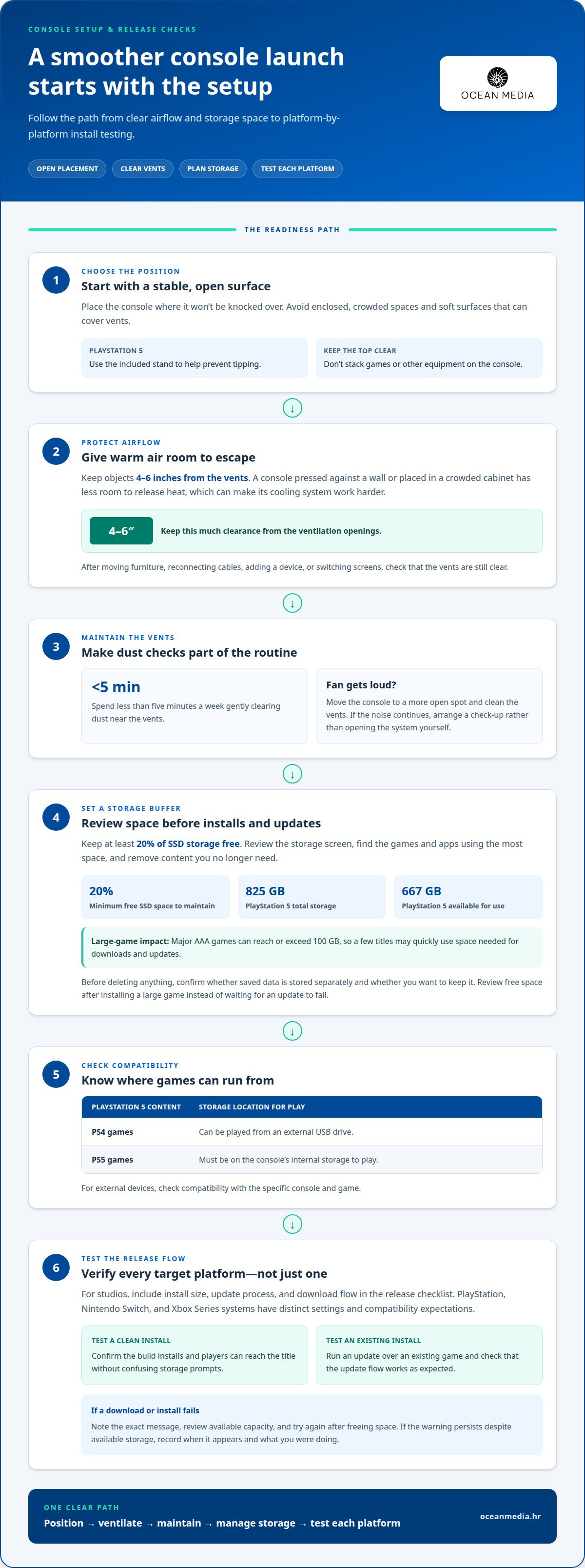
Choose a location before connecting power, a screen, or a controller. Set the console on a stable, open surface where it won’t be knocked over. Keep objects four to six inches from the vents so warm air can escape. A console pressed against a wall or enclosed in a crowded cabinet has less room to release heat, which can make its cooling system work harder during gaming sessions.
For a PlayStation 5, use the included stand and place the console in an open space. The stand helps prevent tipping, while open placement supports airflow. Keep the console away from soft surfaces that can cover vents, and don’t stack games or other equipment on top. When you switch between a television setup and another screen, check that the new position leaves the vents clear.
Cybersecurity and scalping can also disrupt a console launch. Use strong, unique passwords and protect accounts linked to purchases. Fake launch messages can trick buyers into sharing login details, while scalpers may use automated purchasing tactics to buy limited stock quickly, making consoles harder for genuine buyers to find.
Past launches show why usability matters as much as hardware. The RCA Studio II, associated with 1977, had poor controllers and used an RF switch for power. The Atari 5200, associated with 1982, had an unreliable analog joystick. These examples point to a practical lesson: test controls, setup steps, and connections before launch, then address trouble that could frustrate players.
Handheld owners should protect the device during setup and play. Use a protective case and screen protector when available for the model, and keep the handheld away from edges where it could fall. For a handheld with a lithium-ion battery, avoid charging or draining it all the way: those extremes can stress the battery and hasten chemical aging. Careful placement and handling won’t prevent every repair, but they can reduce avoidable strain on the console.
2. Limited or failing storage
Storage pressure can interrupt installs, updates, and gameplay, especially when a console’s usable capacity is smaller than its advertised total. The PlayStation 5 has 825 GB of storage, with 667 GB available for use. Major AAA games can reach or exceed 100 GB, so a few large titles may quickly consume room for new downloads and updates.
Review the storage screen in settings before launch day. Check which games and applications use the most space, then remove content you no longer need. Before deleting anything, confirm whether saved data is stored separately and whether you want to keep it. This quick review helps you make room for a new install without removing something important.
Keep at least 20% of free storage available on an SSD. A practical way to maintain that buffer is to review space after installing a large game, rather than waiting for an update to fail. If you use external devices, check compatibility with the specific console and game. PlayStation 5 owners can play PS4 games from an external USB drive, but PS5 games must be on the console’s internal storage to play.
Distinguish storage symptoms from other hardware issues. A failed download may point to limited space or a connection problem, while overheating and a weak handheld battery have different causes. If an install fails, note the exact message, review available capacity, and try again after freeing space. If the warning persists despite available storage, record when it appears and what you were doing. These details can help distinguish a game-specific problem from a console-wide issue.
For studios, storage planning belongs on the release checklist. Test the final build’s install size, update process, and download flow on every target platform. PlayStation, Nintendo Switch, and Xbox Series systems have distinct settings and compatibility expectations, so one successful install doesn’t prove every version is ready. Test both a clean install and an update over an existing game, then confirm players can reach the title without confusing storage prompts.
These checks help owners keep playing and help developers spot friction before release. If you’re preparing a title for multiple platforms, make storage and install testing part of your console publishing process. Catching early storage warnings can also prevent a small issue from becoming a more expensive repair problem.
Ignoring early warning signs can make console repairs more expensive. Treat a change in normal operation as a reason to pause and assess, rather than assuming it will resolve itself. A brief note about what changed can help you describe the issue clearly if you seek support. Don’t wait until the console is unusable to take a concern seriously. If the same sign returns, reassess your next step instead of repeating the same workaround. Decide whether the console needs a check-up rather than dismissing the concern again—and when you need local help with equipment or home entertainment troubleshooting, community marketplaces like ca-py.ch can connect you with reliable local providers.
3. How should a console launch plan be developed and tested?
Build the plan around platform requirements, player experience, and clear ownership. Name each target platform, such as PlayStation, Xbox, or Nintendo Switch. Create a checklist for each version because submission steps and technical expectations can differ. Assign an owner to every task, from build preparation to launch-day support. Use a shared schedule to track dependencies, decisions, and who will resolve blockers.
Define “ready” before testing begins. For example, a release candidate should install, start, reach its first playable moment, and save progress reliably. Record the expected result beside each test so the team can distinguish a defect from an intentional design choice. Include core paths such as starting a new game, loading a save, changing settings, and returning after a system interruption.
Use a repeatable test sequence for each console build. Install the candidate build and record its version. Test the main menu, controller inputs, gameplay loop, save behavior, and online features. Then test interruptions, such as disconnecting a controller or losing network access during an online session. For every issue, document the steps, observed result, platform, and build identifier. Clear records help developers reproduce problems instead of interpreting vague reports.
- Submission readiness: Review current platform requirements, required assets, metadata, and build packages before submission.
- Player flow: Test the journey from launch screen to active play, including menu navigation and controller prompts.
- Compatibility: Validate supported hardware configurations and accessories, recording differences between builds.
- Recovery: Check responses to interrupted sessions, failed connections, and unexpected returns to the system menu.
- Release decision: Track open defects by impact and document who approves the final build.
Make testing reflect real play. Ask someone unfamiliar with the build to follow the opening sequence without coaching. If they miss a prompt or can’t identify the next action, revise the interface or instructions. Retest after each change, since a fix to one menu can affect another screen or input path.
A disciplined plan helps teams avoid common console launch mistakes by providing a shared way to surface and resolve risks. Rehearse the release sequence with everyone responsible for decisions, and prepare a launch-day runbook covering the approved build, submission status, team contacts, and communication steps. Clear responsibilities and repeatable checks help keep the release on track.
Include the console’s physical setup in the rehearsal, not just its software and release steps. Console owners should keep objects at least four to six inches from the vents. A loud fan may indicate that the console is working hard to cool itself. Move it to a more open spot and clean the vents; if the noise continues, arrange a check-up. Include these checks when preparing the device for testing and reviewing a reported fan-noise concern.
For handheld-console testing, check whether a screen protector and protective case are available for the device. Handheld-console owners should use a screen protector and protective case when those accessories are available for their device. Keeping these physical-use considerations in the release preparation helps the team account for how the console will be set up and handled, alongside the build checks, player-flow tests, and documented issues already in the plan.
4. What are typical console launch costs and budget benchmarks?
Separate the cost of buying a console from the budget for launching a game. A console can cost hundreds of dollars, but hardware is only one possible player expense. For a studio, launch planning should focus on the work required to prepare, test, submit, and promote each platform version.
Build a budget around defined workstreams, not one unexplained total. For example, list platform-specific development, quality assurance, submission preparation, launch marketing, and post-release support. For each item, record the deliverable, owner, timing, and assumptions. If a PlayStation version needs different testing from an Xbox build, list those tasks separately. This makes scope changes visible before they affect the release plan.
Historical media formats offer context, but not a current production benchmark. Neo Geo cartridges could hold up to 256 megabits and were described as ten times as expensive to produce as CD-ROMs. CD-ROMs offered ten times the capacity and were described as costing 1% of Neo Geo cartridges. Those comparisons explain how format choices have shaped game economics; they should not be used to estimate a modern console launch budget.
For a practical forecast, connect each cost driver to a decision the team can control:
- Platform scope: Adding a console version can change engineering, testing, and submission work.
- Build readiness: A stable, well-documented build can reduce repeated investigation and rework.
- Content and features: Online functions, localization, and platform-specific features may add distinct tasks.
- Marketing assets: Plan the creation and approval of store descriptions, screenshots, trailers, and campaign materials.
- Post-launch needs: Account for how the team will triage player reports and prepare updates after release.
Use low, expected, and high scenarios for uncertain work, and explain the assumptions behind each. A high scenario might include extra compatibility testing or a submission revision. Tie estimates to scope rather than unsupported industry averages. Review the budget whenever the platform list, feature set, or launch date changes.
Publishing project costs depend on the project and are provided after a quote request. Factors include platform scope, build readiness, and required work. A clear task list gives you a stronger basis for the discussion and helps prevent overlooked launch responsibilities from becoming last-minute surprises.
5. What marketing mistakes commonly undermine a console launch?
Even a strong game can be hard to discover if its launch message is unclear. Define the audience and central appeal before creating campaign assets. For example, a strategy game might lead with tactical depth, while a family adventure highlights cooperative play. If every post emphasizes a different feature, players may struggle to understand what makes the game distinctive.
Another mistake is treating PlayStation, Xbox, and Nintendo Switch audiences as one undifferentiated group. Keep the core promise consistent, then tailor messaging to each platform’s store presentation and player context. Use accurate platform names and approved assets. Don’t imply a feature or release option that the version doesn’t provide. A mismatch between campaign copy and the playable build can undermine confidence.
Plan the campaign around meaningful milestones, not just a launch-day announcement. Coordinate the reveal, gameplay footage, store-page information, and release messaging so each update gives players a useful new detail. A trailer showing only cinematic scenes, for example, may leave prospective players unsure about the gameplay. Include representative footage and explain the core loop in direct language. When milestones also feature live gaming showcases, press previews, or physical launch events, partnering with event production specialists like NextGen AV ensures that display hardware and presentations run reliably.
- Unclear audience: Define who the game serves, then make the tone and examples relevant to those players.
- Inconsistent claims: Compare every store description, trailer, and social post against the final build.
- Weak store presentation: Review the title, description, screenshots, and artwork together for a coherent first impression.
- Launch-only communication: Prepare updates for key milestones, including the reveal, release, and post-launch changes.
- Unmanaged expectations: State what players can do, which version they’re seeing, and when it will be available.
Give each campaign asset a clear purpose. A gameplay trailer should demonstrate play, a store description should explain the premise and key features, and a community post can answer a specific player question. If players ask whether local multiplayer is included, answer plainly and make sure the store page matches. Assign someone to review public claims across channels before publication.
Measure useful signals rather than celebrating reach alone. Track store-page visits, wishlists, demo feedback, and recurring questions where those tools are available. If players repeatedly misunderstand the game’s genre, revise the opening message instead of simply repeating it. A small review loop can keep the campaign aligned with the actual experience.
Connect your campaign plan to platform readiness and release coordination. Plan your console release with a clear path from platform preparation to launch communications.
Ocean Media: Console Game Publishing
Ocean Media helps developers bring games to consoles through Console Game Publishing. Turn to the team when your project is ready for the technical and administrative work involved in platform submissions and digital distribution. Publishing support can help you coordinate those requirements while keeping your release goals in view.
Prepare a clear project overview, including target platforms, build status, and launch priorities. This gives you a practical starting point for discussing how publishing support fits your release. If you’re ready to move forward, reserve your slot in our publishing pipeline and let's get started today!
Contact Ocean Media to discuss bringing your game to consoles.
Move your console release forward
A release plan matters when it translates into clear ownership, timely decisions, and a player-ready experience. Align your platform goals with the work still ahead so technical preparation and launch communication progress together. A focused publishing process can help organize that transition as you bring your game to consoles.
For developers seeking support with platform submissions and digital releases, Ocean Media offers Console Game Publishing. Start with your project goals and target platforms, then build a practical next-step plan with the team. A thoughtful approach to avoiding common console launch mistakes helps protect the work your team has already invested.
Contact Ocean Media to discuss your needs, reserve your slot in our publishing pipeline and let's get started today! Your next release can move forward with purpose.
Frequently Asked Questions
What are the most common console launch mistakes?
The most common mistakes come from treating launch readiness as a single final check instead of coordinated work across hardware setup, platform builds, and player communication. For example, a team might approve store copy describing a feature missing from the released version. Assign owners to key decisions, maintain one approved source for public claims, and resolve player-impacting issues before release. This discipline helps prevent avoidable confusion and support problems.


