

A rejected certification form is a signal to find the mismatch, not to resubmit unchanged. The practical answer to how to fix certification submission errors is to identify the requirement behind the rejection, correct the form fields or documents that don’t meet it, and submit a complete, accurate package. Start by checking the applicable standards for the target market, then work through each validation message and required attachment.
An unclear error can be frustrating, especially when a console release depends on a smooth publishing process. The way forward is often methodical: isolate the failed field or requirement, make the correction, and review the entire submission before sending it again.
This article covers local requirements, confusing error messages, form validation issues, and incomplete or incorrect certification documents. Follow the steps to trace a rejection to its cause and prepare a more complete submission for review.
Key Takeaways
- Match certification requirements and supporting materials to the market where you plan to submit.
- Use clear error messages to identify what failed and what action will resolve it.
- Review required fields and form behavior to catch validation issues before submission.
- Audit reports, specifications, and certificates for missing, outdated, or inconsistent information.
- For console releases, align submission readiness with the technical and administrative demands of your publishing pipeline.
1. Adapting products and documents to local standards
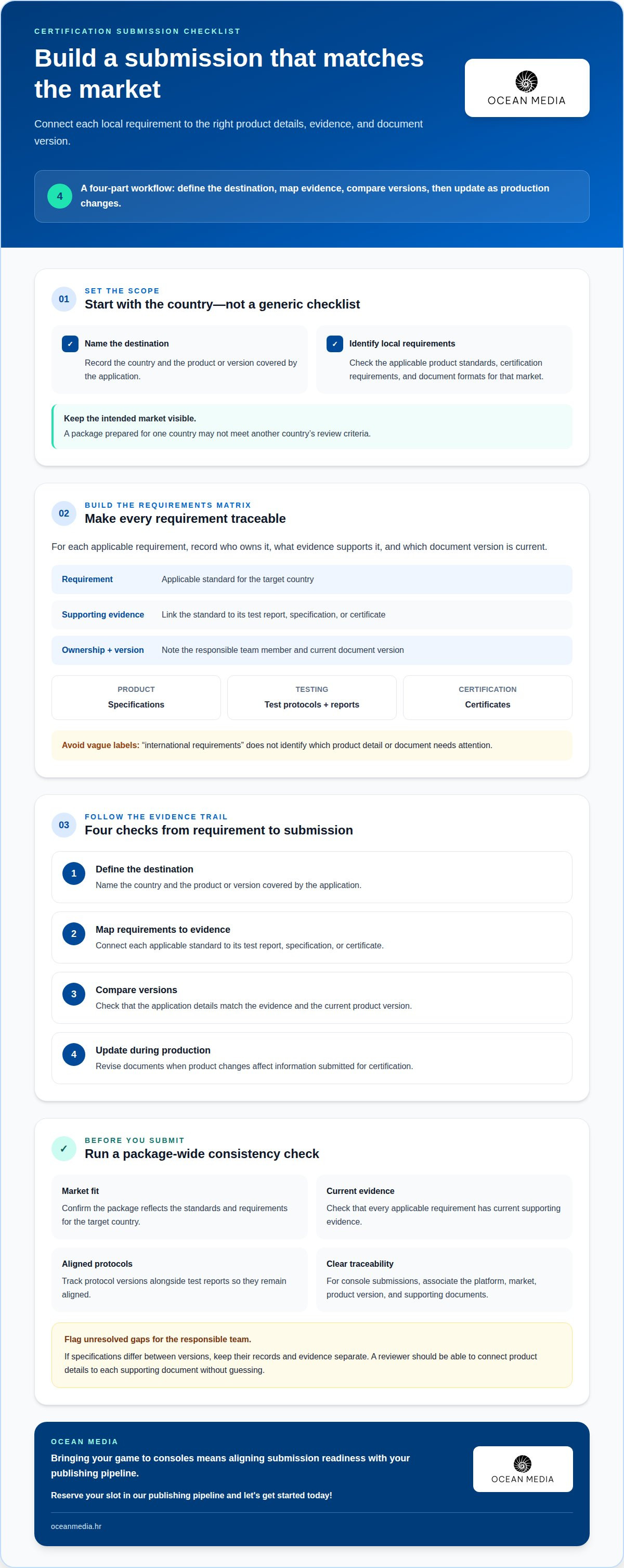
Start with the country where you plan to submit, not a generic global checklist. Identify the applicable product standards, certification requirements, and document formats for that market. Requirements can vary by country, so a package prepared for one destination may not meet another’s review criteria. For a console release, define each intended market before preparing submission materials. This gives your team a clear basis for adapting product details and records.
Build a country-specific requirements matrix before finalizing product development or certification documents. For each requirement, record the responsible team member, supporting evidence, and current document version. Separate entries for product specifications, test protocols, and certificates make omissions easier to spot. Keep the matrix tied to the target country: a broad label such as “international requirements” won’t tell your team which document or product detail needs attention.
Use this sequence to connect local requirements with the materials you submit:
- Define the destination. Name the country and the product or version covered by the application.
- Map requirements to evidence. Link each applicable standard to its test report, specification, or certificate.
- Compare versions. Check that product details in the application match the evidence and current product version.
- Update during production. Revise documents when product changes affect the information submitted for certification.
Address requirements and documents during production, rather than waiting until the submission package is assembled. This gives product, engineering, and certification teams time to resolve mismatches before review. If a test protocol changes or becomes outdated, compare it with the evidence you plan to submit. An electronics manufacturer that missed updated test protocols had to conduct additional tests, delaying certification. Track protocol versions alongside test reports so the two remain aligned.
For a console release, apply the same discipline to each submission package. Clearly associate the platform, market, product version, and supporting documents. If specifications differ between versions, keep their records and evidence separate. A reviewer should be able to connect the submitted product details to each supporting document without guessing. This traceability helps your team determine whether an error stems from a local requirement, a product change, or a document mismatch.
Before submitting, compare the completed package with the matrix. Confirm that each applicable requirement has current supporting evidence, and flag unresolved gaps for the responsible team. This focused review helps you adapt the submission to the target country instead of relying on assumptions from another market.
Companies seeking certification in a country should identify and meet that country’s product standards and requirements. Use this as the starting point for deciding which product details and records need local review, rather than assuming materials prepared elsewhere will suffice. Keep the intended destination visible as teams review the product and supporting documents.
Before finalizing the package, confirm that the standards and requirements for the country are reflected in the certification materials. Resolve any mismatch between a product detail or document and the requirements for that market before submitting. This keeps the work focused on the rules that apply in the country being served.
2. Clear instructions and accessible error messages
A useful error message identifies the failed requirement, affected field, and next action. “Submission failed” offers no clear next step. A message such as “security check failed because an external executable could not run” narrows the investigation. Record the exact message, the step that triggered it, and the form version. These details help your team reproduce the failure instead of making unrelated changes.
Missed deadlines or repeated certification submission errors can delay review and hold up a time-sensitive update. One developer reported that a certification error prevented an urgent security fix from being submitted for an app.
Clear instructions reduce uncertainty before submission. Each form field should explain its expected format, whether it’s required, and how the information will be used. For example, a version field should show a valid example and specify which product version belongs there. Place the guidance beside the field so users can refer to it as they enter information.
Error messages should also work for users who rely on assistive technology. Place each message near the relevant field, describe the problem in text, and explain how to correct it. Don’t rely on color alone to signal an error. If several fields fail, provide a clear summary with direct links or navigation to each issue. This is more efficient than making users search the entire form.
To diagnose a confusing failure, follow a consistent sequence:
- Capture the failure. Save the exact message, affected screen, and action immediately before it appeared.
- Reproduce the issue. Repeat the same submission steps and note whether the error appears consistently.
- Isolate the cause. Change one relevant input or condition at a time, then compare the result.
- Confirm the correction. Repeat the original steps and verify that the message now explains any remaining issue.
Where can you get help with certification submission errors in the United States? Start with the certification body handling your submission, then involve engineers familiar with the product and technical issue. Share the exact message, relevant submission details, and steps to reproduce the error.
For console developers, clear issue records also help connect certification work with release planning. If a submission problem affects bringing your game to consoles, review the developer publishing guidance as part of organizing your next steps.
3. Common causes of form submission failures
Certification submissions often fail because information is missing, product specifications conflict, or supporting files are outdated. A form may also reject an unexpected format, a blank required field, or an incomplete upload. To fix certification submission errors, first identify which part of the process failed.
Classify the issue by its likely source: form entry, document, upload, or payment. For example, a specification that differs between the application and an attached report points to inconsistent records, not necessarily a form failure. This distinction helps you direct the correction to the right team and avoid changing unrelated information.
How can you resolve file format, size, or upload errors when submitting certification documents? Compare the file with the form’s stated requirements, use an accepted format, and reduce the file size if it exceeds the stated limit. Give the file a clear name, retry the upload, and confirm it appears in the submission before continuing.
Check each file carefully. Confirm that it opens, contains the intended pages, and matches the product version named in the application. If an upload fails again, record the exact message and the file involved. These details can help distinguish a document issue from a browser, connection, or portal problem, without repeatedly sending the same file.
How do you correct payment or fee errors in a certification submission? Compare the amount and payment details with the certification body’s current instructions, then check whether the portal shows the transaction as complete. If the payment status remains unclear, use the body’s submission support process and provide the transaction reference.
Don’t submit a second payment just because the confirmation screen failed to load. First, review the portal’s payment status and any receipt or transaction record. Keeping those details together can help the certification body trace the payment to your application.
Use this diagnostic sequence when the cause isn’t obvious:
- Read the full error. Note its exact wording, affected field, and triggering action.
- Review the application. Compare required entries with product details and supporting evidence.
- Test each file. Open it, confirm its version, and check the portal’s format and size requirements.
- Review payment status. Match the portal record with the transaction confirmation before acting.
- Retry one correction. Change the identified issue, submit again, and record the result.
Common certification submission errors include missing test reports, incorrect specifications, outdated certificates, and incomplete form fields. To fix them, trace each rejection to its specific cause, correct the issue, and record what changed before resubmitting.
4. Field validation and form code checks
Field validation catches incomplete or incorrectly formatted entries before submission. Review each required field against the form’s instructions. For example, a version field should reject a blank entry and accept the expected format. Check that error messages identify the specific field and explain how to correct it. A generic warning can leave users guessing, even when validation detects the problem.
Test validation with realistic entries, not just ideal data. Try a missing value, an extra space, and a value in the wrong format. Confirm that each test produces a useful message and preserves other completed fields. For a certification form, test product identifiers and document references as carefully as contact fields. A field that accepts incorrect data can lead to an inconsistent application.
Form code can cause failures even after every field is complete. A recent code change, conflicting script, or failed connection may interrupt submission or prevent a validation message from appearing. Reproduce the error using the same browser, form version, and steps. Then review recent code or configuration changes that might affect submission. Change one relevant condition at a time to keep the cause traceable.
Use a repeatable test process:
- Check required fields. Leave one blank and confirm the form identifies it clearly.
- Test accepted formats. Try a valid and invalid product identifier or date entry.
- Review error recovery. Correct a failed field and confirm previously entered information remains.
- Complete a test submission. Verify that the form reaches its confirmation state and records the submitted information.
Test the form regularly, at least every two weeks. Check the form plugin and content management system for updates monthly. After an update, repeat the same test cases because changes can affect field behavior or submission processing. Record the test date, form version, test inputs, and outcome. This helps distinguish a new code issue from an existing validation problem.
If a submission fails, capture the exact message and the action immediately before it appeared. Compare the result with the last successful test. For example, if valid entries trigger an error after a plugin update, investigate that change before rewriting field rules. If only one field fails, inspect its validation rule and the data it receives.
In broader digital operations, enterprises often rely on platforms from developers like CoTé Software & Solutions to automate data capture and prevent validation errors across complex workflows. For teams bringing a game to consoles, making form checks part of submission readiness serves the same goal: a reliable process connects field requirements, form behavior, and confirmation records, making certification issues easier to isolate and resolve.
For teams bringing a game to consoles, make form checks part of release readiness, not a final administrative step. Confirm that the form accepts expected entries, rejects faulty ones, and reaches its confirmation state after any relevant change. Website owners should check their form plugin and content management system for updates monthly. Keep test inputs and results consistent so changes in behavior are easier to spot.
When a failure appears, pause further changes until you can reproduce it. Record which field or submission step failed, the message that appeared, and whether completed information remained available. After making a correction, repeat the full test sequence instead of checking only the affected field. This helps ensure that a local fix has not disrupted another part of the form.
5. Incomplete or incorrect certification documents
A complete application needs documents that match its product details and review requirements. Missing test reports, incorrect specifications, and outdated certificates can lead to rejection. Before submitting, compare the application with the required document list for the relevant certification process. Check that each report and certificate identifies the correct product or version.
What documents and information are required for a certification submission? Prepare the application, applicable test reports, accurate product specifications, and current certificates required for that certification. Match each file to the product version and information entered on the form.
Audit the package before sending it. Compare model names, identifiers, specifications, and dates across the application and supporting records. For example, if the application describes one configuration but a test report covers another, resolve the mismatch before submission. Track each document’s file name, version, owner, and review status. This makes missing or outdated records visible while there’s still time to correct them.
A company exporting baby food to the UAE faced additional costs and delays after discovering it lacked phytosanitary certificates for its packaging. The example shows why both product contents and packaging records matter. Check documents against the product and destination rather than assuming one certificate covers every component.
Can you edit or resubmit a certification application after submission? The correction process depends on the certification body and the application’s status. Follow its correction request or submission instructions, then revise the affected fields and documents through the stated process.
How can you check certification submission status and respond to a request for corrections? Review the submission portal or status notices, then compare each requested correction with the application and its supporting evidence. Reply through the specified channel, address each item directly, and keep the revised files and submission record.
For a specific U.S. patent correction, a request for a Certificate of Correction for an applicant’s mistake should be filed with the USPTO as outlined in MPEP 1481. The request should explain the error and proposed correction in detail, with supporting evidence or documentation when necessary. It must include the fee required under 37 CFR 1.20(a). MPEP 1481 directs the request to the Commissioner of Patents and Trademarks in Washington, DC, attention to the Certificate of Correction Branch. The USPTO reviews the request against its issuance criteria.
How long does certification resubmission review take? Timing depends on the certification process and the complexity of the correction, including whether the revised evidence addresses every requested change. Track the status through the relevant submission channel and respond promptly to further requests.
For console projects, organize certification documents alongside release materials. Plan your console release submission with a clear view of the documents and corrections still in progress.
Ocean Media: Console Game Publishing
Ocean Media helps developers navigate the technical and administrative demands of console submissions through its Console Game Publishing service. Turn to Ocean Media when platform requirements, submission processes, or release coordination are stretching your team’s capacity. Publishing support can connect submission work with your broader plan for bringing a game to consoles.
With your requirements and documents organized, you can focus on moving the release forward. To take the next step, reserve your slot in our publishing pipeline and let's get started today!
Contact Ocean Media or visit oceanmedia.hr to discuss your console release.
Make your next release more submission-ready
Use each certification review as an opportunity to strengthen your release process. A shared record of decisions, corrections, and responsibilities helps your team apply lessons to future submissions instead of solving the same issue from scratch. Knowing how to fix certification submission errors is valuable; building that knowledge into your publishing process makes it easier to apply across releases.
As you plan your next console launch, connect certification work with the broader technical and administrative path to market. Ocean Media provides Console Game Publishing for developers preparing to bring games to consoles. Discuss your project and release goals to explore how publishing support could fit.
Discuss your console publishing needs, and take the next step toward a stronger release plan.
Frequently Asked Questions
How do I troubleshoot certification application validation errors?
Start by comparing the rejected entry with the form’s format instructions. Check whether automatic formatting, pasted characters, or your device’s date and number settings changed what you entered. For example, retype a product identifier instead of pasting it, then compare the result. If validation still fails, record the field label and exact entry, and share those details with the portal’s support team.
How do I fix incorrect or missing information in a certification application?
Correct the application through the certification body’s stated process, and make each change traceable. Keep a brief change log with the affected field, corrected value, and reason for the revision. For example, if a model identifier was mistyped, record the correction and confirm it matches the product record. Have one designated reviewer compare the revised application before resubmitting it.


