

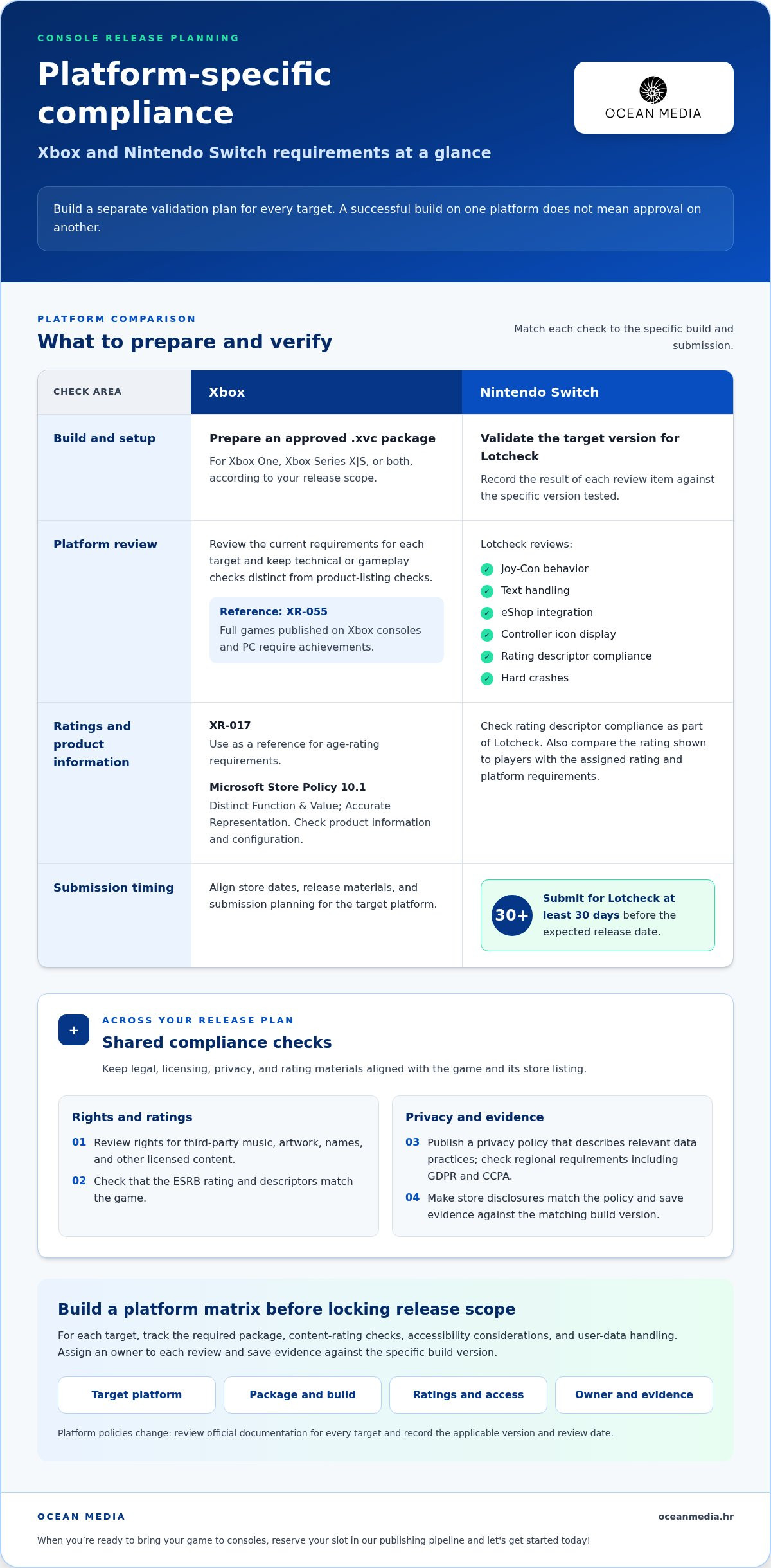
A console submission is assessed against the platform’s own compliance, functional, and performance criteria, so a strong console game release checklist must be tailored to each target platform. For Nintendo Switch, games must be submitted for Lotcheck at least 30 days before the expected release date. Prepare early, and treat platform-specific requirements as part of release planning, not a final build-day task.
It’s understandable to want confidence that a first submission will go smoothly. A practical console game release checklist starts with identifying the requirements for each target platform, testing core functions, and organizing evidence that the build is ready. This guide covers compliance, performance, store listings, localization, and release planning, with steps to help your team spot gaps before submission.
Key Takeaways
- Match your submission checks to each console’s compliance, functional, and performance requirements rather than relying on one universal checklist.
- Plan release timing around platform milestones; Nintendo Switch games must be submitted for Lotcheck at least 30 days before their expected release date.
- Review store listings, localized content, privacy information, and submission documentation together to catch inconsistencies before certification.
- Test complete player journeys across gameplay, transactions, multiplayer, regions, and supported devices, then document issues and fixes clearly.
- When you’re ready to bring your game to consoles, Ocean Media offers Console Game Publishing; reserve your slot in our publishing pipeline and let's get started today!
Platform-specific compliance requirements
Platform compliance means meeting each console’s technical, functional, and content requirements before submission. Choose target platforms early, then map each requirement to a build, test, or document your team can review.
Platform Setup and Validation
Platform setup prepares the right build and configuration for each console or PC release. Validate every version against its target’s submission criteria. A successful build on one platform does not mean approval on another.
For Xbox console releases, prepare an approved .xvc package for Xbox One, Xbox Series X|S, or both. Nintendo Switch Lotcheck reviews Joy-Con behavior, text handling, eShop integration, controller icon display, rating descriptor compliance, and hard crashes. Record the result for each item against the specific version tested.
Changing Platform Requirements
Requirement verification means matching your current build and release materials to the platform’s latest rules. Policies change, so review the official documentation for every target before submission, and record the applicable version and review date.
For XBOX, use XR-017 as a reference for age-rating requirements and review Microsoft Store Policies 10.1, Distinct Function & Value; Accurate Representation, when configuring product information. Full games published on XBOX consoles and PC require achievements under XR-055. Keep these checks separate: an accurate listing does not replace a technical or gameplay test.
Release Compliance Checks
Release compliance checks confirm that legal, licensing, privacy, and rating materials align with the game and its store listing. Before release, review rights for third-party music, artwork, names, and other licensed content. Check that the ESRB rating and descriptors match the game, and publish a privacy policy.
Privacy policies are a legal requirement under GDPR, CCPA, and other regional data protection laws. Check that the policy describes the game’s relevant data practices and that store disclosures match. For age-rating compliance, compare the rating shown to players with the assigned rating and platform requirements.
Platform choice shapes the validation plan. Select platforms based on the game’s design, intended audience, and the versions your team can prepare and maintain. A title built around motion controls, for example, needs focused controller testing on a platform that supports those interactions. If PC is also a target, track its configuration and release materials separately from console submissions.
Build a platform matrix before locking the release scope. List each target, required package, content-rating checks, accessibility considerations, and user-data handling. Console standards can cover accessibility and user-data handling, so assign an owner to each review and save evidence against the matching build version. This makes gaps easier to spot before certification.
Release dates, discoverability, and availability
A release plan aligns each console’s store dates, product configuration, and launch materials. Define these decisions together so your listing, build, and public announcements all point to the same release.
Embargoes and Revenue SKUs
An embargo is an agreed date before which specified launch information should not be made public. An Xbox game embargo is recommended for new releases. Coordinate announcement timing with planned store dates and approved messaging.
A revenue SKU is a store configuration that identifies a purchasable game edition. Keep its title, included content, pricing, and availability consistent across internal release records and the store listing. For Xbox, Microsoft Store Policies 10.1, Distinct Function & Value; Accurate Representation, is a reference for accurate product configuration. Review any separate editions as distinct configurations, not informal labels.
Pricing and Launch Editions
Pricing and launch editions define what customers can buy and what each version contains. Set the base edition and any additional launch editions, with clear differences in included content. Align preorder, discount, and availability details in each platform’s store configuration.
Console game pricing, preorders, discounts, and launch editions are set up through the platform’s product configuration and release plan. For an Xbox game, the preorder date is when customers can begin preordering. Coordinate it with the listed edition and promotional timing.
Discoverability and Availability
Discoverability is how easily players can identify and find a title in a console storefront. Use a distinctive title, accurate description, clear screenshots, and localized product details so the listing represents the actual game in supported regions.
Availability is the period when customers can access a game for purchase or play. For an Xbox game, the release date is when the game becomes available to play; its stop-acquisition date is when it can no longer be purchased. Record these dates separately and align them with your storefront plan and announcement schedule.
Launch-Day and Post-Release Patches
A launch-day and post-release patch checklist tracks the build, store status, and player-facing information around release. Before launch, confirm that the approved version is the intended version, the store listing matches its contents, and the release date is consistent across planned announcements.
For a patch, document the version, changes, affected platforms, and any updates to store or player information. Test the updated build on each target platform before publishing it. Keep a release record linking the tested version to its notes, so your team can identify what changed and communicate it clearly.
- Before launch: align Xbox preorder and release dates with the store configuration.
- At launch: compare the available build and listing against the approved version.
- After launch: test each patch and publish accurate change information.
If you’re coordinating storefront setup and release timing while bringing your game to consoles, explore console publishing support as part of your publishing pipeline.
Store listing certification and localization
A store listing is the player-facing product page and its supporting release information. Keep the page aligned with the final game, and review its content separately for each language and storefront.
Package Certification and Branch Publishing
Package certification is the review of the release candidate and its accompanying submission materials. Keep the candidate isolated from active development work. Record its build identifier, included content, and submission status in one release record.
Before delivery, compare the package contents with the intended product page. If a listing describes a particular mode or feature, confirm it appears in the candidate build. Track asset and text revisions alongside the build so reviewers and your team can identify which materials match the version under review. This reduces confusion when development continues in parallel.
Submission and Certification Failures
Submission and certification are the platform’s review of the release candidate and its compliance evidence. Prepare a submission record that maps each review item to its owner, supporting material, and resolution status.
Common failure points include inconsistent frame rates, UI noncompliance, improper save-data management, and connectivity bugs. Keep a focused test report for each issue, with reproduction steps and the affected game version. When a review identifies a problem, link the finding to the specific change made, then retest the affected behavior and nearby player flows. Clear records help your team prepare a precise resubmission instead of rebuilding evidence from memory.
Store Listing Localization
Store listing localization adapts product-page content for a language and regional audience. Prepare a source-language title, description, screenshots, and promotional text, then review each localized version against them.
Check that translated text describes the same features and edition as the source page. On Xbox, localized title names should not use placeholders or the names of other products. Review text within the store layout, because even a correct translation can be cut off or obscure important information. Keep a locale-by-locale record of approved copy and assets, and replace draft materials before publication.
Store assets, metadata, and product-page content help players identify and understand a game before purchase. Prepare the title, description, screenshots, rating information, and published privacy policy, then compare them with the game and its data practices. Use consistent product naming, and make sure each language accurately presents the same edition and content.
Age Ratings and Ratings Boards
An age rating communicates a game’s suitability and content descriptors to players. For US storefront presentation, prepare the ESRB rating and descriptors, then ensure the product page displays them accurately.
Review rating information against the game’s actual content and the platform’s submission requirements. If a change adds or alters content, reassess whether the listing and descriptors still represent the released version. Keep approved rating materials with the matching product-page assets, so regional teams can use the correct information during launch preparation.
Functional testing of gameplay, transactions, and multiplayer
Build, performance, and compatibility testing checks that the submitted version works on its intended platform. Requirements vary by platform and include functional and performance criteria, so test the release build against the target platform’s requirements before submission.
Gameplay testing verifies that players can complete core actions and progress through the game. Start a fresh save, follow the main route, and test optional paths, checkpoints, menus, and pause behavior. For example, confirm that restarting after a checkpoint restores the expected state without losing progress or duplicating rewards.
Performance testing evaluates how consistently the game runs during representative play. Test demanding scenes, transitions, and extended sessions on target hardware, then record frame-rate inconsistencies, stalls, crashes, and visual problems. Compatibility testing checks that the same game version works correctly with supported hardware and system features. Record the device, build, and steps for each issue.
Transaction testing verifies that purchase flows and related game states behave as intended. Exercise each relevant path, such as opening a store screen, completing or cancelling a transaction, and returning to gameplay. Confirm that the interface reflects the resulting state and that interrupted flows don’t leave players with conflicting information. Keep platform-specific transaction behavior distinct in your test records.
Multiplayer testing checks that online play works across its intended player journeys. Test joining a session, leaving it, reconnecting after an interruption, and returning to the lobby. Review what each participant sees when a session ends or a player disconnects. For games with matchmaking or invites, test those entry points separately so a working direct join doesn’t conceal a broken invite flow.
Input and display testing checks that player actions and interface information remain usable during play. Test each supported control scheme, including menus, gameplay actions, and remapped controls. On Nintendo Switch, include Joy-Con behavior in the test plan. Check text, icons, prompts, and menus in different gameplay states. For example, confirm that a controller prompt updates after the player changes input devices.
Use a concise test record for each scenario. Capture the game version, platform, reproduction steps, expected result, actual result, and issue status. This helps developers retest fixes and confirm that changes haven’t affected other features.
- Gameplay: verify progression, checkpoints, and save-state recovery.
- Performance: examine demanding scenes and extended play on target hardware.
- Transactions: exercise completion, cancellation, and return-to-game flows.
- Multiplayer: test joining, leaving, reconnecting, and lobby return.
Multi-region and multi-device testing
Multi-region testing checks that a game behaves correctly under its supported regional settings. Multi-device testing compares the same release across intended hardware configurations. Build a test matrix pairing each target region with relevant devices, language settings, and game versions.
Start by listing the regional settings your game uses, such as language, date format, and decimal display. Test how they appear in gameplay and menus. For example, if a game displays a scheduled event time, confirm it remains understandable when the device’s regional format changes. Record the region, settings, and game version so your team can reproduce any mismatch.
Check that region-specific choices persist throughout a player session. Change the device language, launch the game, adjust its in-game language setting, and restart. Confirm the selected option remains consistent across the title screen and gameplay. If your game supports region-specific content or settings, test each intended configuration and compare the result with the release plan.
A device matrix identifies the hardware configurations used to test a release. Include each target console family and any supported display modes or device variations relevant to your game. When evaluating displays and peripheral gear for your testing setup, technology comparison resources such as suggestmetech.com can provide useful hardware insights. For example, compare the same scene across target configurations and record whether important visual information remains clear. Tie observations to the device and game version, not just a general note that graphics looked different.
Test display presentation under the settings your release supports. Review text legibility, image framing, and visual effects on each selected configuration. If a menu appears differently across display modes, capture the setup and steps needed to reproduce the issue. This helps identify whether the cause lies in the game, device configuration, or scene presentation.
Combine region and device coverage when the same build will serve multiple markets. For example, test a language change on each selected hardware configuration, then confirm the setting remains correct after closing and relaunching the game. This paired approach can reveal differences a regional review on only one device might miss.
- Region: test supported language and regional-format settings.
- Device: record hardware configuration and the tested game version.
- Display: review framing and visual clarity on intended configurations.
- Persistence: confirm regional choices remain consistent after relaunch.
Use the results to confirm which build and settings are ready for each target market. If you’re preparing a multi-platform launch, reserve your slot in our publishing pipeline and let's get started today!
Ocean Media: Console Game Publishing
Ocean Media provides console game publishing for developers preparing to bring a game to console platforms. Our publishing services support the platform and release work needed to move from development toward a digital launch.
Bring your project goals and current release plans to the conversation. We can identify a clear next step for your publishing pipeline and keep the path to market focused on your game.
Explore Console Game Publishing, reserve your slot in our publishing pipeline and let's get started today!
Turn Release Readiness Into Your Next Milestone
Your release plan can be a working decision tool, not a document that goes quiet after submission. Assign an owner to keep platform decisions, build changes, and launch responsibilities connected as development moves forward. This creates a clearer handoff between the people preparing the game and those guiding it toward players.
Use your console game release checklist to set priorities for the next production milestone. Identify the decisions that need attention first, then bring the right people together around a shared publishing plan. If platform submissions and digital distribution are taking focus away from your team’s release goals, Ocean Media’s console game publishing services can support your path to market.
Explore Console Game Publishing with Ocean Media and take the next step toward bringing your game to consoles. Your release journey can start with a focused conversation about your project and where you want it to go.
Frequently Asked Questions
Guaranteeing First-Time Console Submission Success: Myth or Possibility?
First-time approval is possible, but no checklist can guarantee it. Certification depends on the submitted build meeting the target platform’s criteria, including issues that may appear only in particular gameplay states. Reduce avoidable problems by assigning an owner to each requirement, recording test evidence against the exact build, and reviewing unresolved issues before submission. For example, retest a save-related fix from a fresh game start through the affected checkpoint.
What are the key milestones in a console game release checklist?
A useful console game release checklist follows the project from platform selection through submission and launch readiness. Set milestones for choosing targets, preparing platform builds, validating game functions, completing store materials, testing supported regions, and submitting each release version. For example, treat a localized store page as a separate review item from in-game language testing. Assign an owner and completion record to each milestone so handoffs don’t leave gaps.
What platform certification requirements must a console game meet before release?
A console game must meet the compliance, functional, and performance criteria for each platform it targets. Teams should also account for platform-specific concerns such as accessibility, user-data handling, save behavior, and accurate product information. Build a traceable record connecting each requirement to its test result and the version reviewed. If a requirement changes, update the relevant record and retest the affected build rather than relying on an older result.
What are the PlayStation, Xbox, and Nintendo submission and approval steps?
For each platform, prepare the target build and supporting release information, then submit through that platform’s current process and address review findings against the tested version. Requirements differ, so approval for one console does not mean approval for another. Nintendo Switch has Lotcheck; Xbox console releases use an approved .xvc package for Xbox One, Xbox Series X|S, or both. Keep PlayStation, Xbox, and Nintendo submission records distinct.
What accessibility, localization, and content requirements should be checked before launch?
Check that players can understand and use the game across its intended languages and supported accessibility options. Review subtitles, menu labels, contrast, input prompts, and content descriptors in context, rather than approving them only in source files. For example, verify that a translated subtitle remains readable over a bright scene and that an accessibility setting persists after restarting. Ensure store descriptions and rating information represent the same content as the game.
What are the risks of failing console certification, and how can teams prepare for resubmission?
A failed certification can delay release by weeks or even months. Prepare for resubmission by turning each finding into a tracked issue, identifying the affected build and platform, and recording the change made. Retest the specific scenario that failed, then run nearby gameplay paths to catch regressions. Submit clear evidence tied to the revised version, so reviewers can assess the fix without confusion about which build or behavior changed.


