

A simultaneous PC and console release takes coordination; it does not happen automatically. A simultaneous console and PC launch strategy aligns both versions’ release schedules, while pre-orders and gameplay trailers follow their own announcement milestones.
If you’re tracking a game’s launch, you naturally want clear dates and a firm answer on whether PC and console players can start playing together. Distinguish an announced date from a planning expectation: release timing, pre-orders, and trailer reveals are separate milestones unless the publisher connects them.
This article explains how to assess key dates, spot signals of a shared launch, and make practical decisions to coordinate a console and PC release. You’ll get a clearer view of the rollout and the publishing steps involved in bringing your game to consoles.
Key Takeaways
- A PC and console release can share a launch date when the schedules are coordinated, but pre-orders and a gameplay trailer may have separate announcement milestones.
- Assess the trade-offs of a simultaneous launch, including the extra coordination required across platforms and release plans.
- Factor console certification and platform-holder approval into launch timing, alongside development and release readiness.
- Plan performance, controls, and feature parity for each platform so players get a cohesive experience across PC and console.
- If you’re bringing your game to consoles, reserve your slot in our publishing pipeline and let's get started today!
Simultaneous PC and console release
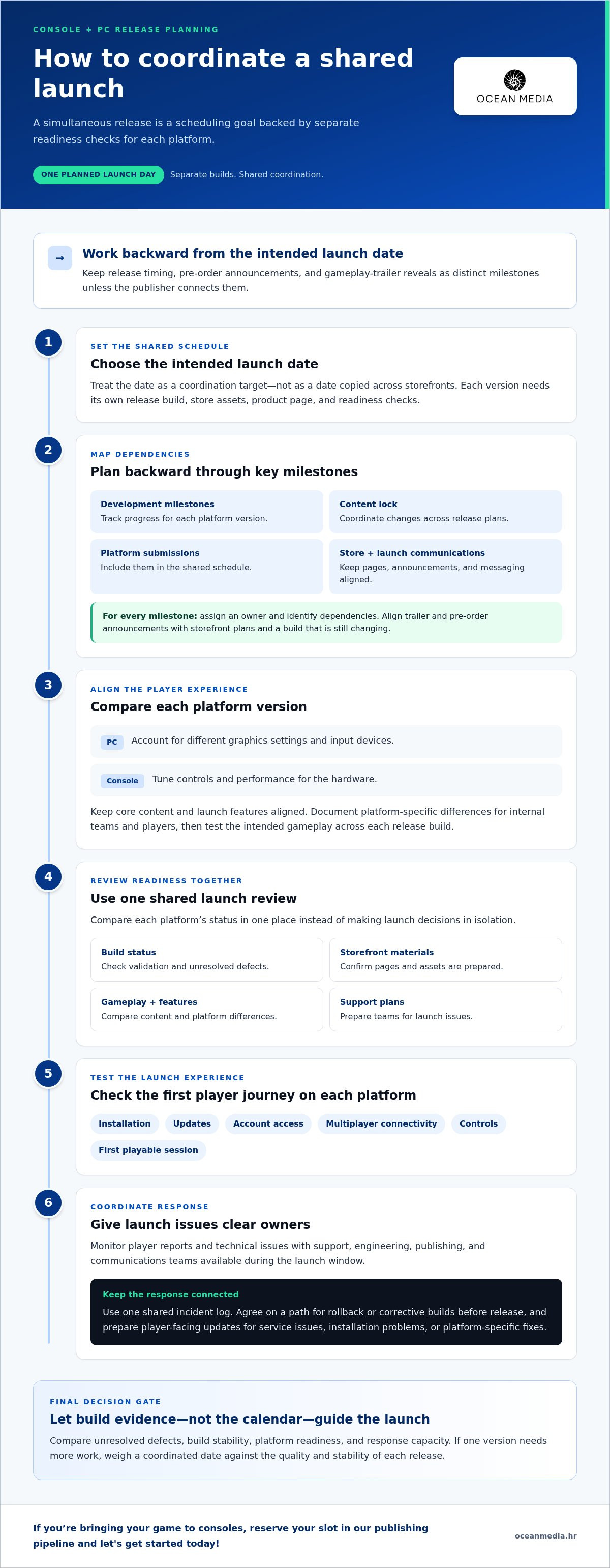
A simultaneous release means players can access the PC and console versions on the same planned launch day. It is a scheduling goal, not simply the same date copied across storefronts. Each version needs its own release build, store assets, product page, and readiness checks, all coordinated around a shared public launch.
Start with the intended launch date, then work backward through the decisions that can affect each version. Map development milestones, content lock, platform submissions, store preparation, and launch communications on one schedule. Assign an owner and identify dependencies for every milestone. For example, trailer and pre-order announcements should match the storefront plans, rather than get ahead of a build that is still changing.
Platform alignment also means comparing the actual player experience. A PC version may support different graphics settings and input devices, while console versions need controls and performance tuned for their hardware. Keep the core content and launch features aligned, then document any platform-specific differences for internal teams and players. In NASCAR 26, track surfaces gain rubber over a race weekend, changing grip and racing lines. That illustrates how a game feature can depend on context; teams should test the same intended gameplay across each release build.
Use a shared readiness review rather than letting each platform team make launch decisions in isolation. Compare build status, unresolved defects, storefront materials, and support plans in one place. The release calendar should separate the game’s launch date from pre-order and gameplay-trailer announcement dates. Track each as its own milestone, with consistent messaging across platforms and regions.
Launch-day testing should cover installation, updates, account access, multiplayer connectivity, controls, and the first playable session on each platform. Assign owners to monitor player reports and technical issues, and agree on a path for rollback or corrective builds before release. Keep support, engineering, publishing, and communications teams available during the launch window, using one shared incident log.
- Maintain a platform-by-platform checklist for build validation, store pages, and launch messaging.
- Run a final comparison of gameplay content and feature differences before release approval.
- Prepare concise player-facing updates for service issues, installation problems, or platform-specific fixes.
A simultaneous console and PC launch strategy works best when a shared date is backed by separate readiness checks for each platform. If one version needs more work, weigh the value of a coordinated date against the quality and stability of each release. Base the decision on build evidence and agreed launch criteria, not the calendar alone.
What are the risks and disadvantages of a simultaneous multi-platform launch?
A shared launch date concentrates production pressure. Your team must prepare PC and console builds, storefront materials, support guidance, and launch communications on one schedule. If a defect appears late, assess whether it affects one platform or several. For example, a PC graphics issue may not occur in the console build, making diagnosis and prioritization more demanding.
Testing also needs to cover more variables. Hardware configurations, operating systems, controller options, network conditions, and platform features can all affect the player experience. Bug reports need enough detail to identify the affected build and conditions. Without platform labels and shared triage, reports can be duplicated, misrouted, or mistaken for unrelated issues. Set criteria for severity and escalation, and assign ownership for each fix before launch.
Operational strain is another trade-off. Engineering, quality assurance, community, and support teams may face competing priorities at once. For example, a PC update might address a performance issue while console teams prepare a separate platform submission. Assign owners by platform and define how updates, player notices, and decisions will be coordinated. This helps reduce confusion when several issues arrive together.
- Release coordination: A changed feature or date must be reflected consistently across storefronts, announcements, and support materials.
- Issue isolation: Record platform, build, hardware or system context, and reproduction steps with each defect report.
- Update planning: Track fixes separately by platform while keeping player-facing explanations aligned.
- Team capacity: Identify who handles triage, technical fixes, and public updates during the launch period.
A simultaneous release can also mean losing the chance to use early feedback from one platform before the others go live. A staggered launch creates time to learn, but can split launch messaging and community attention. If your studio chooses one date, complete cross-platform checks before release rather than relying on launch-day feedback to uncover avoidable differences.
Use a decision gate tied to evidence: compare unresolved defects, build stability, platform readiness, and available response capacity. If one version has a release-blocking issue, decide in advance whether the whole launch moves or only that version changes timing. Document the decision owner and communication sequence. For studios coordinating these dependencies, a clear console publishing process can help organize the work of bringing a game to consoles.
How do console certification and platform-holder approval affect launch timing?
Console certification is a release gate, not a calendar formality. The console build must be prepared for platform review, and approval affects when that version can launch. PC storefront readiness follows a separate track, so matching both dates requires planning around the console submission process.
Build timing matters because reviewers assess a specific version. If your team changes code, menus, or platform-facing features after submission, the updated build may need another review. A late fix can therefore affect the console schedule even when the PC build is ready. Control changes near submission and record which fixes require a new build.
Set up the approval path as a sequence of production gates. Each gate needs an owner, a required deliverable, and a decision point. For example, separate release-candidate preparation, submission, review feedback, corrections, and final release planning. The exact order and requirements vary by platform, so follow the relevant platform-holder documentation and submission tools.
- Prepare the build: Identify the version intended for review and freeze unrelated changes.
- Validate submission materials: Align the build, store assets, product information, and release details.
- Track review feedback: Assign each issue to a technical owner and record its effect on the candidate.
- Reassess the schedule: Update the console milestone before announcing a date across platforms.
Connect approval status to your public launch plan. Don’t treat a target date as final while a release-critical review is still open. If the platform holder requests a correction, assess whether it affects only the console build or shared systems, such as online services. That distinction helps determine whether the PC date can stay unchanged.
Keep one launch calendar with separate fields for PC readiness, console submission, review status, and announcement milestones. Use version identifiers in team discussions so “current build” does not refer to different files across engineering and publishing. A clear escalation path also helps: name who can approve a schedule change and who updates storefront information.
For studios bringing a game to consoles, platform submission planning belongs inside the broader console publishing process. Treat approval as a dependency in the publishing pipeline, then coordinate it with build readiness and launch communications. This gives your team a practical basis for deciding whether PC and console can share one release date, without assuming both tracks move at the same pace.
How should studios handle PC and console performance, controls, and feature parity?
Set shared experience goals, then test each platform against its own constraints. A PC version may need adjustable graphics options, while console builds target defined hardware. Compare frame pacing, loading, image clarity, and input response in the same gameplay scenes. For a racing game, test busy tracks and changing surface conditions, not just empty practice areas.
Build a PC test matrix around the hardware and settings your game supports. Include lower and higher graphics presets, different display resolutions, and keyboard, mouse, and controller input. Record the configuration with each performance issue. A report such as “stutters during a crowded race” becomes more useful when it includes settings and reproduction steps.
For console versions, test representative gameplay on each intended platform and compare how the same scene performs. Focus on frame pacing, visual effects, transitions, and menu responsiveness. A stable average can still conceal brief stalls during a demanding encounter. Use repeatable test routes so developers can compare builds after optimization changes.
- Performance: Profile demanding scenes and compare results before and after code or asset changes.
- Controls: Verify button prompts, remapping, sensitivity, and menu navigation for each supported input method.
- Display: Review text, interface layout, and visual readability across supported screen sizes and settings.
- Features: Track shared gameplay systems, online functions, and platform-specific differences in a parity matrix.
Feature parity means setting clear expectations, not forcing identical implementation everywhere. A PC settings menu may not translate directly to a console interface, but players should know which core systems and content are shared. Document differences, such as platform-specific input options or interface behavior. Then align store descriptions, patch notes, and support guidance with the actual build.
Controls need more than a basic input check. Test common actions in context: aiming while moving, navigating menus with a controller, or switching between keyboard and controller. Confirm that prompts update when the active device changes. For accessibility options, verify that settings remain available and work consistently across platform builds.
Use one comparison sheet for performance targets, feature availability, known differences, and test results. Assign each issue to a platform owner, then retest affected scenes after a fix. Before release, review the sheet alongside the final builds. This gives your team a practical view of parity and helps prevent platform-specific adjustments from creating unexpected gaps elsewhere.
How do platform fees, pricing, regional pricing, and sales policies compare across PC and consoles
Compare each storefront’s commercial terms before setting a shared price. PC and console platforms can differ in revenue share, payment processing, taxes, discount rules, and reporting. These terms affect net revenue, so create a separate comparison for every planned storefront. Don’t assume one platform’s agreement or sales calendar applies to another.
Start with the relevant platform agreements and record how each defines revenue, deductions, payouts, and refunds. Then model the same example transaction across storefronts using each platform’s actual terms. Make assumptions visible, including tax treatment and applicable deductions. This gives you a useful comparison without mistaking the headline price for the amount your studio receives.
Regional pricing adds another decision. A simple currency conversion may not reflect local purchasing power, taxes, or storefront conventions. Review how each platform handles regional price points, available currencies, and price updates. For example, if a game launches in the United States and other markets, compare proposed local prices across PC and console listings before publishing. Keep the underlying pricing logic consistent while accounting for platform-specific controls.
- Revenue terms: Record each platform’s deductions, payout process, and refund treatment.
- Regional price points: Compare currencies and local prices across every storefront.
- Discount eligibility: Track timing, approval steps, and restrictions for promotions.
- Price changes: Identify who can change a listing and how updates appear to players.
- Sales reporting: Align platform reports with your internal accounting categories.
Sales policies also shape launch planning. Storefronts may have their own processes for discounts, bundles, pre-orders, price changes, and promotional placement. Create a calendar listing each platform’s submission steps and decision owners. Before announcing a discount, confirm that planned dates and terms align across listings. A mismatch can confuse customers, even when each storefront follows its own policy.
Keep a central pricing sheet with the product’s base price, regional adjustments, planned promotions, and storefront status. Assign an owner to update it whenever a platform agreement or campaign changes. Use the sheet to review how discounts affect expected net revenue on each platform, rather than comparing consumer prices alone. This gives publishing and finance teams one shared reference.
For developers bringing a game to consoles, connect commercial planning with the console publishing workflow. Plan console publishing for your game with the platform requirements and storefront schedule in view.
Ocean Media: Console Game Publishing
Ocean Media helps studios bring games to consoles through Console Game Publishing. Turn to the team when your release plan includes console platforms and you need support with the technical and administrative complexities of platform submissions. This work can help you coordinate console publishing requirements with PC development and launch planning.
With a clear publishing pipeline, you can organize the steps involved in preparing a console release and align them with your studio’s goals. Explore console publishing support to see how Ocean Media can fit your plans. Visit oceanmedia.hr, reserve your slot in our publishing pipeline and let's get started today!
Shape the next stage of your release
Turn your simultaneous console and PC launch strategy into a working schedule with clear owners, decisions, and milestones that support your studio’s release goals. The next step is to align console publishing work with your build plan, making platform preparation part of production rather than a last-minute task.
Ocean Media offers Console Game Publishing for studios bringing games to consoles. If you’re ready to map out that path, connect with the team to discuss how console publishing can fit your launch plans.
Contact Ocean Media to discuss your launch, reserve your slot in our publishing pipeline and let's get started today! Your next release step can start with a focused conversation.
Frequently Asked Questions
What is a simultaneous console and PC launch strategy for a video game?
It’s a plan to make a game available on PC and consoles on the same launch date. The strategy coordinates separate platform builds, storefront listings, and release communications around that date. For example, the PC product page and each console listing can show consistent launch information while retaining platform-specific descriptions and assets. The shared date is the goal; each version still needs its own preparation.
What are the benefits of launching a game on consoles and PC at the same time?
A coordinated launch gives you one central release moment to present to players across platforms. Your studio can align campaign announcements, community activities, and creator outreach around the same date instead of maintaining separate launch waves. It also gives players more choice at launch. These advantages depend on every version delivering a strong experience, so the shared date should support product quality, not override it.
How should developers plan a simultaneous console and PC release timeline?
Begin with the intended public date, then work backward through each platform’s build, storefront, and approval milestones. Assign an owner to every dependency, including release messaging and the final decision on date changes. Keep platform status visible in one schedule, but track PC and console readiness separately. For instance, a PC build can be technically ready while a console deliverable still needs attention.
How should studios coordinate marketing, trailers, and preorders across platforms?
Use one approved source for the launch date, game description, key art, and platform availability. Give each platform owner the correct assets and copy, then compare storefront pages before campaigns go live. Schedule trailer and pre-order communications as separate milestones so announcements accurately reflect what players can access. If regional versions use different copy or dates, include those changes in the shared campaign plan.
What successful games used a simultaneous PC and console launch, and what results did they achieve?
A useful example needs documented PC and console release dates that match, as well as reliable evidence for any claimed outcome. Assess results using clearly defined measures, such as sales, active players, or audience engagement, and state the timeframe and source for each. Don’t treat positive reception or a shared release date alone as proof of commercial success. Keep claims about launch timing separate from claims about performance.


