

A console update can restore player confidence, but a rushed release can introduce new problems. Managing patches and updates on console takes more than a finished build: your team needs a dependable process for prioritizing issues, coordinating development and QA, and preparing each platform submission.
Updates matter after launch, but versioning, testing, release timing, and player communication all need to stay aligned. A repeatable workflow makes those moving parts easier to manage, from the first issue report through release and ongoing support.
In this guide, you’ll learn how to triage patch priorities, test builds, prepare submissions, plan release timing, and communicate clearly with players. You’ll also see how publishing expertise supports platform requirements and certification. Ocean Media brings over 20 years of gaming-industry experience to digital console publishing, helping developers bring their game to consoles and coordinate publishing operations. Let’s make the path clearer and build a process your team can repeat.
Key Takeaways
- Managing patches and updates on console works best as a repeatable publishing workflow, not a last-minute task.
- Give every issue a priority, affected version, owner, and clear acceptance criteria to keep work accountable.
- Balance urgent fixes with appropriate regression and platform-focused testing before release.
- Use a structured checklist to track build readiness, submission, player communication, and post-release review.
- Bring platform-specific publishing expertise into your update process as you bring your game to consoles.
Why managing patches and updates on console is an ongoing release responsibility
Launch is a milestone, not the end of your release work. New issues, player feedback, and planned improvements can all lead to changes that need to be prepared and delivered carefully. Managing patches and updates on console means coordinating those changes through a publishing workflow, with attention to build readiness, quality assurance, platform processes, release timing, and player impact.
What counts as a console game patch or update?
A patch is a post-release build change, often focused on correcting a defect or improving stability. An update may include a patch alongside broader planned changes. A game release is the initial launch; patches and updates are changes made afterward. Teams may use these terms differently, so define the scope of each release. For a general explanation, see this overview of a software patch.
A focused fix can have a different player impact and testing scope from an update that changes several systems. Before work begins, write down what is included and what is out of scope. That distinction helps your team choose the right tests and explain the change to players.
Why does update management continue after launch?
Post-launch work can start with a reported defect, player feedback, or a planned improvement. Each change needs a priority and an owner, followed by a prepared build, appropriate testing, platform submission, release coordination, and follow-up. Without that sequence, teams can lose track of which issue a build addresses or whether its intended outcome has been verified.
Platform requirements and submission processes vary. Check current official platform documentation for each release, and include those requirements in your plan alongside QA capacity and scheduling. Update management is part of the wider publishing lifecycle, not a separate task after development. If you’re planning the initial journey too, our console publishing support for developers helps you understand how publishing fits into bringing your game to consoles.
Start with a consistent record for each change: the issue, priority, affected version, responsible owner, and acceptance criteria. Use that record to guide build preparation, testing, submission, release, and post-release monitoring. Ocean Media brings over 20 years of gaming-industry experience to digital console publishing, helping developers coordinate platform-specific requirements and certification as part of ongoing publishing operations. Make update planning part of a dependable process by building it into your publishing pipeline.
Managing Console Patches: From Issue Report to Release
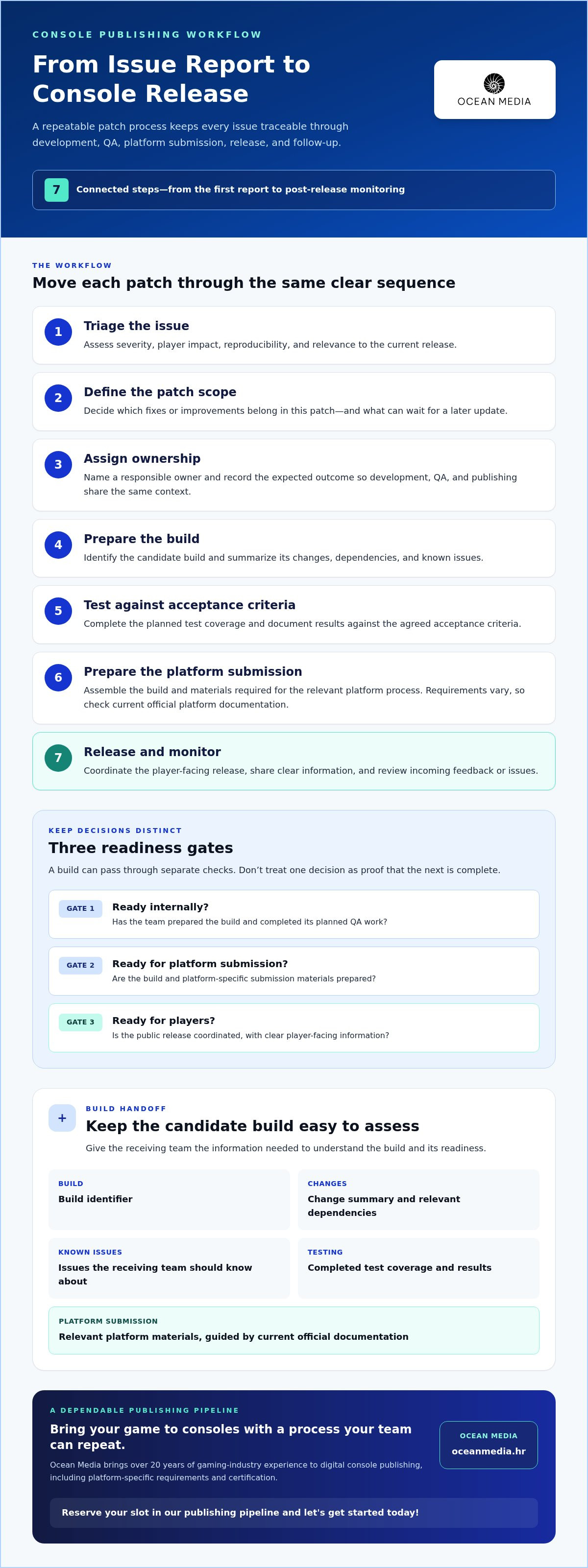
A reliable patch workflow keeps an issue traceable from the first report through post-release monitoring. Keep three decisions separate: whether a build is ready internally, whether it’s ready for platform submission, and whether the update is ready for players. Distinct readiness gates make it easier to spot missing work before it affects release coordination.
Use this sequence as a practical starting point for managing patches and updates on console:
- 1. Triage: Assess severity, player impact, reproducibility, and relevance to the current release.
- 2. Define scope: Decide which fixes or improvements belong in this patch and what can wait.
- 3. Assign ownership: Name a responsible owner and record the expected outcome.
- 4. Prepare the build: Identify the build and summarize its changes, dependencies, and known issues.
- 5. Test: Complete the planned coverage and document results against acceptance criteria.
- 6. Submit: Prepare the materials and build needed for the relevant platform process.
- 7. Release and monitor: Coordinate the player-facing release, share clear information, and review incoming feedback or issues.
How should a team prioritize patch requests?
Group reports by severity, player impact, reproducibility, and whether they affect the current release. For example, a repeatable defect that blocks a core player action may warrant a higher priority than a visual issue with a limited effect. Separate urgent fixes from improvements that can be planned for a later update. Record the decision and expected outcome so development, QA, and publishing share the same context. A useful patching system for your game also keeps changes traceable as they move toward players.
What belongs in a patch-ready build handoff?
Give the receiving team enough information to understand and assess the candidate build: its identifier, change summary, known issues, completed test coverage, and relevant dependencies. Include the platform-specific submission materials needed for that release, using current official documentation to guide preparation. Requirements vary, so don’t treat one platform’s process as a universal template. Keep internal QA sign-off separate from submission readiness and the final public release decision.
Clear handoffs make it easier to coordinate work across your publishing pipeline. Our console certification and publishing support connects platform processes with your release workflow as you bring your game to consoles.
How to balance patch speed, QA coverage, and release risk
Fast delivery matters when an issue is disrupting play, but speed alone doesn’t make a build ready. The right approach depends on player impact, the scope of the change, testing evidence, and the platform’s current submission process. Disciplined validation can reduce avoidable risk, but it can’t promise a release will be risk-free.
When should a team consider a hotfix or a planned update?
Assess urgency and impact first. A focused change for a severe, reproducible issue may justify evaluating a hotfix, while lower-priority fixes can often be grouped into a planned update. Grouping gives your team room to coordinate related changes and player-facing explanations, but a larger scope may also call for broader testing. Platform processes and release options differ, so verify current details in official documentation rather than assuming one approach applies everywhere.
| Decision factor | Urgent hotfix | Grouped update |
|---|---|---|
| Scope | Usually centered on a specific issue. | Combines planned fixes or improvements. |
| Testing focus | Validate the fix and check related systems that could be affected. | Test each change and interactions across the combined build. |
| Coordination | Align the response quickly, without skipping readiness decisions. | Coordinate scope, QA capacity, submission, and player communication. |
These are planning considerations, not fixed rules. A wider change may still be urgent, while a seemingly small fix can have broad effects. A measured patch management approach helps teams weigh the work, validation, and release decision together.
How can teams reduce regression risk before submission?
Base QA coverage on what changed and how a failure could affect the player experience. For example, a change to save-related behavior calls for checks that exercise the relevant save flows, alongside regression checks for connected features. Set clear acceptance criteria before testing, then document which build was reviewed, what coverage was completed, and any known issues. This evidence helps the team make an informed submission decision instead of relying on an informal “looks good.”
Agree on how the team will respond if testing or post-release monitoring surfaces a problem. Identify who assesses the issue, how its impact is recorded, and how the next decision is communicated. Response options depend on the relevant platform’s capabilities, so verify them against current official documentation. This coordination is part of a dependable publishing pipeline. Our console game publishing support helps you align platform processes with release planning as you bring your game to consoles.
Build a repeatable console update checklist for every release
A checklist turns update work into a visible process rather than a series of informal handoffs. For managing patches and updates on console, give every task an owner and record evidence of completion, such as a test report, approved build record, or finalized player-facing notes. Your team can then see what’s done, what’s blocked, and what still needs a decision.
Use these stages for each release:
- Pre-production: Confirm the update’s scope, priority, acceptance criteria, owner, and target release plan. Evidence: an approved issue record or scope summary.
- Build readiness: Identify the candidate build and document its changes, dependencies, and known issues. Evidence: a build handoff record.
- Testing: Record completed test coverage, results, and unresolved issues. Evidence: QA findings tied to the build.
- Submission: Check current platform-specific guidance and prepare the materials relevant to the submission. Evidence: a submission record and copies of required materials.
- Release: Confirm the release decision, timing, player-facing notes, and internal support information. Evidence: approved messaging and a release record.
- Post-release review: Track reports related to the change and document lessons for the next update. Evidence: a brief review linked to the released build.
What should teams verify before submitting an update?
Before submission, confirm the intended changes and build identity are clear, test results are documented, and known issues are visible to the people making the release decision. Check current official platform guidance for relevant requirements and submission materials. Don’t assume one platform’s process applies to another. Prepare player messaging and internal support information too, so teams can respond consistently once the update is available.
Scale recordkeeping to your team. A small studio can manage the workflow in one shared tracker, with a task owner and a link to evidence for each stage. A multi-team project can use the same stages while assigning owners by discipline or platform, then capturing approvals and handoffs in a shared release record. Keep the structure consistent and expand the level of detail as the project grows.
What should teams review after an update goes live?
Compare incoming reports with the issues the patch aimed to address. Note whether the expected outcome was achieved, and capture lessons from build handoffs, testing, submission, and communication. Link the review to the released build so the next release has a useful starting point. Use what you learn to refine the checklist over time.
For broader launch context, explore our console publishing roadmap. A dependable update process is one part of a well-coordinated publishing pipeline.
How publishing support helps you manage console patches over time
A dependable update workflow needs more than a build and a release date. You’re coordinating creative priorities, QA findings, platform-specific processes, certification, submission materials, and player communication. Publishing expertise connects those moving parts, helping your team keep responsibilities and handoffs visible throughout the release cycle.
Where can a publishing partner support patch operations?
A console publishing partner can coordinate platform requirements, certification steps, submission preparation, and digital release activities as part of your publishing pipeline. Clear ownership matters: your team should know who prepares the build, who reviews test evidence, who manages submission tasks, and who approves player-facing communications. Defined handoffs make it easier to see what’s ready and what still needs attention, without treating platform processes as identical or assuming a particular approval outcome or timeline.
Ocean Media is a digital console game publisher with over 20 years of gaming-industry experience. We work alongside developers on the publishing lifecycle, connecting platform-specific requirements with release operations. Your studio retains its creative direction and ownership of the game; our publishing support helps coordinate the operational path to release. We focus on bringing your game to consoles through digital publishing, not work-for-hire development.
What is a practical next step for bringing your game to consoles?
Start by mapping your current update workflow. Note who owns issue triage, build preparation, QA sign-off, platform submission, release decisions, and player communication. Then identify gaps: perhaps a handoff has no clear owner, test evidence isn’t tied to a build, or release messaging is prepared too late. A simple responsibility map gives you a concrete starting point for improving the process and coordinating updates across your team.
If you’re assessing how a publishing relationship can support your wider release plans, explore our console publishing partnership support. We work with you to align publishing responsibilities with your project’s needs and make update coordination part of a dependable workflow.
Bring your current goals and workflow questions to the next step. Let’s build a clearer path for managing patches and updates on console, from platform processes through digital release. Reserve your slot in our publishing pipeline and let’s get started today!
Make every console update part of a stronger release plan
Managing patches and updates on console is ongoing publishing work. A clear workflow helps you move from issue prioritization to build preparation, testing, submission, release, and follow-up with fewer gaps between teams. Match QA coverage to the scope and player impact of each change, and use an owner-led checklist to keep decisions and handoffs visible.
Publishing support connects your update process with platform-specific requirements and certification. Ocean Media brings over 20 years of gaming-industry experience and supports digital console publishing across major platforms. You retain creative ownership while we work alongside you to coordinate publishing responsibilities and keep your release process moving.
Your next step is to identify where your current update workflow needs clearer ownership or stronger coordination. Then let’s build a structured path for bringing your game to consoles and supporting it beyond launch.
Frequently Asked Questions
What is a patch in a console game?
A console game patch is a post-release change to a game build, often intended to fix a defect or improve stability. A broader update may include fixes alongside planned changes to the game. Teams may define the terms differently, so set the scope of each release clearly. That helps you decide what to test, how to coordinate the build, and what to tell players.
How do developers release a patch on console?
Developers typically identify and prioritize the issue, define the change, prepare a build, test it, and organize the platform submission and release. The exact submission process and materials vary by platform, so use current official documentation for your target platform. Keep internal build readiness separate from submission readiness and the decision to release publicly. Clear owners and documented handoffs help the team track each stage.
Do console game patches need to be tested before release?
Yes. Test the intended fix and assess whether the change could affect connected systems or player flows. A focused change may need a narrower test plan than a broader update, but scope alone shouldn’t replace risk assessment. Set acceptance criteria before testing, record which build was reviewed, and document coverage and known issues. This gives your team evidence to support a release decision rather than relying on informal approval.
Can a console game update introduce new problems?
Yes. Changes can cause regressions, including in systems that weren’t the original target of the patch. For example, a fix to one gameplay interaction could affect a related feature. You can reduce avoidable risk by matching regression checks to the changed systems, reviewing the candidate build, and documenting results. No test plan can promise a problem-free release, so agree on how you’ll assess and communicate issues if they appear.
How often should a console game receive patches?
There isn’t one ideal patch schedule for every game. Set timing based on issue urgency, player impact, the scope of planned changes, your team’s QA capacity, and platform submission processes. A severe issue may need prompt attention, while lower-priority fixes can be grouped into a planned update. A consistent cadence can help you organize work, but don’t let a calendar replace an informed assessment of each release.
What should a console patch release checklist include?
Include the update’s scope, priority, owner, acceptance criteria, build identifier, change summary, dependencies, and known issues. Record completed test coverage and results, then check current platform-specific submission guidance and materials. Before release, confirm the release decision, player-facing notes, and internal support information. After it goes live, track relevant reports and capture lessons for the next update. Assign an owner and completion evidence to every checklist task.
How can an indie studio manage console updates with a small team?
Use one shared tracker to record each issue, priority, affected build, owner, and expected outcome. Keep the workflow lightweight, but assign responsibility for build readiness, testing, submission coordination, release messaging, and post-release review. Managing patches and updates on console becomes easier when the team can see decisions and handoffs in one place. Ocean Media supports digital console publishing, platform-specific requirements, and certification. Reserve your slot in our publishing pipeline and let's get started today!


