

Is there one official checklist for every console release? No. Console platform certification requirements vary by platform, and licensed developers can access the detailed requirements through each platform’s developer portal. Use the current requirements for every target platform rather than assuming one checklist covers them all.
Certification affects more than the final submission. Your application, eligibility, submission timing, age ratings, user-generated content, and localization all shape the release. This guide explains how to plan these elements across platforms and regions, and where certification preparation fits in your publishing pipeline.
A clear plan helps align submissions with your release schedule and resolve issues before they reach certification review. When you’re planning to bring your game to consoles, Ocean Media’s Console Game Publishing service can support the technical and administrative work. Contact our team to discuss your publishing plans.
Key Takeaways
- Use the current requirements for each target platform. The detailed checklists are platform-specific and available to licensed developers through platform portals.
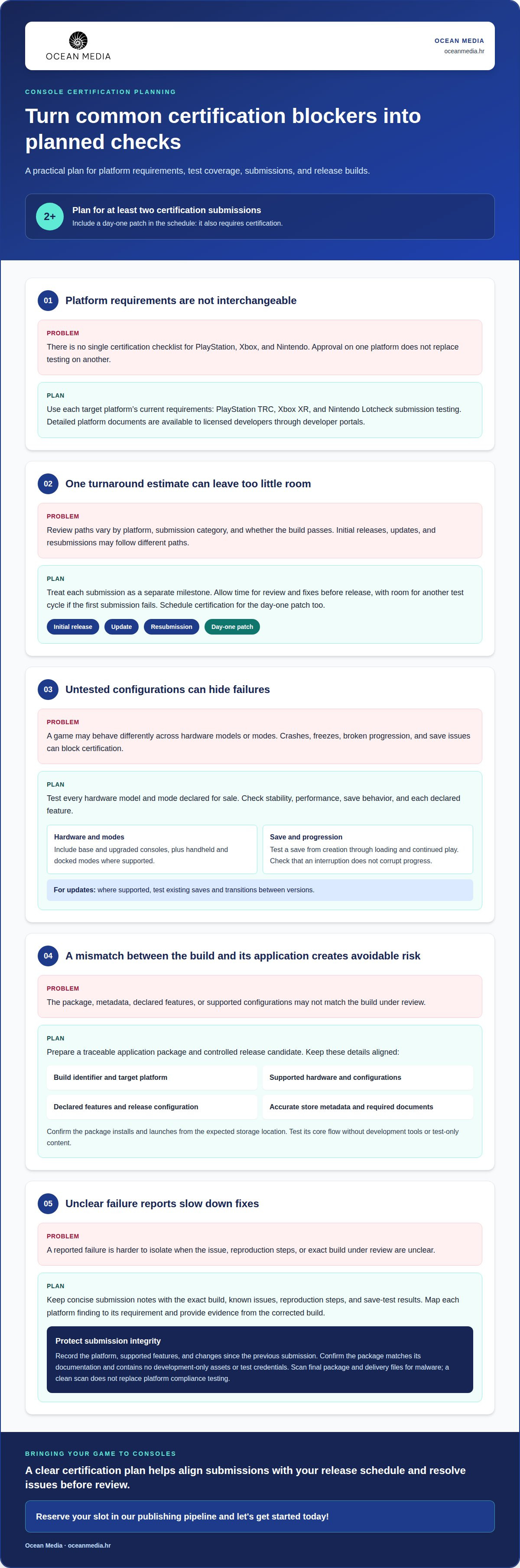
- Build certification into your release schedule: plan for at least two submissions, and include any day-one patch in certification planning.
- Plan age ratings for every release region, using IARC for digital releases on participating storefronts and other regional systems where required.
- Make sure every language on your store listing is fully translated and tested for missing strings, truncation, and UI overlap.
- When you’re ready to bring your game to consoles, reserve your slot in our publishing pipeline and let's get started today!
Certification turnaround times by submission category
There is no single certification checklist for PlayStation, Xbox, and Nintendo. PlayStation’s technical requirements checklist is called TRC, Xbox requirements are abbreviated XR, and Nintendo submission testing is commonly called Lotcheck. Each platform applies its own requirements.
Review times depend on the platform, submission category, and whether the build passes. An initial release, an update, and a resubmission may follow different review paths. Plan each as a separate milestone instead of relying on one universal turnaround estimate.
How do console platform certification requirements differ between PlayStation, Xbox, and Nintendo? Their terminology and test requirements differ: PlayStation uses TRC, Xbox uses XR, and Nintendo’s extended requirements are associated with XR, while its submission testing is called Lotcheck. The detailed platform documents are confidential and available to licensed developers through developer portals.
How much do console developer access, certification, and resubmission cost? There is no single amount for PlayStation, Xbox, and Nintendo. Costs depend on the platform and its access and submission terms. Plan access, initial certification, and any resubmission as separate items.
Technical checks can cover stability, performance, save behavior, and declared features. Test demanding scenes and menus in extended play sessions on every supported hardware model. For example, test a save from creation through loading and continued play, then check that an interruption does not corrupt progress. Verify each supported mode and feature against the platform document.
Common blockers include crashes, freezes, broken progression, and differences between the submitted build and its documented behavior. Pay particular attention to save compatibility: where supported, test existing saves after an update and transitions between versions. A reproducible test case helps isolate whether a failure involves gameplay, platform integration, or build configuration.
Protect submission integrity with a controlled release candidate. Record the build identifier, target platform, supported features, and changes since the previous submission. Before upload, confirm that the package matches its accompanying documentation and contains no development-only assets or test credentials. Scan the final package and delivery files for malware; a clean scan does not replace platform compliance testing.
Prepare concise submission documentation that lists known issues, reproduction steps, save-test results, and the exact build under review. If a platform reports a failure, map each finding to its requirement and provide evidence from the corrected build. Keep communication focused, consistent, and linked to the relevant platform case or submission record.
Plan for at least two certification submissions, and include a day-one patch in the schedule because it also requires certification. Allow time for review and fixes before the release date, with room for another test cycle if the first submission fails. This gives your development team and publishing partners a clear sequence without assuming the same turnaround across platforms.
Product certification application process
Certification begins with a platform-specific application and a build prepared for the configurations you plan to release. Align the package, metadata, and declared features with the platform’s current requirements.
Products Requiring Certification
A new console game must undergo platform submission testing before release. Updates and patches also enter certification workflows. A day-one patch must be certified, so coordinate it with the main game build. For downloadable content and live-service changes, the applicable submission path depends on the platform’s current rules and the change itself. Separate game content from service updates in your release plan, then identify the relevant submission category for each.
Versions Tested
Test every hardware model and mode declared for sale. This can include base and upgraded consoles, plus handheld and docked modes where supported. Treat each combination as a distinct test configuration: a game that works in docked play may still have display, control, or performance issues in handheld play. Record the submitted build and its supported configurations in the application.
What are the certification requirements for publishing a game on PlayStation, Xbox, and Nintendo consoles? Submit the game through the appropriate platform process and meet its current technical and submission requirements. Sony, Xbox, and Nintendo maintain distinct requirements, so approval on one platform does not replace testing on another.
Prepare a traceable application package. Match the build identifier to the platform, supported hardware, release configuration, and declared features. Include accurate store metadata and required submission documents. Before sending, confirm that the package installs and launches from the expected storage location, then test its core flow without development tools or test-only content.
Xbox certification testing takes place in three main stages after a submission is received. The exact review sequence and handling of failures depend on the platform. Keep each application’s build, notes, and platform responses together so your team can connect a reported issue to the precise version under review.
For updates, patches, downloadable content, and live services, distinguish code changes from content changes. A patch can affect existing saves or progression, so test those paths against the intended release configuration. A content update may introduce new assets or store information. Document what changed and submit it through the applicable platform route instead of assuming every update follows the original game’s workflow.
Plan the application around a release candidate, not a moving development build. Use an internal test pass to catch installation, configuration, and content issues before submission. If the platform returns a failure, reproduce it on the same supported setup, correct the build, and keep the resubmission record connected to the original case. A clear console publishing pathway can help align these application steps with your release plan.
Age ratings and user-generated content
Age ratings and user-generated content affect how a game is presented and assessed across regions. Include these checks in the release plan alongside platform compliance, privacy, security, and accessibility testing.
What accessibility, privacy, security, and age-rating requirements must console games meet? Check the requirements that apply to each platform and release region, including technical, data, and age-rating considerations. Assess accessibility and security against applicable platform requirements, then test relevant features in the submitted version.
Ratings are regional, not a single global label. For digital releases on participating storefronts, use IARC; use other regional rating systems where required. Map each intended release region to its rating path, then align the store listing, in-game content, and submitted build. For example, a release planned for several regions needs ratings appropriate to each region before its storefront materials are ready.
User-generated content can change what players encounter after launch. Inventory features such as custom character names, uploaded images, player-created levels, and text or voice communication. For each feature, document what users can create, where it appears, and what controls are available. This gives your team a clear view of how player content may affect ratings and platform review.
Review both fixed game material and user-created content. Record rating-relevant content in the release version, then test UGC features with representative examples. For instance, verify that a custom name displays correctly in menus and multiplayer sessions, and that player-created content appears as intended. Keep test results with the version submitted for review.
Start privacy work with a data-flow inventory. List the information collected by account creation, analytics, multiplayer, and UGC tools. Document its purpose, handling, and connection to platform services, then check that the game’s notices accurately describe those flows. A change to an analytics SDK or account feature should trigger a fresh review of the affected data practices.
For security, test the paths that accept or display player content. Check input handling, access controls, and how the game responds to malformed submissions. Keep UGC separate from trusted game assets, and test reporting or moderation tools where included. These checks can expose issues before release, but one platform’s controls do not necessarily satisfy another platform’s requirements.
Check the accessibility options the game actually provides. Test features such as subtitles, remappable controls, text scaling, and color alternatives where implemented. Confirm each option works across menus and gameplay, not just on one screen. Link the results to the release version, rating details, and platform-specific submission records.
When content changes after approval, review the affected rating, data flows, and UGC behavior before the next release. A new custom-content feature or regional edit can change what players see, so update the relevant documentation and tests together.
Eligibility requirements and recommended training
Console game certification eligibility depends on access to each platform’s developer process. You need the appropriate developer account and submission permissions before a game can enter review. Keep account ownership, team roles, and release responsibilities clear. For example, assign a production contact to coordinate application details and route platform feedback to engineering, QA, and production.
Platform access and technical readiness are separate steps. An approved developer account provides access to relevant submission materials, but it does not mean the game has passed testing. Once your team has access, use current platform documents to map requirements to game features. Record an owner and evidence for each check, including security, save behavior, account features, and supported hardware configurations.
Training is most useful when it follows your project’s actual platform targets. Have QA and development review the applicable requirements together, then integrate those checks into normal test cycles. For example, trace a feature such as cloud saves from implementation through test evidence and submission documentation. This helps the team understand how a functional issue can become a certification finding.
GlobalPlatform functional certification is a separate program, not a route for submitting console games. It assesses compliance, functional behavior, and interoperability for products that support GlobalPlatform specifications. A product must be submitted to an accredited laboratory and pass functional evaluation tests. Organizations seeking qualification as functional certification laboratories or test-tool providers must be full or participating members in good standing.
That distinction matters for eligibility. A game studio preparing a console release should focus on the target platform’s developer process. GlobalPlatform membership applies to organizations seeking the specified laboratory or test-tool qualification. A GlobalPlatform credential does not replace console approval, so match each application to the platform and product being assessed.
Build a focused internal learning plan around roles and concrete tasks:
- Production: map account permissions, submission ownership, and release milestones.
- QA: turn each applicable requirement into a repeatable test and recorded result.
- Development: review platform integration points, including security and hardware behavior.
- All teams: rehearse a mock submission using the correct build, documents, and issue records.
Repeat the exercise when platform requirements change or a new console target enters scope. A mock review can reveal gaps in ownership, evidence, or technical understanding before the formal application. Tie training to the build in preparation so teams can apply each lesson directly to release work.
Localization, regional warnings, and age ratings
Localization goes beyond translating dialogue. Fully translate and test every language on the game’s store listing for missing strings, truncation, and UI overlap. Treat each listed language as a release commitment, then connect its text, audio, store assets, and regional warnings to the correct build.
Start with a language inventory tied to your storefront plan. For example, if your listing declares English and French, include both in the internal localization matrix. Track menus, subtitles, tutorials, error messages, and store descriptions separately. Translating the opening screen does not show that every interface string is complete.
Test localization in context, not just in a spreadsheet. A long French menu label may fit a desktop preview but overlap a console button prompt. Check text at the intended display size and in every supported mode. Record missing strings, clipping, and inconsistent terminology against the relevant language and build.
Review regional warnings deliberately. Match each warning shown in the game and store materials to the target region and platform submission documents. For example, compare the warning screen and store description for the same release territory. Keep approved text with the regional build so later edits do not silently create a mismatch.
Connect age-rating preparation to region, storefront, and version. IARC applies to digital releases on participating storefronts; other regional rating systems apply where required. Keep rating information aligned across the store listing, game content, and submitted version. A regional content edit should trigger a review of the corresponding rating materials.
Microsoft and other platform storefronts may use different listing workflows, so keep each platform’s assets and language declarations distinct. Do not assume metadata transfers correctly from one platform to another. In your release matrix, pair each platform and territory with its languages, rating status, warning text, and tested build.
- Language: list every declared language and its translated content.
- Interface: test strings for omissions, truncation, and overlap.
- Region: align warning text with the relevant platform documents.
- Version: associate ratings and localized assets with the submitted build.
Before submission, review the final regional assets internally. Compare the store listing with the game’s language menu, warning screens, and rating details. Resolve inconsistencies before moving the release candidate forward. This structured review helps manage localization alongside platform testing rather than leaving it as a last-minute text check.
Planning regional assets and submission details across platforms? Plan your console publishing process with a clear release workflow.
Ocean Media: Console Game Publishing
Ocean Media provides Console Game Publishing for developers, helping coordinate the technical and administrative work involved in bringing games to consoles. Turn to Ocean Media when planning platform submissions and seeking publishing support that connects certification preparation with your release plans.
A clear view of target platforms, build status, and regional plans helps align submission milestones with the wider publishing pipeline. Ocean Media supports developers as they navigate the publishing process and prepare games for a global audience.
Contact Ocean Media to discuss your release, reserve your slot in our publishing pipeline and let's get started today!
Set Your Console Release in Motion
Turn platform planning into a release path your team can follow. Treat certification as part of the publishing plan, not a final checkpoint: align ownership, build readiness, regional decisions, and release priorities early. This gives your team a shared basis for coordinating development and publishing as the project moves forward.
The console platform certification requirements for your game depend on its target platforms and release scope. Keep those decisions visible as the project evolves, and revisit the plan when your release direction changes. Clear priorities help your team focus its effort and align console release work with the wider publishing pipeline.
Ocean Media offers Console Game Publishing for developers preparing to take that next step. Contact Ocean Media about your console release and let’s shape a practical path forward together. Your game’s journey to players can start with a focused conversation and a clear plan.
Frequently Asked Questions
Is this checklist the official requirements list?
No. This FAQ is a practical overview, not a platform-issued checklist. The detailed certification documents are confidential and available to licensed developers through platform developer portals. Use the current document for each target platform as the authority for a specific submission. For example, a team preparing a PlayStation build should use PlayStation’s applicable materials rather than treating a general guide as approval criteria.
What are TRC, XR and Lotcheck?
TRC is Sony’s name for its technical requirements checklist, and XR is the abbreviation used for Xbox requirements. Nintendo submission testing is commonly called Lotcheck. These terms refer to distinct platform processes, not a shared standard. If your release targets several consoles, keep each platform’s requirements and test evidence separate so a result for one submission is not mistaken for approval on another.
What is console certification?
Console certification is a platform’s review of a submitted game build against its applicable technical and submission requirements. It helps assess whether the game functions appropriately on that platform before release. For example, a build may need to demonstrate reliable installation, navigation, and progression. Certification is distinct from age ratings, which assess content for release regions and storefronts.
What are TRC, XR, and Lotcheck, and how do platform certification test cases work?
TRC refers to Sony’s technical requirements checklist, XR to Xbox requirements, and Lotcheck to Nintendo submission testing. A platform test case turns a requirement into a reproducible check, such as verifying that a particular menu returns correctly after a system interruption. Teams use the applicable platform document to identify expected behavior, then record the tested build and results for each case.
How do developers submit a console game for certification, and what are the required steps and documents?
Developers submit through the relevant platform’s developer process, using its current portal and instructions. A practical sequence is to prepare the release build, assemble the required submission materials, validate the package, and send it for review. Materials should identify the build clearly and describe relevant features. Keep platform feedback and revised submission records together to maintain a traceable history.
How long does console certification take, and how many submission attempts are allowed?
There is no single turnaround time or universal attempt limit across PlayStation, Xbox, and Nintendo. Review timing depends on the platform, submission category, and any issues found. Plan for at least two certification submissions, with room for fixes and another review cycle if needed. Avoid setting a launch date based on an assumed review duration.
What happens when a game fails console certification, and how can developers appeal or resubmit?
A failed submission means the platform has identified an issue that needs attention before approval. Review the finding against the relevant requirement, reproduce it on the affected setup, and correct the build or supporting materials. Then submit the revised version through the platform’s process. Keep responses factual and focused on the reported issue; available review or appeal routes depend on the platform’s procedures.
What legal, localization, and regional requirements apply when certifying a console game for release in the United States?
For a United States release, align the game’s rating and storefront materials with applicable release requirements. Age ratings should cover every release region, using IARC for digital releases on participating storefronts and other regional systems where required. Fully translate and test every language declared on the listing. Account for platform-specific data requirements, and ensure the submitted version matches its regional content.


