

A strong mobile game isn’t automatically ready for consoles. Migrating from mobile to console game development works best when the core gameplay holds up beyond touchscreens and the team can adapt controls, interface, performance, and monetization for a different play environment. The opportunity is broader reach, but the port needs to feel purpose-built, not simply transferred.
A new platform can give your game room to grow, but first assess whether its design and production foundations support the move without losing what players value. This guide explains how to assess demand and retention, redesign touch-first interactions for controllers, plan platform features and performance budgets, and choose a porting strategy that fits your game.
We’ll also cover how console publishing fits into the release path, including the technical and administrative demands of platform submissions. When you’re ready to bring your game to consoles, reserve your slot in our publishing pipeline and let's get started today!
Key Takeaways
- Test whether your game’s core interactions feel intuitive with keyboard, mouse, and controller input, not just touch.
- Plan platform features around the game’s save systems, storefront integration, accessibility, and player experience.
- Set performance and memory budgets for each target platform, then test how the game behaves under real play conditions.
- Use player requests and retention patterns to assess demand, while reviewing whether mobile monetization fits PC and console play.
- Choose a porting approach that preserves your game’s identity while adapting its interface, session flow, and technical needs.
Adapting controls for different input devices
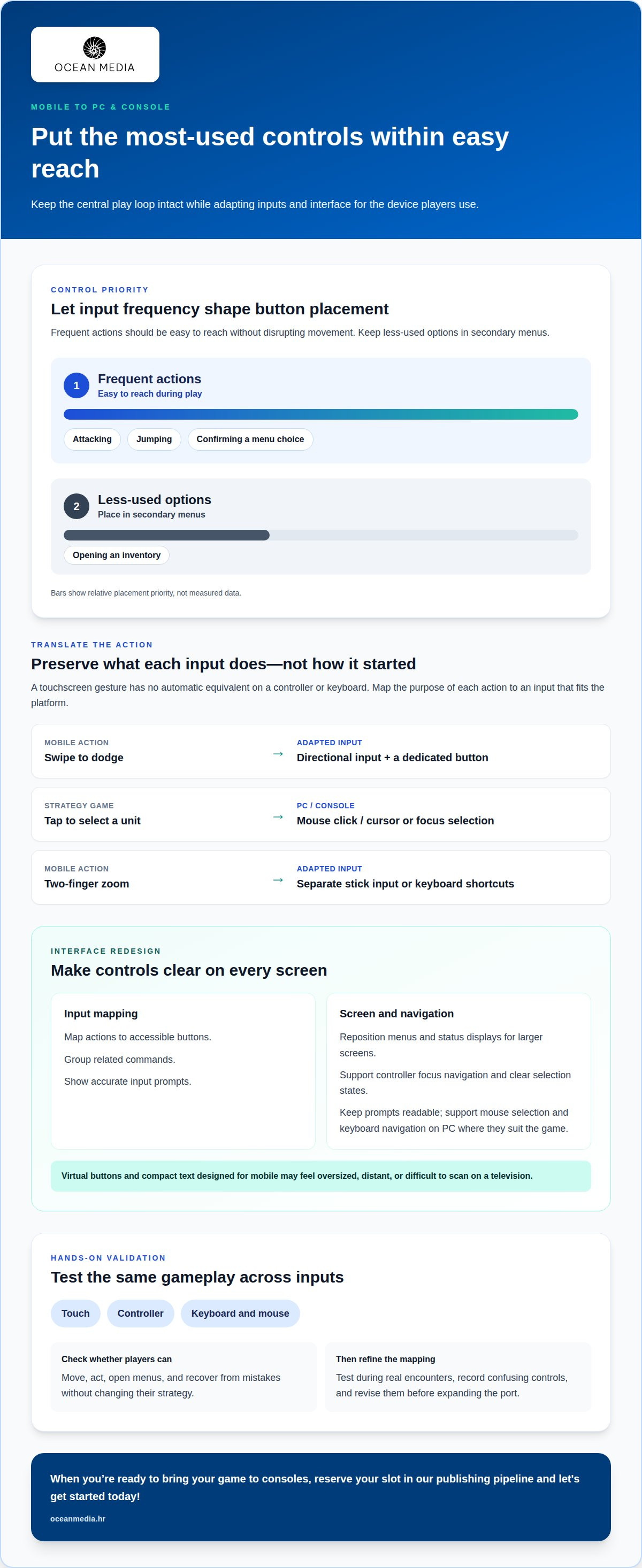
Adapt touch-first actions into deliberate controller or keyboard inputs, then redesign the interface for larger screens. Preserve the central play loop while making each action clear and comfortable on its target device.
Controller and Keyboard Input
Controller and keyboard input means mapping each game action to buttons, sticks, keys, or mouse movement. It matters because a touchscreen gesture has no automatic equivalent on a controller or keyboard. For example, replace a swipe-to-dodge action with a directional input and a dedicated button. On PC, offer keyboard and mouse support alongside controller compatibility when the game’s actions benefit from both.
Control and Interface Redesign
Redesigning controls and the interface means reshaping the game’s input logic and screen layout for each device. A control scheme that works under a thumb can feel awkward on a gamepad. Map actions to accessible buttons, group related commands, and show accurate input prompts. On larger screens, reposition menus and status displays so players can read and navigate them comfortably.
Start by listing every touch interaction in the mobile build. Classify each as movement, aiming, selection, confirmation, or a contextual action. A tap to select a unit in a strategy game could become a mouse click on PC and cursor or focus selection on console. A two-finger zoom gesture may need separate controls, such as stick input or keyboard shortcuts. Preserve the purpose of each action, not its original gesture.
Next, review how often players repeat each input. Frequent actions such as attacking, jumping, or confirming a menu choice should be easy to reach without disrupting movement. Less-used options, such as opening an inventory, can sit in secondary menus. This mapping keeps the main loop responsive and avoids a crowded button layout. Test the scheme during real encounters, not just on a settings screen.
Mobile UI often places virtual buttons over the play area and uses compact text. On a television, these elements may feel oversized, distant, or difficult to scan. Adapt the interface for controller focus navigation, clear selection states, and readable prompts. On PC, support mouse selection and keyboard navigation where they suit the game. An engine’s UI scaling and input systems can help organize these adaptations, but each platform still needs hands-on review.
Finally, test the same gameplay sequence with touch, controller, and keyboard and mouse inputs. Check whether players can move, act, open menus, and recover from mistakes without changing their strategy. Record confusing mappings and revise them before expanding the port. This technical pass makes control adaptation part of the design, rather than a late production patch, and gives the release a more consistent feel across platforms.
Platform features such as cloud saves and achievements
Platform features shape how players continue a game, track progress, and discover its content after launch. For a cross-platform release, plan cloud saves, achievements, controller support, storefront integration, localization, and accessibility alongside the core game, rather than treating them as disconnected extras.
A cloud-save design should define which progress travels with a player and how the game handles conflicting save states. Achievements should connect to meaningful play milestones rather than simply copying mobile objectives. For example, a long-term progression goal can remain consistent across platforms, while achievement prompts and save menus fit each platform’s interface. These decisions affect player expectations when they switch devices or return for another session.
Genre can suggest where a port may fit. Strategy, RPG, card battler, roguelike, simulation, puzzle adventure, narrative, action, and co-op games are among the genres suited to mobile-to-PC expansion. That doesn’t make every title an automatic fit. A turn-based strategy game may translate naturally to mouse selection, while a co-op action game needs its multiplayer flow to work on the target platform. Evaluate the actual play loop and audience, not just the genre label.
Mobile versions can provide useful evidence before a broader launch. Retention, monetization, and player-behavior data can reveal which activities keep players engaged and where they leave. Compare data across platforms to distinguish patterns tied to the game from those tied to a particular device or input method. A/B testing can examine a specific change, such as tutorial prompt placement, while keeping the comparison focused. Combine results across versions carefully: differences in controls, session context, or store presentation can affect player behavior.
Cross-platform architecture makes comparisons and future updates easier to manage. Keep core game rules distinct from platform-specific input, rendering, save handling, and build processes. This separation helps teams adapt platform features without duplicating the whole game. Plan for content parity and engineering headroom, so a platform-specific update doesn’t force unrelated systems to change. Then test shared progression and version differences together.
Existing releases offer useful examples of platform journeys. Cuphead began as a Microsoft exclusive before arriving on Nintendo Switch and PlayStation 4. TMNT: Splintered Fate was developed for PC, Nintendo Switch, PlayStation, and Xbox. These examples show different release paths, not a universal template. If you’re planning platform submissions and release coordination, explore our developer publishing information as you shape your cross-platform plan.
How should teams set performance and memory budgets?
Console technical requirements vary by platform: each target has hardware limits, resolution demands, performance expectations, and submission criteria. There is no single frame-rate or memory target for every console. Set budgets for each target device, then validate performance against that platform’s requirements and certification process.
Start by identifying the most demanding gameplay scene and the assets it loads. Measure CPU and GPU use, memory consumption, loading behavior, and frame pacing on target hardware. Use the results to reserve room for effects, interface elements, and later content. A budget should account for the complete scene, not just character models or the environment. If a level exceeds its limits, adjust asset detail, effects, or scene complexity before adding more content.
Mobile builds add thermal performance and battery use to the equation. High CPU and GPU utilization can cause thermal throttling on mobile devices, reducing performance during play. Higher display refresh rates can make motion smoother while increasing power use. Android power-efficiency guidance recommends aligning a device’s refresh rate closely with the game’s frame target. It also says a maintained 30 FPS target may suit a mobile game better than a 60 FPS target.
Frame pacing matters as much as the chosen frame target. Uneven intervals between frames can make a game feel less responsive, even when average performance seems acceptable. Profile demanding moments, such as combat with several effects, and check whether animation and input remain consistent. On consoles, match visual settings and rendering work to the target hardware. On mobile, account for variation across devices rather than assuming every player has the same capacity.
Improving visuals doesn’t always require increasing every setting. Review texture sizes, lighting, shadows, and effects individually, then prioritize changes that improve clarity or atmosphere. Set a memory budget for assets loaded at once, including interface art and audio. Streaming or unloading content can help manage large levels, but transitions must not interrupt play. Test settings changes in representative scenes, where resource use and visual complexity combine.
Build a testing matrix around target platforms, devices, resolutions, and gameplay conditions. Include extended play sessions to reveal thermal changes, memory pressure, and frame drops that brief checks may miss. Tie results to a specific build and scene so each optimization has a clear comparison. Treat platform certification as a release requirement: test platform-specific behavior early, resolve failures, and repeat checks after changes to rendering, saves, or interfaces. This gives teams evidence that each build meets its intended performance budget.
Evaluating mobile-game readiness for PC and console
Readiness depends on more than technical feasibility. Players must want the new version, and its design must suit a broader play environment. Weigh audience signals, gameplay fit, and production needs together to decide whether the port has a clear direction.
Mobile and Console Development Differences
Mobile and console development differ in hardware, operating environments, play settings, and platform expectations. This matters because your mobile build may need code changes and optimization before it runs well on console hardware.
Assess whether your game’s central loop remains engaging without mobile-specific assumptions. Ads, rewarded videos, gacha systems, subscriptions, timers, and in-app purchases may need reconsideration for PC or console audiences. Living-room play also changes how menus, loading, saves, and session flow should work. Preserve the game’s identity while adapting these details for its new platform.
Skills and Tools for Console Development
Console development calls for platform-specific build, debugging, performance, and submission skills. These capabilities help identify platform-related issues and prepare a version that meets each target’s technical expectations.
Your mobile team can build on its experience with input abstraction, rendering, save systems, and build pipelines. You’ll also need to understand how UI scaling and platform-specific settings affect the player experience. For example, the team should be able to trace a rendering issue to its source and test the fix on target hardware. Include certification preparation and platform-specific QA in release planning.
Console Development Kits
Console development kits provide platform-specific hardware and software for building and testing a game. A PC or mobile build cannot fully reveal how the title behaves on console hardware.
You generally pursue access through the relevant platform holder’s developer program and follow its onboarding process. The kit supports practical testing, including performance checks and platform-specific behavior. PlayStation 4 and 5, Xbox Series S/X, and Nintendo Switch have distinct target environments, so access and development workflows vary. Plan kit access early enough to include hardware testing in your production schedule.
Porting Risks and Common Pitfalls
Porting risks arise when teams underestimate design changes, platform differences, or audience expectations. A technically functional build can still feel poorly suited to new players.
Player requests for PC releases, controller support, or console availability can signal cross-platform demand. Strong retention after the first day, first week, and first month can indicate that your gameplay loop has potential beyond mobile. Treat these as evidence, not a substitute for reviewing your game’s systems and audience.
As you assess migrating from mobile to console game development, map dependencies across input, rendering, saves, and build pipelines before setting scope. Test how offers, timers, and progression behave in longer living-room sessions, then adapt the design where needed. Your mobile release may contain platform-specific features that require replacement or redesign. We can shape a sound plan for migrating from mobile to console game development by weighing player demand against the technical work and protecting the game’s identity.
What are the main differences between mobile and console game development?
A mobile release and a console release serve different play environments, hardware, and audience expectations. Moving a game between them means adapting the full experience, not merely changing its target device.
Session length can change how a game’s pacing feels. The average mobile gaming session lasts around 30 minutes to an hour, while the average console session lasts an hour to two hours. A mobile game built around short bursts may need smoother progression and save points for longer living-room play. Review how players enter, pause, and resume a session before deciding what needs to change.
Hardware is another major difference. Mobile devices vary, so developers often balance visual detail and performance across different capabilities. PlayStation 5, Xbox Series S/X, and Nintendo Switch each represent distinct console targets. A console build still needs platform-specific performance planning, but its design should reflect the selected hardware rather than assume every device behaves alike. A port may require code changes and optimization for its target platform.
Business models can also shape the experience. Mobile games may rely on ads, rewarded videos, timers, or in-app purchases. PC and console releases may instead support premium sales, downloadable content, bundles, and seasonal promotions. Choose a model that fits the game’s audience and how its content is presented. For example, a timed offer designed for frequent mobile sessions may feel intrusive during a longer console session.
Production and discovery differ, too. A cross-platform launch can open additional routes to revenue and long-tail discovery rather than relying only on mobile ads, in-app purchases, or user-acquisition campaigns. Yet each version needs a coherent store presentation and content plan. Keep shared game systems aligned while adapting platform-specific details, so updates don’t create inconsistent player experiences.
Visual expectations should guide the port, not dictate a blind upgrade. More screen space can reveal interface gaps, while larger displays make image quality and readability easier to assess. Review the full play experience on the target screen, including menus, dialogue, and gameplay. A mobile-game port may be a cut-down version because of device constraints. Moving to console doesn’t automatically mean restoring every feature or increasing every asset’s detail.
Use these differences to define the project’s direction: identify what players value, what changes on the target platform, and which adaptations protect the game’s identity. Then scope the console version around a clear audience and release plan.
Ocean Media: Console Game Publishing
We provide console game publishing for developers preparing to bring a mobile title to consoles. Our services include digital distribution across console platforms and expertise in navigating the technical and administrative complexities of platform submissions. We’re a natural next step once your readiness assessment is complete and you’re shaping a console release.
As you plan, consider your target platforms, submission needs, and release goals. A clear view of these decisions helps frame our publishing conversation and the path from a prepared build toward a global audience. Contact us to discuss your project, reserve your slot in our publishing pipeline and let's get started today!
Shape the next move for your game
Turn your readiness assessment into a focused release direction. Decide which player experience you want to carry forward, what should change for the new platform, and how your team will judge the finished version. A clear goal keeps production choices connected to the game’s identity instead of letting platform requirements define it.
That direction also gives your team a stronger basis for planning migrating from mobile to console game development. Align creative priorities with the technical and publishing work ahead, then keep key decisions visible across the project. Your game can reach a new audience while still feeling unmistakably like itself.
Ocean Media can support your console release through Console Game Publishing. Contact Ocean Media about your game and discuss the path ahead. Your next platform journey can start with a clear plan and a creative vision worth carrying forward.
Frequently Asked Questions
What are the benefits of porting your mobile game?
Porting can give a proven game access to players who prefer PC or console play. It can also help your team learn whether successful mobile systems translate to different audiences. For example, compare how players engage with a progression feature across versions, then use that insight to guide future content. A port can extend a game’s reach and give its world and mechanics another way to find players.
How does the porting happen?
Porting moves a game to a new platform through a sequence of technical and design adaptations. Teams first define the target platform and scope, then identify dependencies in code, assets, saves, and input. They adapt the build, test core gameplay on target hardware, resolve platform-specific issues, and prepare submission materials. A change to save behavior, for instance, can affect both player progression and testing, so related systems need coordinated review.
What platforms should you consider?
Choose platforms by matching your game’s audience, design, and production capacity. PC may suit titles that benefit from mouse and keyboard play, while consoles such as PlayStation 5, Xbox Series S/X, or Nintendo Switch offer different hardware and living-room contexts. You don’t need to target every platform at once. A focused first release can help your team learn from development and player response before expanding the plan.
What are the costs and licensing fees for console game development and publishing?
Budget depends on the port’s scope, the condition of its code and assets, target platforms, and the testing and adaptation required. Separate development work from publishing and platform-related commercial terms when planning. Licensing or commercial arrangements depend on the relevant agreements, so don’t assume one universal fee applies across platforms. A practical budget identifies each workstream and accounts for changes uncovered during testing.
How do console certification and submission processes differ from mobile app store reviews?
Both involve submitting a build for platform review, but console certification focuses on platform-specific requirements and the game’s behavior on its target system. Mobile app store review also evaluates apps against the store’s criteria. For a console release, organize builds, required materials, and issue tracking around each platform’s submission process. A failed check may require a change and another submission, so release planning should allow for review cycles.
What steps and timeline are involved in moving a game development studio from mobile to console?
Start by selecting a target platform and assessing the game’s code, content, and audience fit. Next, plan the port, adapt the build, test it on target hardware, and prepare for submission and certification. The schedule depends on the game’s technical condition, number of targets, scope of changes, and issues found during review. Map dependencies early so interface, save, and build changes can be coordinated across the team.


