

A striking trailer can still miss its mark if viewers can’t see what makes the game worth playing. Creating a game trailer for console stores means shaping a clear story around the experience: show what players do, reveal what makes the game distinctive, and give every moment a purpose.
You know the trailer needs to make an impression quickly. The challenge is balancing story, gameplay, and a strong pitch without crowding the message. This guide covers a practical structure, opening hooks, trailer length, and the choices that shape a focused script, so you can present your game clearly and with creative intent.
When you’re ready to bring your game to consoles, Ocean Media can help you navigate console game publishing and the publishing pipeline. Reserve your slot in our publishing pipeline and let's get started today!
Key Takeaways
- Build the trailer around actions players can see and distinctive moments that make your game stand out.
- Give the footage a clear story arc, moving from a compelling setup through escalating play to a satisfying finish.
- Open with the experience itself, so viewers quickly understand what makes the game worth their attention.
- Choose a runtime that fits the trailer’s purpose, then use each scene to earn the viewer’s continued interest.
- Shape the pitch and script around one central message, with visuals that your team can capture from the game.
1. TL;DR What makes a Successful Game Trailer?
A successful trailer makes a game’s appeal visible through specific player actions. Start with a moment that demonstrates the concept, such as a risky traversal move, a surprising combat choice, or a puzzle solved in an unexpected way. Then build a short sequence around cause and effect: show what the player does, what changes, and why it matters. A striking image helps, but visible gameplay gives viewers evidence of the experience.
Plan the workflow around moments viewers can understand without a developer explaining them. Capture clean footage of each action, then check whether its goal and result are clear on screen. If a mechanic needs context, show the obstacle before the move and its consequence afterward. Choose footage that communicates what makes the game distinctive, whether through mechanics, art direction, characters, or tone.
Console store trailers and Steam or other PC store trailers share a core purpose: present a game’s appeal through clear footage. The useful distinction is the destination, not a guaranteed difference in storytelling. Shape the edit and deliverables for the specific store submission instead of assuming one export will fit every listing.
There isn’t one universal video specification for PlayStation Store trailers in the facts available here. A general recording baseline is at least 1920×1080 pixels and 30 frames per second, with 3840×2160 pixels and 60 frames per second when possible; use the current PlayStation submission requirements for delivery.
The same baseline applies to Xbox Store footage, but it should not be mistaken for an Xbox-specific export specification. Follow the Xbox submission workflow’s file and presentation requirements when preparing the final asset.
Nintendo eShop trailers also need to follow the specifications for their store submission. The general recording guidance is at least 1920×1080 pixels and 30 frames per second, or 3840×2160 pixels and 60 frames per second when possible.
Approvals and content rules vary by platform, so prepare footage and end cards for the destination store. Keep game footage, title presentation, and promotional claims consistent with the actual game. Handle rating marks and other required assets within each platform’s process rather than assuming one universal rule applies to every trailer.
Captions make spoken information available to viewers who can’t hear the audio. Keep each line readable, synchronized with speech, and clear of important gameplay or interface details. Treat this as good caption practice, and check the destination platform’s technical delivery rules separately.
Submission delays can result from preventable mismatches: an export that misses the destination’s specifications, text that obscures important action, or footage that doesn’t reflect the game. Build a final review into the workflow. Compare the intended file with the platform’s current requirements, then watch the complete export to check legibility, audio, and a clear call to action.
Close with an end card that gives viewers one direct next step, such as finding the game in its console store. Keep the title and call to action prominent, leave enough time to read them, and avoid competing messages. A focused ending gives interested players a useful direction.
2. Story structure, setup, execution, and resolution
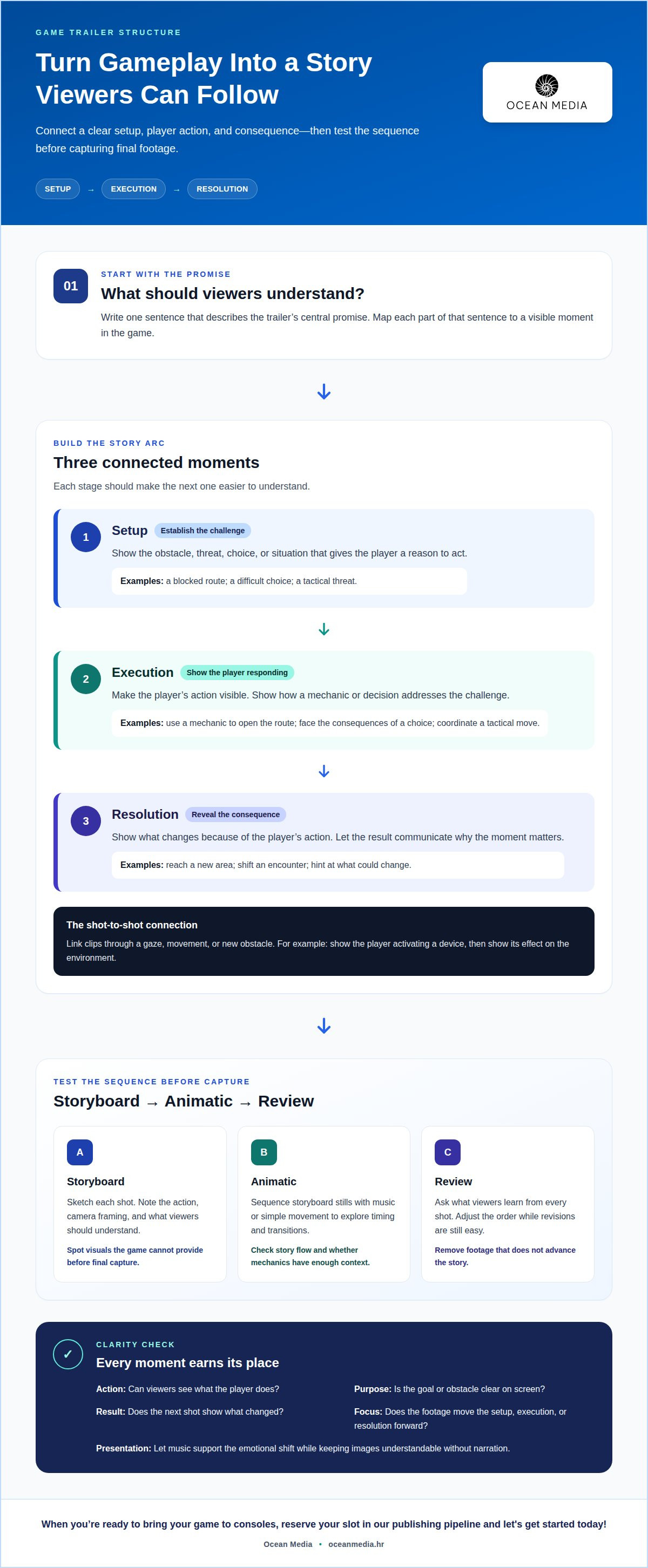
Give the trailer a miniature story, not a sequence of unrelated clips. A useful structure moves through setup, execution, and resolution: establish a challenge, show the player responding, then reveal the consequence. For example, a character spots a blocked route, uses a game mechanic to open it, and reaches a new area. That progression helps viewers understand the action and its purpose.
Start by identifying the game’s central promise. In a character-driven adventure, the setup might introduce a difficult choice, execution shows the player facing its consequences, and resolution hints at what could change. For a tactics game, establish a threat, show a coordinated move, then reveal how it shifts the encounter. These examples turn mechanics into a story the audience can follow.
Connect each shot to the next through a clear relationship. A cut can follow a character’s gaze, a movement, or a new obstacle. If one clip shows a player activating a device, the next can show its effect on the environment. When creating a game trailer for console stores, use these visual connections to make separate shots feel like one coherent experience.
Use a storyboard to test the sequence before capturing final gameplay. Sketch each planned shot, note the action and camera framing, and mark what the audience should understand. This can reveal a script that depends on visuals the game cannot provide. If a written line describes a dramatic close-up but gameplay offers only a distant view, revise the line or choose another moment.
An animatic adds timing and motion to storyboard frames. Sequence stills with music or add simple movement to clarify transitions, without using a game engine or code. This rough version helps the team judge whether the story flows and whether a mechanic has enough visual context. Adjust the order before recording footage, when changing a frame is easier than rebuilding an edit.
Review every transition for clarity. Ask what viewers learn from each shot, then remove footage that doesn’t advance the setup, execution, or resolution. If the main character appears in three consecutive clips without a new action or consequence, combine or replace them. Let music support the emotional shift while keeping the images understandable without narration.
For a practical workflow, write one sentence describing the trailer’s promise, then map each sentence to a visible moment. When creating a game trailer for console stores, use a storyboard to guide capture and an animatic to reveal gaps in pacing or logic. As you plan for bringing your game to consoles, explore resources for game developers that support the publishing journey.
3. Opening hooks and capturing audience attention
Use the first 5-10 seconds to give viewers a reason to keep watching. Start with a playable moment, not a slow introduction: a character escaping a collapsing bridge, a surprising ability changing combat, or a camera reveal exposing a strange world. Each example gives the audience an immediate visual question. What happens next? The opening should make that question clear through action, while showing what makes the game distinct.
Choose a hook that belongs to the game’s concept. A stealth title might open with a guard turning toward the player, then show a clever escape. A racing game could begin with a tight turn that demonstrates its handling and visual style. These moments capture attention by introducing both a challenge and a way to engage with it. Avoid a striking image that promises an experience different from the gameplay that follows.
Keep logos and static title screens out of the opening stretch. Spending the first 5-20 seconds on logos, title screens, or interface screens delays the moment viewers see the game in action. Instead, place branding over an active shot where it remains legible without interrupting the visual. The game title should appear in the first 3 seconds, so integrate it into the opening rather than postponing it for a separate card.
Build the opening sequence as a compact visual argument. Show a distinctive action, reveal its consequence, then move to a second scene that expands the promise. For example, an opening grapple across a gap can lead to a wider view of the level and its next obstacle. This gives viewers a reason to follow the edit. Keep the script focused on the same promise instead of introducing unrelated features immediately.
Capture several versions of the opening during the marketing workflow. One might lead with a character, while another begins with a mechanic or environmental reveal. Compare them at full speed and without explanatory context. If a visual only makes sense after narration, replace it with a clearer action or add the missing setup. This helps your team judge the hook as viewers will encounter it.
Make the opening work with sound and without it. A sharp musical cue can strengthen a reveal, but the visual should still communicate the action when muted. Use readable movement, clear contrast, and framing that directs attention to the player or key object. Then transition into the trailer’s broader story. A strong hook is the first piece of evidence that the full video delivers on its promise.
4. Trailer length and viewer abandonment
Choose a runtime that gives the trailer room to make its point, then cut every shot that delays it. A concise store version can stay under 60 seconds, while a story-focused edit may need 60-90 seconds. Gameplay reveals commonly run 90-120 seconds, but that longer format should earn its runtime through meaningful footage and progression. Your purpose matters more than a standard duration.
Viewer retention data illustrates why the opening and pacing deserve attention. A Visible Measures study from September 2010 found 19.4% of viewers left during the first 10 seconds, while 44.1% had clicked away after 60 seconds. The study covered 40 million videos and 7 billion viewings. These figures describe that study, not a universal prediction for every game trailer.
Wistia reports that viewers watched an average 30-second video 85% of the way through, compared with 50% of a two-minute video. Treat that comparison as a prompt to review each section, not a guarantee of how your audience will behave. If a 30-second edit communicates the game’s promise, extra runtime can weaken the pace rather than add value.
Match the cut to its marketing role. An announce trailer typically runs 45-75 seconds; a story trailer often runs 60-90 seconds. Launch trailers commonly last 60 seconds, while update or season trailers often use 30-45 seconds. Use these ranges as planning references, then let the footage and message determine the final edit.
Review the timeline in three passes. First, watch for motion that communicates the game’s core experience. Next, remove repeated shots or transitions that add no new information. Finally, check whether the ending provides a clear next step. A YouTube cut can be adapted for another destination, but preserve the store version’s intended message and presentation.
Shorter isn’t automatically stronger. A two-minute gameplay reveal can justify its length if each sequence introduces a new mechanic, location, or escalation. Animation can bridge scenes, but it shouldn’t replace footage that demonstrates play. If the middle feels slow, tighten pauses, shorten repeated action, or reorder scenes so the trailer keeps delivering new information.
Create alternate versions from one edit when different placements call for different runtimes. Keep a longer sequence of approved footage, then make a focused store cut and a shorter promotional cut. Compare each version from beginning to end: every second should support the trailer’s promise. The finished runtime should reflect what viewers need to understand, not how much footage is available.
5. Written pitches and trailer scripts
Start the pitch by deciding what viewers should understand, where they’ll watch, and how much of the game you’ll reveal. Those choices shape the script’s voice, footage, and ending. A story-focused pitch might promise a difficult choice; a mechanics-led pitch could spotlight a distinctive way to solve problems. When creating a game trailer for console stores, align the message with the audience and the store listing’s purpose.
Write the pitch in plain language before turning it into a shot list. Describe the player’s experience in a sentence, then identify the moments that prove it. For example, “outsmart a pursuing enemy using the environment” can become a sequence showing the threat, an interactive object, and the escape. This links the written concept to footage your editing team can capture.
Build the script around visible evidence. For each line of narration or on-screen text, specify the gameplay moment that should appear. If a line promises strategic freedom, show a decision with a visible consequence rather than another generic combat shot. When creating a game trailer for console stores, remove claims the footage can’t support. This keeps the pitch credible and avoids implying features the game doesn’t demonstrate.
Keep text screens brief. On-screen copy should stay well under five or six words, so viewers can read it without missing the action. Replace a sentence such as “Choose your path through a world at war” with a concise phrase like “Choose your path.” Let the visual provide context, and save longer explanations for the pitch document instead of placing them over gameplay.
A rudimentary trailer can communicate a concept before a polished edit exists. The Viewfinder team used an early trailer to explain its game and pitch it to creative partners, publishers, and investors. The lesson is to treat a rough version as a communication tool. Clear footage and a focused sequence can make the idea easier to discuss, even before every visual element is final.
Use a simple review workflow: read the pitch aloud, match each sentence to a shot, then remove anything without a clear visual source. Next, check that the opening, middle, and final card support the same promise. If a script depends on a scene that can’t be captured from gameplay, rewrite the line or change the shot before editing begins.
For support with the publishing steps around bringing your game to consoles, explore the developer publishing path.
Ocean Media: Console Game Publishing
We support your move from a finished trailer and game build to the console publishing process. Our Console Game Publishing service helps you navigate the technical and administrative complexities of platform submissions and digital distribution. Turn to us when you’re preparing to bring your game to consoles and need publishing expertise for the next stage.
A clear trailer pitch can communicate your game’s identity, while our organized publishing process addresses the work beyond the creative edit. With us as your dedicated publishing partner, you can focus on preparing your title and its materials as it moves through the publishing pipeline.
Contact us to reserve your slot in our publishing pipeline and let's get started today!
Move your game toward its next release
Your trailer introduces the experience. The next step is aligning that creative presentation with the practical work of bringing your game to consoles. As you prepare your title for release, consider how its store presence and publishing process can support the same clear vision.
Ocean Media offers Console Game Publishing for developers moving through console platform submissions and digital distribution. If your team is ready to take that step, connect with us about the publishing path for your game. We can make the next stage easier to approach together.
Contact Ocean Media, reserve your slot in our publishing pipeline and let's get started today!
Frequently Asked Questions
How Much Does it Cost?
Trailer production costs depend on the work needed to create the final video. Existing gameplay footage may call for a different production approach than a project requiring new capture, bespoke animation, voice recording, or original music. Editing complexity and the number of versions also affect scope. Define the intended audience, destination, and deliverables first; those decisions help establish what the production needs.
How long should a console store game trailer be, and what should it include?
A concise console store trailer should generally stay under 60 seconds. Use that time to identify the game, demonstrate its central appeal, and show enough varied footage to help players understand the experience. For example, an action game might feature one combat encounter and a contrasting exploration moment. Finish with a readable end card directing interested viewers to the game’s store listing.
How much does it cost to produce a game trailer for console stores?
Set a production budget by separating the work into clear components: footage capture, editing, animation, audio, and platform-specific versions. A trailer assembled from available gameplay has different needs from one built around custom cinematic sequences. Decide which elements are essential to communicating the game, then scope production around those priorities. This gives your team a practical basis for planning without treating every trailer as the same project.
How do you submit a game trailer to PlayStation, Xbox, and Nintendo console stores?
Prepare the trailer for the destination store and confirm its current submission requirements in that platform’s workflow; there is no universal specification. As a general recording baseline, use at least 1920×1080 pixels at 30 frames per second, or 3840×2160 pixels at 60 frames per second when possible.


