

Passing Xbox TCR takes more than a stable build. To understand how to pass Xbox TCR, align your game with applicable technical requirements, age ratings, legal obligations, and content policies, then validate the submission before certification. For a patch, prepare according to the changes and their effects on existing features.
You already know that a late certification issue can disrupt a release plan. The challenge is turning platform requirements into practical checks your team can carry through development, testing, and submission.
This guide explains how TCR applies to games and console patches, where certification failures commonly arise, and how age ratings, legal responsibilities, and content rules affect readiness. It also covers patch timing and submission preparation, helping you plan the approval process with a clearer view of the work ahead.
Key Takeaways
- Use the current Xbox TCR documentation to turn platform requirements into clear, testable checks for your game.
- Age-rating alignment, legal obligations, and content policies all contribute to certification readiness, alongside technical compliance.
- Test platform features and interruption scenarios before submission to catch issues while they’re easier to address.
- Match your Partner Center submission type and materials to the release or patch, and plan approval time into your schedule.
- After a failure report, prioritize the cited requirements, fix affected areas, and run regression tests before resubmitting.
Where can developers find the current Xbox TCR documentation?
Start with the Xbox developer documentation available through Partner Center and your authorized developer resources. Use the current TCR materials for the title and submission type you’re preparing. Requirements can differ by feature, so search for a specific test case or platform rule ID instead of relying on a general checklist.
Turn each applicable requirement into a testable item. For example, use TRC-0150 as a platform rule ID in a compliance bug ticket. Record the affected build, steps to reproduce, observed result, and expected result. A clear ticket helps connect a failed test to the requirement that needs attention, rather than leaving the team with an isolated symptom.
Test-case identifiers also help narrow the documentation. Xbox test case 001-01 covers title stability, while 003-20 covers initial play markers for streaming installs. Use those identifiers to locate the relevant criteria, then map each criterion to a repeatable test in your build. Keep the requirement reference beside the test result, especially when several features share a flow.
Age-related requirements need the same precision. The Xbox Family test setup defines a child as less than 13 years old. The Xbox account age-group table assigns 1 to children, 2 to teens, and 3 to adults. Use the applicable documentation to check how your game behaves across those account contexts, including age-sensitive access and user experiences.
Include non-technical obligations in the same compliance review. Include applicable data-protection obligations and platform-specific data requirements in the compliance review. Data handling and platform behavior therefore belong in your review alongside technical test cases. A requirements tracker can group each item by feature, responsible team, test result, and supporting evidence.
Achievement limits offer another example of why you should consult the current requirement, not rely on memory. Xbox achievement requirements list a minimum of 10 achievements and a maximum of 100 achievements for a launch title. The lifetime maximum is 500 achievements. Semi-annual additions allow up to 100 additional achievements. Gamerscore limits are 1,000 at launch and 5,000 lifetime, with 1,000 additional Gamerscore allowed in semi-annual additions.
When a requirement changes or a feature enters scope, update its test case and evidence together. Link the documentation reference, build details, and outcome in your team’s compliance record. This makes it easier to trace a certification issue to its requirement and prepare a focused submission.
What are the most common reasons Xbox games fail certification?
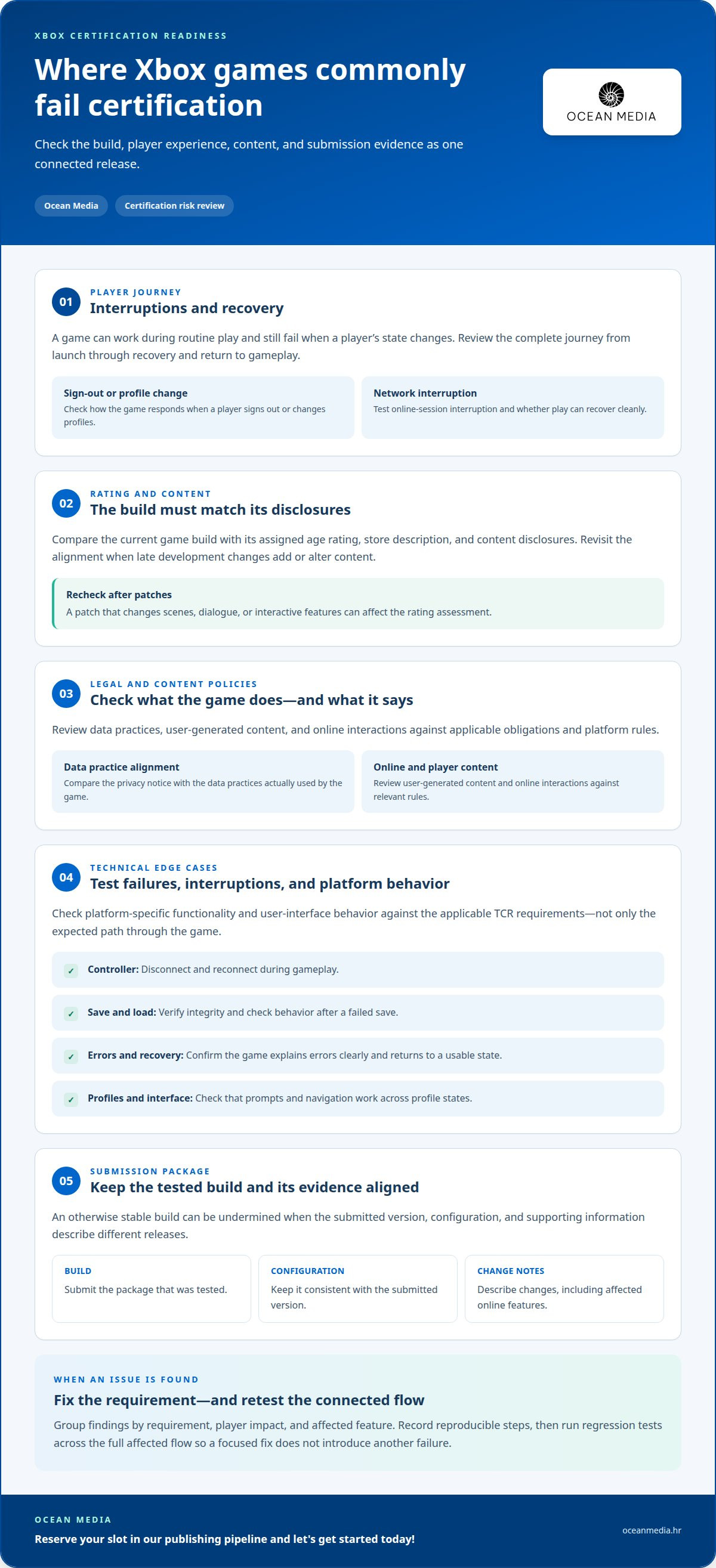
Certification problems often arise when a game’s build, content, and submission evidence don’t align. A title may work during routine play but fail when a player signs out, loses network access, or changes profiles. Such gaps can affect multiple features. Review the complete player journey, including launch, interruptions, recovery, and return to gameplay.
Age-rating alignment is another key review area. The game’s actual content, store description, and assigned rating should be consistent. For example, a rating assessment may not reflect content added late in development. Compare the current build with the rating information and content disclosures for the submission. Repeat this review whenever a patch changes scenes, dialogue, or interactive features.
Legal obligations and content policies can also create certification issues. A title’s data practices, user-generated content, and online interactions should match applicable obligations and platform rules. For example, a privacy notice that describes different data practices from those used by the game creates a mismatch. Review the player-facing explanation alongside the relevant game flows, including changes introduced by updates.
Technical and functional failures often appear in edge cases. A controller disconnect during gameplay, a network interruption during an online session, or a failed save can expose incomplete recovery behavior. Check whether the game returns to a usable state and explains errors clearly. Platform-specific interface behavior matters too: a prompt or navigation flow that works with one profile state may break with another.
Submission packaging and documentation can undermine an otherwise stable build. The submitted version, its configuration, and supporting information must describe the same release. For example, notes that omit a changed online feature leave testers without useful context. Keep build identifiers and change descriptions aligned, and submit the package that was tested.
A practical approach to how to pass Xbox TCR is to group findings by requirement, player impact, and affected feature. Give each issue reproducible steps, then retest the complete affected flow after a fix. A change to login, for instance, can affect profile behavior beyond the login screen. Track regression results to make sure a local fix doesn’t introduce a new failure elsewhere.
For teams coordinating certification readiness with release planning, console publishing support for developers can help connect submission preparation with the wider publishing pipeline.
Readiness work applies across release types: Xbox certification covers full games, Game Previews, betas, and demos. Xbox certification testing should check platform-specific functionality and user-interface behavior against applicable TCR requirements. Console certification testing should also cover save and load integrity, error-message handling, network and profile behavior, and achievements. Include controller disconnection and reconnection scenarios so interruptions aren’t overlooked.
Kudos QA describes console certification as a final barrier between a finished build and release. Treat it as a release-readiness check: validate these areas in the build being prepared, including their user-facing behavior, and confirm that fixes preserve affected functionality.
How do developers test an Xbox game before submitting it for certification
Console certification testing checks whether a game meets platform holders’ technical and functional standards. Start during development, not only at the QA handoff. Early compliance checks expose issues while teams can still address them within the feature’s normal workflow. Finding issues early can reduce late-cycle rework costs by 6-10 times. A named certification owner can monitor requirement updates and translate them into testable tasks.
Build a test plan around applicable Xbox TCR requirements and actual player flows. Check platform-specific functionality and user-interface behavior, including scenarios that interrupt those flows. A controller disconnect, for example, should not leave the game stuck or lose progress. Test network interruptions, profile changes, save and load integrity, achievement behavior, and error messages. For each test, define the expected result, record the outcome, and provide reproducible steps.
Include scenarios that standard playthroughs can miss. Xbox compliance testing should cover Quick Resume during a save and storage hot swapping. Also test controller disconnection and reconnection, including what happens if the player resumes mid-action. Test network interruptions for relevant online features, and exercise account-dependent behavior through profile changes. Fresh testers can reveal confusing flows that the development team already knows how to navigate.
- Stability: Run repeated launches and transitions, recording crashes, hangs, and recovery behavior.
- Save systems: Test save creation, loading, interrupted saves, and clear error handling.
- Network and profiles: Exercise sign-in changes, connection loss, and return to online play.
- Hardware interruptions: Automate repeatable controller and storage interruption tests where possible.
- Platform interface: Validate applicable Xbox features and user-interface behavior against TCR requirements.
- Achievements: Test progress, unlock conditions, and platform reporting across relevant player flows.
Run an internal certification simulation in a clean test environment with fresh testers. Give them the build and test cases rather than informal verbal guidance. This makes unclear instructions and hidden dependencies easier to spot. Record each deviation with reproduction steps, screenshots where useful, and its requirement reference. When a test fails, retest the complete affected flow after the fix, not just the action that exposed the issue.
Plan test coverage around your target hardware. Console development kits are needed for each target platform and, in some cases, each hardware generation. Associate the build, test environment, and results with the same submission candidate. This creates a traceable record and helps distinguish a fixed issue from an untested change before certification begins.
How do you submit an Xbox game for certification through Partner Center
Partner Center is the submission route for Xbox game certification. First, identify what you’re submitting: a digital-download-only product, disc-only product, disc-and-digital product, or content update. Match the submission type to the build and release activity. Represent a patch as a content update, not as an unrelated full product. This distinction helps organize the package and the certification work that follows.
Prepare the submission package and supporting documentation together. Certification testing should verify that both are ready, so align the submitted build with its description and release details. For example, if a content update changes an online feature, include that change in the submission information. Keep the package and documentation consistent with the same build. A mismatch can make it harder to assess what the team intends to certify.
Use a deliberate sequence to keep the submission coherent:
- Select the submission type that matches the product or update.
- Prepare the build and associated documentation for that submission.
- Submit the product through Partner Center for certification.
- For a disc product, consider placing the disc order alongside final certification submission.
The disc order is recommended but not mandatory. After a disc product is submitted in Partner Center and its BVTs pass, the Xbox Certification team orders certification test discs. These are silver discs without artwork, carrying basic details such as the BinaryID and manufacturing date. This process applies to disc submissions, so plan the physical submission path alongside the digital package.
Submission timing depends on type. Xbox certification’s service-level agreement is 5 business days for disc submissions, 4 business days for Digital Base Final submissions, 2 business days for Digital Content Update submissions, and 5 business days for optional submissions. Treat these as service-level targets when building a release schedule, not as a reason to delay preparation. Packaging issues or a failed test can affect the broader timeline.
Certification testing consists of three main stages. Keep the submission candidate and its documentation aligned throughout. For a day-one patch, build approval into the release plan early enough to address test findings before launch. The scope of the change matters: a small correction and a feature addition may need different preparation. Clear submission details help testers understand what they’re reviewing and give your team a focused basis for responding to results.
What should developers do after receiving an Xbox certification failure report?
Start by turning the Xbox certification report into actionable issues. For each finding, identify the affected feature, build, and requirement. Record the reported behavior, then reproduce it under the same conditions. If the report cites a platform requirement, link it to the internal bug ticket. This ties the fix to the reason for failure instead of treating the report as a general quality concern.
Next, determine the scope of each issue before changing the build. A failure in profile handling, for example, may affect sign-in, saved data, and access to online features. Trace the complete player flow around the reported defect. Assign an owner, define the expected behavior, and record the corrected result. Don’t close a ticket after checking only the action named in the report. Related paths may expose the same underlying problem.
- Reproduce: Follow the report’s conditions and record the result on the failed build.
- Diagnose: Connect the behavior to the relevant requirement and affected game systems.
- Fix: Make a focused change that addresses the cause, not only the visible symptom.
- Retest: Run the original test and regression checks across related features.
- Document: Keep the updated build details and test evidence with the issue.
Regression testing matters after a fix. A certification QA process can retest affected areas to confirm compliance. For a save issue, test saving, loading, and recovery after an interruption. For a network issue, repeat the affected online flow after connection loss. This can reveal whether a fix resolves one failure but disrupts another feature. Tie results to the build prepared for resubmission.
Plan for the effect on release timing. A failed submission can delay a release by weeks, and another paid submission may be required. If the game has Conditions for Resubmission, resolve each one and reach a clean submission. A game with CFRs can become eligible for XBOX Rapid Updates after all CFRs are resolved in a clean submission. A qualifying critical fix may bypass XR testing, but other functionality in that update that requires testing is handled separately.
Make the resubmission package reflect the corrected build and its changed functionality. Clear change details help connect the new submission to the earlier findings. For support coordinating console release preparation after certification feedback, plan your console publishing pipeline with a team experienced in console submissions.
Keep the evidence package concise and specific: record the build tested, the steps followed, the observed outcome, and the areas covered by regression checks. A certification QA process can include regression testing after fixes to verify compliance in affected areas. Compare those results with the original failure and note any remaining uncertainty before preparing the submission. If the issue is not fully resolved, don’t present the build as ready. Clarify what remains and assign follow-up work so the next review isn’t based on an unverified assumption.
Include submission effort in the recovery plan. A game that fails console certification may require another paid submission. Account for that possibility in internal expectations, and align the corrected build and supporting evidence before resubmitting. Focus communication on resolved findings and the tests that confirm them, without implying unrelated changes were part of the fix.
Ocean Media
Ocean Media helps developers navigate console release requirements through Console Game Publishing. If you’re preparing an Xbox submission or planning a patch, the publishing process can help bring technical and administrative considerations into your wider release plan. That’s especially useful when certification findings affect build readiness, submission details, or launch timing. With the right release coordination, your team can keep platform approval connected to the steps involved in bringing your game to consoles. If you’re ready to discuss your game’s publishing path, contact Ocean Media, reserve your slot in our publishing pipeline and let's get started today!
Carry Certification Readiness Into Your Release Plan
Make certification readiness part of your release strategy, not a final checkpoint added after development. A plan for how to pass Xbox TCR is more useful when ownership, build decisions, and publishing milestones stay connected as your game evolves. This approach helps your team manage changes, keep release priorities visible, and make informed decisions when approval work affects the schedule.
Your next step is to decide how much publishing coordination your team needs as you prepare to bring your game to consoles. Ocean Media offers Console Game Publishing for developers building a console release. If you’re ready to discuss how publishing support could fit your plans, contact Ocean Media about publishing support. Let’s make your next release step a clear one, and keep your team moving forward.
Frequently Asked Questions
What is Xbox Technical Certification Requirements (TCR)?
Xbox Technical Certification Requirements (TCR) are platform requirements a game must meet during Xbox certification. They cover the technical and functional behavior expected on the platform. A requirement may apply to a specific feature or player flow, so teams use its identifier to connect a test result with the rule being assessed. For example, a compliance ticket can reference the relevant requirement alongside the build and reproduction details.
What are the Xbox certification requirements for game crashes, stability, and performance?
Xbox certification evaluates whether the title remains stable and functions as expected. Certification identifies 30 frames per second as a baseline for passing, while 60+ FPS reflects the smoothest experience many players expect. These are different considerations: frame rate alone doesn’t establish stability. Crashes, hangs, and failed recovery can still affect a test. Assess performance alongside reliable operation across the game’s supported player flows.
How long does Xbox certification take, and how many resubmissions are allowed?
Xbox certification generally takes about 4 to 7 days. The service-level target depends on submission type, with Digital Content Update submissions at 2 business days. A failed submission may require another paid submission, so treat each resubmission as a new corrective cycle: address the reported issues, prepare the revised build, and submit it for testing. Plan release timing around that work rather than assuming a particular number of retries.


