

A PEGI rating is not the same as console certification. Treating them as one approval step can complicate your launch plan. The right PEGI rating submission process depends in part on whether your game is digital-only or also getting a physical release, so confirm the route before setting your schedule.
If you’re unsure what to prepare, you’re not alone. Content details, interactive features, and release format all matter, and incomplete information can make planning harder. This guide explains the typical information involved, how digital and physical submission routes differ, and what to verify with PEGI, your publisher, or your platform. It also covers PEGI’s interactive risk criteria, introduced in June 2026, so you can account for features such as monetization and online communication during preparation.
You’ll come away with a clearer view of the review journey and how to coordinate age-rating work with platform certification in your publishing pipeline. A structured plan helps you manage the connected tasks involved in bringing your game to consoles.
Key Takeaways
- Identify whether your release format uses a digital or physical rating route, then confirm current eligibility and requirements with the relevant rating body, publisher, or platform.
- Prepare accurate content information using the current official questionnaire as your guide, and verify which materials apply to your route.
- Use the PEGI rating submission process as one part of your publishing pipeline. Rating review and console technical certification are separate tasks.
- Track age-rating work alongside platform certification, store assets, and other release dependencies to support a more reliable launch plan.
- Explore how Ocean Media’s digital console publishing experience can help you coordinate release complexities: reserve your slot in our publishing pipeline and let's get started today!
What the PEGI rating submission process covers, and what it does not
The PEGI rating submission process concerns how a game is assessed for an age rating and how that rating is communicated to players and parents. PEGI, or Pan-European Game Information, helps consumers make informed choices about game content. For developers, a rating is one part of release planning, not complete approval to launch.
The route can depend on how a game is distributed, including whether it’s digital-only or also receiving a physical release. Requirements may also vary by platform or territory. Before preparing materials or setting milestones, check the latest guidance with PEGI, your publisher, and the relevant platform. For background on PEGI’s age categories and content descriptors, see Pan-European Game Information (PEGI).
What does a PEGI rating tell players and parents?
PEGI age categories indicate the age group for which a game’s content is considered suitable, while content descriptors flag elements that may help explain the rating, such as violence or language. Check current official terminology when reviewing your submission materials. The rating communicates content suitability, not whether a game is well made, easy to play, or right for every individual player.
For example, a fictional adventure might include stylized combat. That detail could be relevant to an assessment, but it doesn’t determine an official result on its own. The outcome depends on the game and the applicable criteria.
Is a PEGI rating the same as console approval?
A PEGI age rating communicates a game’s content suitability to consumers; console platform certification checks a build against a platform’s technical and submission requirements. The two serve different purposes. A rating doesn’t confirm that a game build meets platform requirements, and platform certification doesn’t replace age-rating work.
Storefront compliance and release approval are also separate parts of the publishing pipeline. Coordinate each task, confirm who handles it, and track its status against the launch plan. For a wider view of how regional systems fit into release planning, read our console age rating systems guide.
Keeping these workstreams distinct helps you plan the full process of bringing your game to consoles. Ocean Media supports developers with digital console publishing and platform submission complexities, but does not award PEGI ratings or control rating decisions. To discuss publishing support, explore developer publishing information.
How to prepare for a PEGI rating submission
Start by confirming the route, not by assembling every possible file. The PEGI rating submission process can differ according to release format and the applicable platform workflow, so verify current requirements with PEGI, your publisher, or the relevant platform. Then use the official questionnaire for that route to identify the information you’ll need to provide.
What information should developers gather first?
Build a concise content inventory guided by the questionnaire. Include gameplay and presentation details relevant to its questions. Depending on the game, these could include how violence is depicted, language, or interactive features such as monetization and online communication. For current information on PEGI’s approach, consult Video Games Europe’s PEGI Code of Conduct, including its guidance on interactive risk categories.
Before collecting submission materials, identify the route and the person responsible for it. Ask which items apply to your release. Build access, screenshots, forms, and supporting files may be relevant, but don’t assume every route requires the same package. Confirm the current requirements directly.
How can you avoid incomplete or inconsistent answers?
Assign one person to coordinate responses across design, production, and publishing. That owner can check that the questionnaire describes the same content reviewers can access in the submitted build, and that store descriptions don’t contradict either. If a feature changes, review the related answers and materials rather than relying on an older version.
Accurate, consistent disclosure gives reviewers a clear account of the game they’re assessing. If a question or rating criterion is unclear, note the uncertainty and ask the appropriate contact for clarification instead of guessing.
- 1. Confirm the route. Check which process applies to your release format and platform.
- 2. Identify the owner and source materials. Find the responsible contact and the current official questionnaire.
- 3. Inventory relevant content. Use the questionnaire to guide a concise review of gameplay, presentation, and interactive features.
- 4. Verify route-specific requirements. Confirm whether you need to provide build access, screenshots, forms, or other supporting files.
- 5. Cross-check before submission. Compare your answers with the build and store metadata, then resolve uncertainties before sending materials.
A publishing partner can help coordinate rating-related tasks with the wider console release plan, while PEGI or the relevant rating route determines the outcome. If you’re planning the next steps for bringing your game to consoles, explore digital console publishing support.
How submission, review, and rating outcomes fit together
The PEGI rating submission process follows a broad sequence: confirm the route, provide the requested content information, complete the applicable review, then check the resulting rating and how it should be presented. Exact steps and materials depend on the route, so treat the outline below as a planning aid, not a universal checklist. Confirm current eligibility and requirements with PEGI or the relevant platform before submitting.
Which PEGI submission route applies to your game?
Release format can affect the route. Digital games on participating storefronts may use the IARC questionnaire to generate regional ratings, including PEGI. A physical release may involve a direct PEGI submission. Storefronts, territories, and game formats can affect the details, so don’t assume one route applies to every release of your game. For practical rating information, consult the Video Standards Council (VSC) and confirm the process with the responsible body or platform.
| Release context | Route to check | What to verify |
|---|---|---|
| Digital release | IARC questionnaire, where the relevant storefront supports it | Storefront eligibility, questionnaire steps, and how the rating is issued and displayed |
| Physical release | Direct PEGI submission, where applicable | Current submission instructions, required materials, fees, and review steps |
This comparison is a starting point, not a substitute for current official guidance. If your game is launching in more than one format or through different storefronts, confirm whether more than one workflow applies.
What happens if reviewers need clarification?
Questions or requests for clarification depend on the applicable route and the information provided. They don’t automatically mean rejection or a delayed launch. Keep a clear record of the submitted questionnaire, build details, supporting materials, and the contact managing the submission. These records give your team a reliable reference if a reviewer asks about a feature or needs more detail.
Respond precisely. Refer to the relevant part of the game or supporting evidence, and keep descriptions consistent with the submitted build and store information. If a question is unclear, ask the responsible contact for guidance instead of guessing at the criteria.
Once the rating outcome is confirmed, record it as one release dependency alongside platform certification and storefront tasks. Ocean Media helps developers coordinate console publishing complexities, but PEGI or the applicable rating route determines the rating. To discuss bringing your game to consoles, explore developer publishing information.
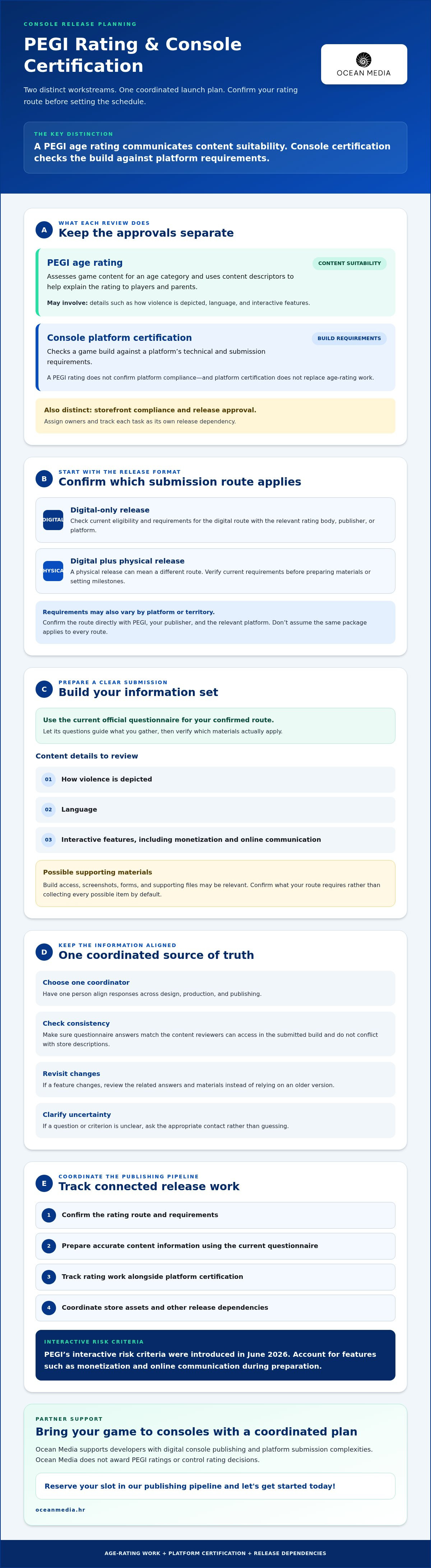
How to prevent rating confusion from disrupting your console launch
A PEGI age rating does not certify your console build. Rating review considers the game’s content and how it should be classified for players and parents. Platform certification assesses a build against the relevant platform’s technical and submission requirements. Storefront compliance and release readiness are additional workstreams, each with its own criteria and owners.
Keep these tasks distinct in your launch plan. The console publishing roadmap offers broader release context; the checklist below helps you track separate dependencies.
- Age rating: Confirm the applicable route, prepare content information, and track review status and the confirmed rating.
- Technical certification: Track the platform submission, build requirements, test results, and any follow-up requested by the platform.
- Store assets: Check required metadata and presentation materials with the relevant storefront, keeping age-rating information consistent once confirmed.
- Release readiness: Record dependencies, owners, and target dates, then review open tasks with your publisher and platform contacts.
How should teams schedule rating work alongside certification?
List each workstream separately and name an owner, required inputs, and dependencies. For example, the rating contact may need accurate content information, while the platform submission owner tracks build and technical requirements. Confirm target dates with the responsible partners rather than relying on generic timelines. Keep rating status visible in your publishing pipeline and launch tracker so the team can see what’s confirmed and what remains open.
Plan the PEGI rating submission process alongside platform certification, not as a substitute for it. A confirmed rating does not mean a build has passed platform review, and a certified build does not resolve age-rating tasks.
What should you do when rating and platform requirements differ?
Use PEGI guidance for rating questions and platform documentation for platform requirements. If the sources appear to conflict, write down the specific issue and ask the relevant rating body or platform contact to clarify which guidance applies. Avoid resolving differences through assumptions or by copying an answer from another release route.
Once you have confirmation, update the relevant internal checklist, submission records, and store information. Share the decision with each workstream owner so the same confirmed details carry through to launch. This handoff helps prevent outdated assumptions from resurfacing late in the process.
If you’re coordinating rating and platform tasks as part of bringing your game to consoles, explore digital console publishing support.
Bring your game to consoles with a publishing partner
A dependable launch plan connects age-rating work with platform submissions, certification, digital storefront preparation, and release tracking. Start by confirming the applicable rating route, preparing accurate content information, coordinating the review with the responsible contact, and tracking each dependency through launch. A publishing partner can help organize these connected workstreams, but PEGI or the relevant rating route determines the rating outcome.
Ocean Media is a digital console game publisher with over 20 years of gaming-industry experience. Its work includes helping developers navigate platform submissions, certification, and digital publishing complexities. As you discuss a potential partnership, clarify how the PEGI rating submission process fits into the wider publishing work and who is responsible for each task.
What should you ask a publishing partner about PEGI coordination?
Start with ownership and scope. Ask who will manage rating-related communication, platform contacts, and any supporting materials, then confirm which responsibilities are included in the publishing partnership. Don’t assume the publisher submits for a rating or supplies every item unless that has been agreed.
It’s also useful to ask how age-rating tasks connect with platform certification and digital storefront preparation. For example, confirm how your team will share a rating outcome with the people managing platform submissions and store information, and who will update launch tracking when details are confirmed.
How can you start the publishing conversation?
Bring a concise project overview to the discussion. Include your target platforms, release goals, current submission status, and any known rating or certification dependencies. If you’re still confirming the route, say so. A clear picture of what’s decided and what remains open gives both sides a practical starting point.
Then align on ownership, next actions, and how progress will be tracked across the publishing pipeline. This keeps expectations clear while leaving room to confirm details with the relevant rating body and platform contacts.
Explore developer publishing information to discuss a potential partnership and your release needs. Bringing a game to consoles is a connected process, and a clear first conversation can help shape the path ahead.
Make your console launch plan work as one pipeline
A clear PEGI rating submission process starts with confirming the route and preparing accurate content information. Keep rating review distinct from console certification, then track both alongside storefront requirements and other launch dependencies. These steps help your team see what’s complete, what still needs confirmation, and who owns each task.
For decisions about eligibility, materials, and review steps, check current guidance with PEGI, your publisher, or the relevant platform. A rating is one part of bringing your game to consoles, not the finish line. Coordinating it with the wider publishing pipeline can help your team move forward with fewer assumptions.
Ocean Media brings over 20 years of gaming-industry experience, including expertise navigating console platform submissions and digital publishing. If you’re planning a console release, discuss your goals, platforms, and next steps with the team. Explore publishing support for your game.
A structured plan and the right publishing partner can help you focus on moving your game toward launch with confidence.
Frequently Asked Questions
How do you submit a game for a PEGI rating?
First, confirm which submission route applies to your game and release format. The PEGI rating submission process then involves checking current official requirements, preparing accurate content information and any requested materials, and submitting through the applicable route. Keep your build, questionnaire responses, and store descriptions consistent. Routes and requirements can change, so verify the current details with PEGI or the relevant platform before submitting.
Is PEGI required to release a game on console?
Requirements can depend on the platform, territory, and distribution route, so don’t assume one rule applies to every release. Check current requirements for each intended storefront and market with your publisher and platform contacts. A PEGI age rating communicates content suitability; it isn’t the same as technical certification or approval to publish. Confirm which rating steps apply to your release before setting launch dependencies.
What information do developers need for a PEGI submission?
The required information and materials depend on the applicable submission route. Start with its current official questionnaire or instructions, then prepare accurate descriptions of the game content it asks about. Confirm whether you need to provide build access, screenshots, forms, or other supporting information. Don’t rely on an old checklist. Check that your answers match the game version being submitted and remain consistent with its store descriptions.
How long does the PEGI rating process take?
There isn’t one turnaround time to assume for every submission. Timing may vary by route, review needs, and whether further information is requested. Ask the relevant rating body, platform, or publishing partner for current expectations, and allow room in your plan for clarification and follow-up. Track rating review separately from technical certification so progress in one workstream isn’t mistaken for completion of the other.
Can a game receive a PEGI rating before console certification?
Age-rating assessment and console technical certification are separate workstreams, and their sequence depends on the route and platform requirements. Confirm the required order with the relevant rating body, platform, or publisher rather than assuming a universal sequence. As you plan, identify dependencies and owners for both tasks, then record each status separately in your publishing pipeline. A rating outcome alone doesn’t confirm that the console build has passed certification.
What happens if a game changes after PEGI submission?
If your game changes after submission, check whether the change affects information already provided or may be relevant to the rating. Consult current process guidance and ask the appropriate rating contact or platform whether an update or other action is needed. Document the build version and any decisions. Don’t assume every change requires a new submission, or that a change never needs to be reported.
Does Ocean Media issue PEGI ratings?
No. Ocean Media is a digital console game publisher, not a rating authority, and it doesn’t issue PEGI ratings or control rating decisions. With over 20 years of gaming-industry experience, Ocean Media helps developers navigate console platform submissions, certification, and digital publishing complexities. If you’re considering a publishing partnership, ask how rating coordination fits the proposed scope and which responsibilities are included as you plan to bring your game to consoles.


