

A strong campaign can lose momentum when an asset is hard to find, carries outdated branding, or is not ready for its platform. Preparing marketing assets for console platforms takes more than polished visuals: your team needs clear file names, consistent brand standards, purposeful asset choices, and a reliable approval process.
Every console release brings its own mix of creative, marketing, and publishing tasks. Make those tasks easier to coordinate by ensuring everyone can identify the current files and see what is ready to use. A well-organized publishing pipeline turns that clarity into smoother collaboration.
Learn how to organize file names and asset libraries, maintain consistent branding, choose assets for different campaign needs, and define approval roles. We’ll also cover how platform tools support distribution and how console game publishing can simplify the technical and administrative work of bringing a game to consoles. When you’re ready to plan your release, contact Ocean Media to discuss console game publishing.
Key Takeaways
- Set consistent file-naming, version, and status rules so teams can find current assets quickly.
- Organize approved brand materials in an accessible library, and retire outdated files to reduce confusion.
- Keep master creative files alongside channel-ready formats to support coordinated campaign distribution.
- Choose assets for the campaign’s audience and format, then define who reviews and approves each item.
- Use platform tools and a clear publishing pipeline to coordinate the technical and administrative work of bringing your game to consoles.
Marketing asset management and brand consistency
Strong asset management gives every team a clear source for approved creative. Preparing marketing assets for console platforms starts by defining how files are named, reviewed, and updated before campaign materials move across channels or markets.
Consistent Messaging and Visual Branding
Consistent messaging and visual branding mean using a core message and recognizable design across campaign formats. This helps players identify your game and gives collaborators clear boundaries for adapting materials. A social post and a console store banner, for example, can use different layouts while retaining the same game title, logo, colors, and central promise.
Build templates around elements that must stay fixed, then specify which copy or images teams can adapt. Keep approved logos, fonts, and visual references together, and label current versions clearly. This streamlines work across channels and markets without letting local edits change the game’s identity.
Platform Store Specifications and Submission Rules
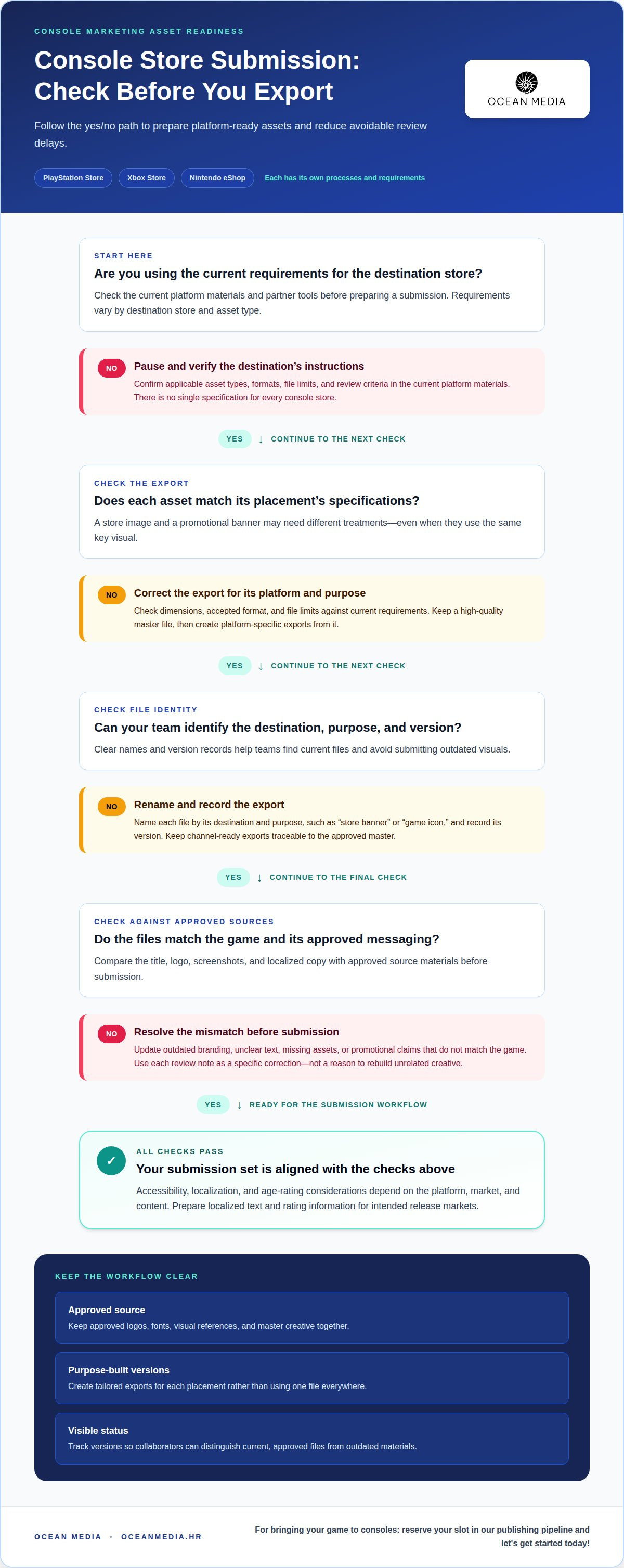
Store specifications and submission rules are platform-specific instructions for preparing materials for review. The required assets and submission details vary by destination store. PlayStation Store, Xbox Store, and Nintendo eShop each have their own processes, so use the current requirements in the respective partner tools.
For each store, confirm the applicable asset types, formats, and review criteria in current platform materials before preparing a submission. Accessibility, localization, and age-rating considerations also depend on the platform, market, and content. Prepare localized text and rating information for intended release markets, and ensure submitted materials match the game and its approved messaging.
Image Formats, Sizes, and File Limits
Image dimensions, accepted formats, and file limits depend on the destination platform and asset type. There is no single specification for every console store. Check current submission requirements for each placement before exporting. A store image and a promotional banner may need different treatments, even when both use the same key visual.
Keep a high-quality master file, then create platform-specific exports from it. Name each export by its destination and purpose, such as “store banner” or “game icon,” and record its version. This makes it easier to replace a file when platform requirements or approved creative change.
Common Asset Rejection Reasons
Submissions can be delayed when files fail platform checks or conflict with approved game information. Common issues include incorrect dimensions or formats, missing assets, unclear text, outdated branding, and promotional claims that do not match the game. Treat each review note as a specific correction, not a reason to rebuild unrelated creative.
Before submission, compare each export with the platform’s current instructions and approved source materials. Confirm that the title, logo, screenshots, and localized copy represent the same release. A clear workflow for preparing marketing assets for console platforms also tracks versions, helping teams avoid submitting outdated visuals when corrected files are available.
Campaign collaboration and asset distribution
A distribution plan connects each campaign message to its audience, channel, and required asset. Map these connections before production so a launch announcement, store page, and social media post support the same release without using identical creative everywhere.
Start with the campaign objective, then list the channels that can support it. A launch campaign might include a console store page, social media posts, a trailer, and press materials. For each channel, define its audience, message, format, owner, and release timing. This map reveals gaps early, such as a trailer without supporting copy or a social post without a clear next step.
Use a channel matrix to turn the map into assignments. Include the source asset and each channel-specific version so collaborators can trace edits back to approved creative.
- Store page: use approved game details and platform-ready visuals.
- Social media: adapt the campaign message to each post’s format.
- Press materials: provide consistent descriptions and approved imagery.
- Internal teams: identify the asset owner and release status.
Omnichannel distribution means coordinating related assets across channels, not copying one file everywhere. Keep master files alongside channel-specific exports. For example, a campaign key visual can anchor a store banner, social post, and press image, with each version tailored to its placement. Include brand guidelines with the files so teams have a practical reference when adapting layouts or copy.
Asset management software can simplify distribution by centralizing approved files and organizing access. Set up campaign folders or metadata fields for channel, territory, language, status, and launch phase. A social media manager can then find the right approved version without relying on email attachments or personal storage. Keep older versions identifiable so they are not mistakenly returned to active campaign folders.
Plan content around the release sequence. Assign an owner to each deliverable, note dependencies, and set a shared status such as draft, approved, or scheduled. If a trailer changes, the campaign lead can identify which captions, store materials, or regional adaptations need updating. This makes the source of each published asset visible and helps teams coordinate changes across markets.
For your next campaign, connect channel planning with the wider console publishing path for developers. A shared distribution map gives creative, marketing, and publishing collaborators a common view of what is ready, where it belongs, and what still needs attention.
Teams should also look for underused channels, emerging platforms or formats, and gaps in current campaigns. For multi-platform campaigns, retain master files alongside channel-specific assets and formats.
Choosing assets and production resources
Choose creative assets by connecting each item to a campaign goal and audience. Then select production resources and storage that support reuse, clear ownership, and efficient updates.
Matching Assets to Audiences and Goals
Asset selection means matching a format and message to the audience’s needs and the campaign objective. This helps you invest production time in materials with a defined role. A gameplay trailer can demonstrate mechanics, while a key visual can establish the game’s tone across promotional placements.
Start with the audience, the action you want them to take, and the campaign stage. A launch announcement may need concise copy and a strong visual. A feature-focused campaign may benefit from gameplay clips that show a specific system. A 30-second video is one example of a social media asset, but its content should still serve the campaign strategy.
Next, map each asset to its intended use and identify reusable components. A design team might create a title treatment, character artwork, and editable templates. Team members can adapt approved components for different placements while preserving the core creative direction.
Choose an asset management system that suits how your team creates and finds files. A shared library can centralize approved materials, access, and older versions. Useful features may include searchable tags, controlled permissions, and organized storage. Some systems can also convert an uploaded JPEG into other file types, helping team members retrieve versions suited to their needs.
Prioritize ease of use and scalability alongside features. A system should support your current workflow and accommodate a growing asset library. Clear folder structures and consistent metadata can improve efficiency, especially when collaborators need to find a specific campaign visual or template.
Marketing Asset Production Costs
The cost of creating marketing assets for a console game depends on the project’s scope and production requirements. The price depends on the case and is given after a quote request. Key factors include the asset types, creative complexity, number of adaptations, localization needs, and revision process.
Build a brief before estimating resources. List each deliverable, its purpose, audience, format, and required source material. A campaign, for example, might need a trailer, store visuals, and social media cutdowns. Clarifying these needs helps distinguish new creative production from adaptations of existing game assets.
Production resources can include in-house designers, external creative partners, and asset management software. Assign an owner to each deliverable, and identify who supplies source files, approves creative, and manages updates. Reusable templates can reduce duplicated design work, while centralized storage helps team members find approved files. The right mix depends on your strategy, existing skills, and the production work still required.
Cross-functional collaboration and approvals
Clear roles help creative, marketing, and publishing teams move assets through review without losing context. A defined workflow connects content creation to platform submission and later updates.
Asset Approval Workflows
An asset approval workflow defines who reviews each file, what they assess, and how approval is recorded. It matters because a campaign asset can pass through several teams before release. Assign a creative reviewer to check visual accuracy, a marketing reviewer to assess message alignment, and a final approver to confirm submission readiness.
Set an owner, status, and deadline for each review stage. Keep feedback attached to the relevant file version rather than scattered across messages. An audit trail records decisions and changes, helping the marketing team understand why a design was approved or returned.
Make review criteria specific. A trailer review can check the game footage, title treatment, and campaign message; store copy can be checked against approved game information. Clear criteria help reviewers focus on their responsibilities instead of reopening settled creative choices.
Submitting and Updating Platform Assets
Developers submit and update marketing assets through the PlayStation, Xbox, and Nintendo partner portals. Select the relevant title and asset category, prepare files according to that platform’s current instructions, and follow its review workflow. Portal steps and fields differ, so use the guidance in each platform’s publishing tools.
After a change is approved internally, identify the new version and the assets it replaces. Upload revised files through the relevant portal workflow, then record their status and submission date in the shared tracking system. This gives collaborators a clear record across platforms.
Cross-functional collaboration works best when each handoff gives the next person the context they need. A designer can provide the source file and intended placement; a marketing lead can confirm campaign copy; and the publishing owner can coordinate platform submission. This sequence reduces guesswork as assets move from creative production to release preparation.
Use a shared tracker to connect each asset with its owner, channel, version, approval status, and next action. If a localized store image changes, for example, the tracker identifies the related language version and platform submission. Team members can then update the correct files without replacing approved materials that remain current.
Plan updates as part of the workflow, not as informal follow-up. When a game title, release detail, or campaign message changes, assign a reviewer to assess affected assets across channels. Recording the decision keeps creative and publishing teams aligned and preserves a clear history of what was submitted and when.
Marketing asset platform options
PlayStation, Xbox, and Nintendo have platform-specific guidelines, and requirements can vary by asset type. Check each platform’s current partner tools before preparing or updating screenshots, trailers, icons, or key art.
Comparing Console Platform Guidelines
Platform guidelines shape how an asset is prepared and submitted for a particular console store. Comparing them matters because a file suitable for one destination may need a different version elsewhere. Treat each platform as its own delivery path rather than assuming one export or checklist fits every store.
Use a comparison sheet to record each platform’s asset categories, file instructions, review steps, and update process. Keep a link or reference to the relevant guidance in your internal asset library. When a platform changes its instructions, the assigned owner can update the sheet and alert the teams preparing affected materials.
Guidelines by Asset Type
Asset-type guidelines describe how a specific creative item should be prepared for its intended placement. They matter because screenshots, trailers, icons, and key art serve different roles and may have distinct platform requirements. Confirm the applicable instructions for each asset category in the destination platform’s tools before exporting or submitting.
Screenshots present gameplay, trailers communicate motion and story, icons identify the title, and key art establishes its visual identity. Keep these as separate entries in your organization’s records. Record each destination, asset type, approval status, and current version so teams do not substitute an outdated file for a required format.
Platform portals and asset management systems support different parts of the workflow. Partner tools provide the destination for platform-specific submission tasks; a digital asset management system can organize, store, and distribute source files, approved versions, templates, and guidelines. Keeping these roles distinct helps team members find the correct master without mistaking it for a final platform export.
Choose tools that fit your organization’s workflow. A shared library should make approved materials accessible to the right collaborators, preserve older versions, and support useful metadata. Tags for platform, asset type, territory, and status, for example, help a team find a specific key art file without searching unrelated campaign folders. Train team members to use the system consistently.
Make updates part of the process. Assign an owner to review platform guidance, record changes in the comparison sheet, and identify affected assets. Then update the corresponding exports and archive files that no longer meet current needs. This creates a traceable path from source creative to submitted material.
As you plan your console release, explore the developer publishing pathway and align asset preparation with your wider publishing process.
Ocean Media: Console Game Publishing
Ocean Media helps developers navigate the technical and administrative work involved in bringing a game to consoles. Its Console Game Publishing service is a natural next step when your team is preparing a release and needs support with platform submissions and digital distribution.
Clear marketing assets are one part of a successful publishing pipeline. If you’re aligning approved materials with a wider console release, Ocean Media can connect that preparation to the publishing process. This gives your title a structured path toward console platforms while your team stays focused on the game and its audience.
Contact Ocean Media and reserve your slot in our publishing pipeline and let's get started today!
Move Your Console Campaign Forward
Turn campaign preparation into a release-ready plan. Set an owner for each asset, align production milestones with your publishing schedule, and connect decisions to the game’s launch priorities. This gives your team a practical starting point for preparing marketing assets for console platforms while keeping the wider release in view.
As plans take shape, identify the decisions that need coordination across creative, marketing, and publishing. A focused conversation can connect those priorities with the technical and administrative work of bringing your game to consoles. Ocean Media provides Console Game Publishing for developers preparing that transition.
Contact Ocean Media to discuss your campaign and explore a clear next step for your release. Your game has a world waiting to discover it, and thoughtful preparation can help your team move toward that moment with purpose.
Frequently Asked Questions
How Do Platform-Specific Naming Conventions Work?
Platform-specific naming conventions make each file’s destination and status clear. Use a consistent order for the game title, platform, asset type, territory or language, version, and date. For example, a file name can identify the game, console, store image, and English-language version before the date. Use leading zeros for sequence numbers, and avoid special characters so files sort consistently.
What should be included?
A useful asset record includes the file name, asset type, platform, language or territory, version, approval status, owner, and storage location. Include the source file or a reference to it when an export has been adapted. For example, a localized store image record should distinguish the approved master from each language version. These details help teammates identify the right file without opening every asset.
What marketing assets do console platforms require for game releases?
Release materials commonly include screenshots, trailers, icons, key art, store descriptions, and localized copy. The exact set depends on the platform’s submission categories and planned store presentation. A game, for example, may need gameplay captures alongside its title artwork, while promotional copy supports the listing. Organize assets by platform and purpose so your release team can prepare the relevant materials for each destination.
How long does console marketing asset review and approval take?
Review timing depends on the platform’s workflow, submission completeness, and whether reviewers request changes. Missing files or inconsistent title information can mean an asset package needs more preparation before review proceeds. Revision rounds also affect the schedule, especially when updated creative needs internal approval before resubmission. Build review and revision stages into your release plan, and coordinate asset updates with the teams responsible for each platform submission.
What accessibility, localization, and age-rating requirements apply to console marketing materials?
Accessibility, localization, and age-rating considerations depend on the platform, market, and content. Prepare localized text and rating information for intended release markets, and ensure materials match the game and its approved messaging.


