

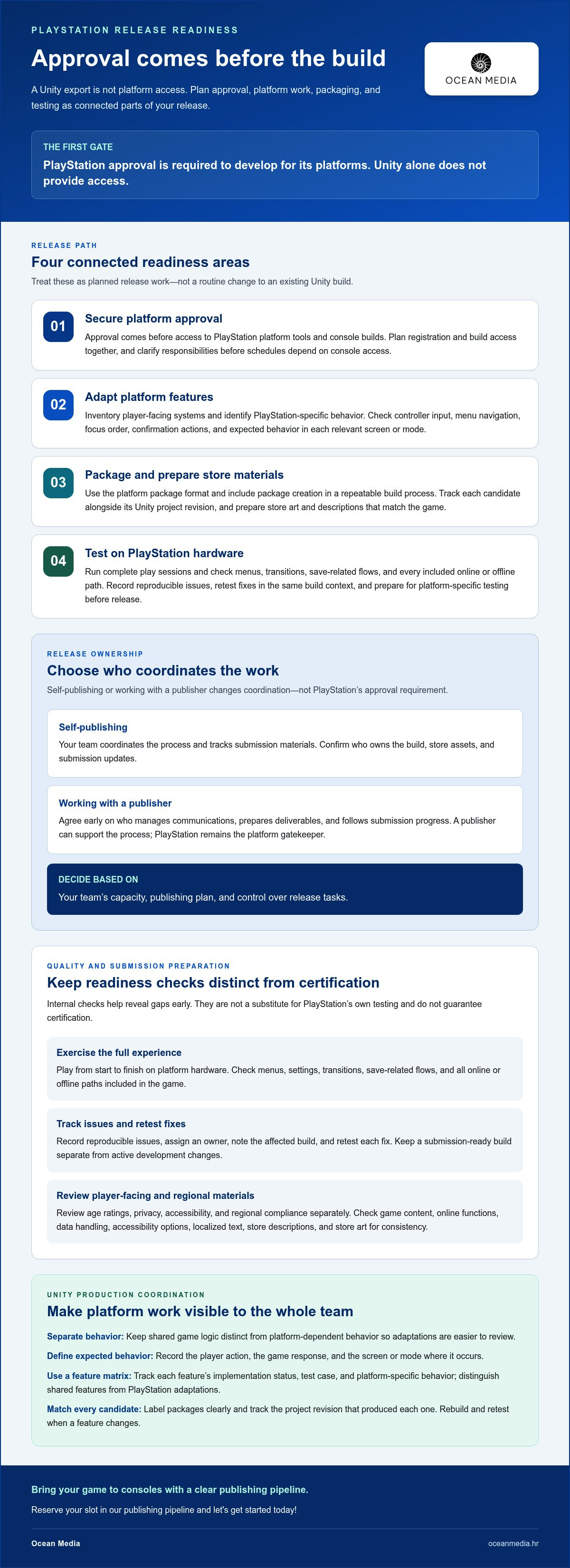
Platform approval is the first gate, not a Unity export setting. Publishing a Unity game on PlayStation requires approval from PlayStation to develop for its platforms; Unity alone does not provide access. A PlayStation release also requires platform-specific testing before launch.
If you’re already developing in Unity, it’s natural to expect the console release path to begin with a build setting. In practice, platform approval comes first, followed by the technical and submission work needed to prepare your game for PlayStation. Understanding that order helps you plan the transition without treating a console release as a routine change to your existing build.
This guide explains how developer registration and approval shape access, then covers PlayStation-specific features, the platform’s package format, store art, and hardware testing. You’ll get a clear view of the steps involved in bringing your game to consoles and how each fits into the publishing pipeline.
Key Takeaways
- Secure PlayStation’s approval for development before planning on access to platform tools and console builds.
- Prepare for a platform-specific release by adapting features, using the required package format, and creating store art.
- Plan registration and build access as connected steps in the console publishing process.
- Test and optimize your game on PlayStation hardware as part of preparing for platform submission.
- Understand the publishing requirements early so you can plan the technical and administrative work involved in bringing your game to consoles.
Closed-platform approval
PlayStation development begins with platform approval, not a Unity export. Approval, access, and release testing are distinct steps in the publishing process.
Self-Publishing and Publisher Requirements
Self-publishing and working with a publisher affect who coordinates the release. Neither removes PlayStation’s approval step: developers need approval to develop for its platforms. With self-publishing, your team coordinates the process and tracks its submission materials. With a publisher, agree early on who manages communications, prepares deliverables, and follows submission progress.
Clarify responsibilities before production schedules depend on console access. For example, document who owns the build, store assets, and submission updates. Make the decision based on your team’s capacity, publishing plan, and control over release tasks. A publisher can support the publishing process, but PlayStation remains the platform gatekeeper.
Technical and Certification Requirements
A PlayStation game must pass platform-specific testing before release. This is an essential certification milestone, so don’t treat a successful Unity build as approval to launch. Prepare a stable candidate build, then test it through the platform’s submission process. Unity’s recommended workflow also includes platform-specific implementation and the platform package format.
To assess performance, test the game on PlayStation hardware. Exercise complete play sessions, menus, transitions, and save-related flows as internal checks. Record reproducible issues and retest fixes in the same build context. These are practical preparation steps, not a substitute for PlayStation’s own testing or a statement of individual certification criteria.
Ratings and Regional Compliance
Review age ratings, privacy, accessibility, and regional compliance separately in your release plan. Start with an accurate inventory of the game’s content, online functions, data handling, and player-facing options. Use it to prepare consistent store descriptions and other release materials. Review relevant requirements for each target region before finalizing localized content.
For example, map what data the game collects and why, then document the privacy information players encounter. Check that accessibility options work as described and that translated text fits menus and store assets. These checks help your team identify gaps early; they do not establish a universal rating or legal rule for every market.
Certification Failure Prevention
Build instability, incomplete flows, and mismatched release materials can create avoidable submission problems. Treat these as internal risk areas, not a definitive list of PlayStation rejection reasons. Before submission, run a clean, start-to-finish playthrough on platform hardware. Check menus, settings, and every online or offline path included in your game.
Assign an owner to each issue, record the affected build, and retest every fix. Compare store art and descriptions with the actual game, including its content and features. Keep a submission-ready build separate from active development changes. This release discipline gives your team clearer evidence of readiness without implying that internal checks guarantee certification.
Platform-specific features
A Unity project needs platform-aware decisions before its PlayStation build is ready. Unity’s recommended workflow includes implementing PlayStation-specific features and building in the platform’s package format. Treat these as connected production tasks, not a final export adjustment.
Start with a feature inventory. List each player-facing system, then identify where its behavior may differ on PlayStation. For example, map input actions to the controls your game supports. Check how menus respond to controller navigation, including focus order and confirmation actions. This gives your team a concrete implementation and review plan.
Next, separate shared game logic from platform-dependent behavior, and keep those boundaries visible in your Unity project. A platform-specific input layer, for example, can help isolate controller handling from gameplay rules. That structure makes changes easier to review without unintentionally altering the PC or other platform builds.
Define expected behavior for every feature before implementation. Record the player action, the game’s response, and the screen or mode where it appears. For an in-game pause menu, specify how players open it, move between options, and return to play. Test the sequence on the target platform rather than relying only on editor behavior.
Unity’s PlayStation workflow also requires the platform package format. Include package creation in a repeatable build process, and label each candidate clearly. Track the Unity project revision alongside its matching package. If a feature changes, rebuild and retest the corresponding candidate instead of assuming an earlier package reflects the latest work.
Use a feature matrix to coordinate design, engineering, and QA. Include the feature name, implementation status, test case, and any platform-specific behavior. Mark shared features separately from PlayStation adaptations. This helps teams spot unfinished work, such as a menu that supports mouse input but lacks complete controller navigation.
Store presentation is another production track. Prepare PlayStation store art alongside the game’s feature work, and track asset ownership and review status. For example, connect each approved image to the title and release materials it represents. This keeps platform-facing presentation aligned with the game players will actually receive.
For a structured view of the PlayStation developer publishing path, align feature implementation, packaging, and review tasks in your release plan. Bringing your game to consoles works best when each task has an owner and a testable outcome. A concise matrix gives your team a practical way to track those outcomes as the build evolves.
Include platform store art in the same production plan as feature work and package creation, rather than treating it as separate promotion. Record the assets being prepared, who owns each one, and whether it is ready for review. Keep those details connected to the title and release materials they represent. When the game or its presentation changes, check that the corresponding store art still reflects the intended release. This keeps platform-facing presentation visible alongside implementation and packaging, giving design, engineering, and QA a shared view of its status. Treat the art as part of the PlayStation workflow, from planning through review.
How do I access the console builds for PlayStation?
PlayStation console builds require platform approval; Unity alone does not grant access. Fees, royalties, and revenue shares depend on the publishing arrangement and agreement.
PlayStation Platform Access Submission
Begin by seeking approval to develop for PlayStation platforms. Approval is the gateway to platform development access, including the console build workflow. Prepare a clear project overview and identify the team responsible for development and release coordination. Keep the current Unity project and production plan organized as you move forward.
Self-publishing means your team coordinates platform access and publishing tasks. Working with a publisher can shift coordination responsibilities, but it does not remove the platform approval step. Clarify who manages submission materials, build preparation, and release communication. Clear ownership helps prevent a gap between approval and active development.
PS5 Build and Deployment Steps
The supported Unity version and PlayStation development tools depend on your approved development setup. Use the toolchain assigned to that setup rather than assuming a standard Unity installation can create a PlayStation package. The platform workflow requires building in its package format, then testing the resulting game on PlayStation hardware.
A practical build sequence starts with an approved project and platform-specific implementation. Prepare the Unity project, create the PlayStation package, then install and run that build on the target hardware. Test the main game flow, menus, and input behavior. Track the project revision alongside each package so your team can identify which build produced an issue.
Keep the first console build focused. Select a representative gameplay path, include its essential assets, and confirm that the package launches correctly. Then expand testing to additional modes and content. If a change affects platform-specific behavior, create a new package and repeat the relevant tests. This sequence helps distinguish a Unity project issue from a packaging or hardware behavior issue.
Plan build ownership before production reaches submission. If your team has separate roles, assign one person to manage Unity project changes and another to track package versions. Record build dates and change summaries in your internal release notes. For example, note whether a candidate changes controller behavior, store-facing content, or gameplay. These records make build comparisons more useful.
Console access also affects scheduling. Include time for platform setup, package preparation, and hardware testing in your release plan. Keep platform-specific tasks visible alongside your Unity milestones. That way, a completed PC build is not mistaken for a completed PlayStation build. Each target platform needs its own ready-to-test candidate.
For a coordinated route through PlayStation developer publishing, map access, packaging, and deployment tasks together. This gives your team a clear view of what must happen before a console candidate is ready.
PlayStation developer registration
PlayStation approval is a prerequisite for developing on its platforms. Registration starts the process, but it is not the same as console build access. Seek approval before assigning platform-specific production work or setting console milestones.
Begin by organizing a clear picture of your studio and game. Keep the project name, current development status, intended platform, and team responsibilities consistent across your internal records. These details help your team describe the project accurately during registration and coordinate follow-up work.
Use PlayStation’s developer registration route to seek approval. Assign the registration task to someone who can represent the project and track its progress. If your team works with a publisher, agree who coordinates registration and who owns development decisions. This distinction helps prevent gaps when approval leads into production planning.
Prepare an internal registration brief before starting. It can capture the details your team needs, without assuming a fixed application format:
- Project: the current game name, genre, and development stage.
- Team: the people responsible for development and publishing coordination.
- Plan: the intended PlayStation release and its place in your production schedule.
Keep those notes current. For example, if the project name or release plan changes, update your team’s shared records before using them in registration discussions. Consistent details make internal handoffs clearer, especially when design, engineering, and publishing responsibilities sit with different people.
After registration, distinguish approval from the work that follows. PlayStation approval allows development for its platforms; it does not mean the game is finished or ready to release. Your team still needs to implement platform-specific features, prepare the appropriate package, and complete platform-specific testing before release.
Translate approval into production tasks. Assign an owner for platform integration, identify which Unity project branch will carry PlayStation changes, and add a console-build milestone to your schedule. For example, keep the PC release candidate separate from the PlayStation candidate. This helps your team track platform work without confusing a desktop build with a console deliverable.
Registration also benefits from clear team communication. Record who handles project updates, build preparation, and publishing coordination. If responsibilities change, update the shared plan before the next handoff. A defined owner for each task gives your studio a practical path from registration toward platform development while keeping approval, implementation, and release testing distinct.
For a Unity studio, sequencing is key: seek PlayStation approval first, then plan platform development around the access and work that follow. Keep the project description, team ownership, and production milestones aligned as you move forward.
Testing and optimization on platform hardware
Unity’s recommended PlayStation workflow includes testing on platform hardware and optimizing the game. An editor run can help catch early issues, but it cannot replace running your candidate on the target hardware. Build testing into production, not just final submission preparation.
Start with a baseline build that represents the current release candidate. Record its Unity project revision, package version, and known issues. Then run a repeatable playthrough on PlayStation hardware. Include a fresh launch, a complete gameplay loop, menu navigation, and a return to the title screen. These checkpoints make later comparisons more useful.
Test player actions in context. For example, try pausing during active play, opening settings, changing an option, and resuming. Check that the game responds consistently and preserves the player’s progress. Repeat key paths after changes to input, interface flow, loading, or scene transitions. A fix in one system can affect another, so retest connected features.
For optimization, identify the actual bottleneck before changing assets or code. Use Unity’s profiling tools to compare demanding scenes with simpler ones. Look for patterns such as frame-time spikes during effects, longer waits around scene changes, or memory growth during extended play. Treat these observations as prompts for investigation, not assumptions about platform limits.
Change one relevant area at a time. If a scene stutters when multiple effects appear, compare it before and after adjusting those effects. Rebuild the package, repeat the same playthrough, and record what changed. This controlled loop helps your team see whether an optimization improved the experience or introduced new issues.
Keep a test log that links observations to builds and reproduction steps. Include:
- The Unity revision and package tested.
- The gameplay location and actions that revealed the issue.
- The observed behavior and the change made.
- The retest result on PlayStation hardware.
Prioritize issues by their impact on players and how reliably your team can reproduce them. A crash that blocks progress deserves attention before a minor visual inconsistency. Recheck fixed issues along the same gameplay path, then test nearby paths that share the affected system. This gives QA and engineering a common record for release decisions.
Keep hardware results tied to the exact candidate build. When a Unity change creates a new package, rerun affected scenarios rather than relying on earlier results. Use the findings to focus optimization and readiness work. To coordinate the publishing steps around your tested build, plan your console release with a structured publishing path.
Ocean Media: Console Game Publishing
Ocean Media publishes console games for developers preparing a PlayStation release. Turn to us when your team needs support coordinating the technical and administrative work involved in platform submissions. We help align the publishing process with your project’s release goals, so you can focus on moving your game toward launch.
Whether you’re planning your first console release or organizing an established Unity project, let’s map the publishing steps around your game and team. To bring your game to consoles, reserve your slot in our publishing pipeline and let's get started today!
Contact Ocean Media or visit oceanmedia.hr to discuss your publishing plans.
Move Your PlayStation Release Forward
The next step is to turn your console publishing plan into a working production schedule. Assign a clear owner to each milestone, connect development and release decisions, and make space for platform work alongside your existing Unity roadmap. This gives your team a practical foundation for bringing your game to consoles while keeping creative priorities in view.
Publishing a Unity game on PlayStation is a substantial project, but you can approach it through a series of coordinated decisions. If you’re ready to discuss how your release could move through a publishing pipeline, connect with Ocean Media and outline your goals together.
Contact Ocean Media about your PlayStation game and take the next step with confidence. Your game’s path to players starts with a clear conversation.
Frequently Asked Questions
What are the requirements to become a PlayStation partner and publish a game?
You need PlayStation’s approval to develop for its platforms before planning platform development. For publishing a Unity game on PlayStation, prepare a concise project summary covering your game, its development stage, intended platform, and team responsibilities. These details help coordinate registration and production planning. If you’re working with a publisher, decide who will manage platform communications and who will make development decisions.
How does PlayStation game certification and submission work, and how long does it take?
A PlayStation game must pass platform-specific testing before release. The timeline for publishing a Unity game on PlayStation depends on candidate readiness, testing, and any fixes needed after review. A stable, well-tested build gives your team a clearer starting point, while discovered issues add work before release. Track each candidate and its changes so you can connect feedback with the right build and plan follow-up testing.
What are the age-rating, privacy, accessibility, and regional compliance requirements?
Review age ratings, privacy, accessibility, and regional compliance separately in the release plan. Inventory the game’s content, online functions, data handling, and player-facing options, then review relevant requirements for each target region.


