

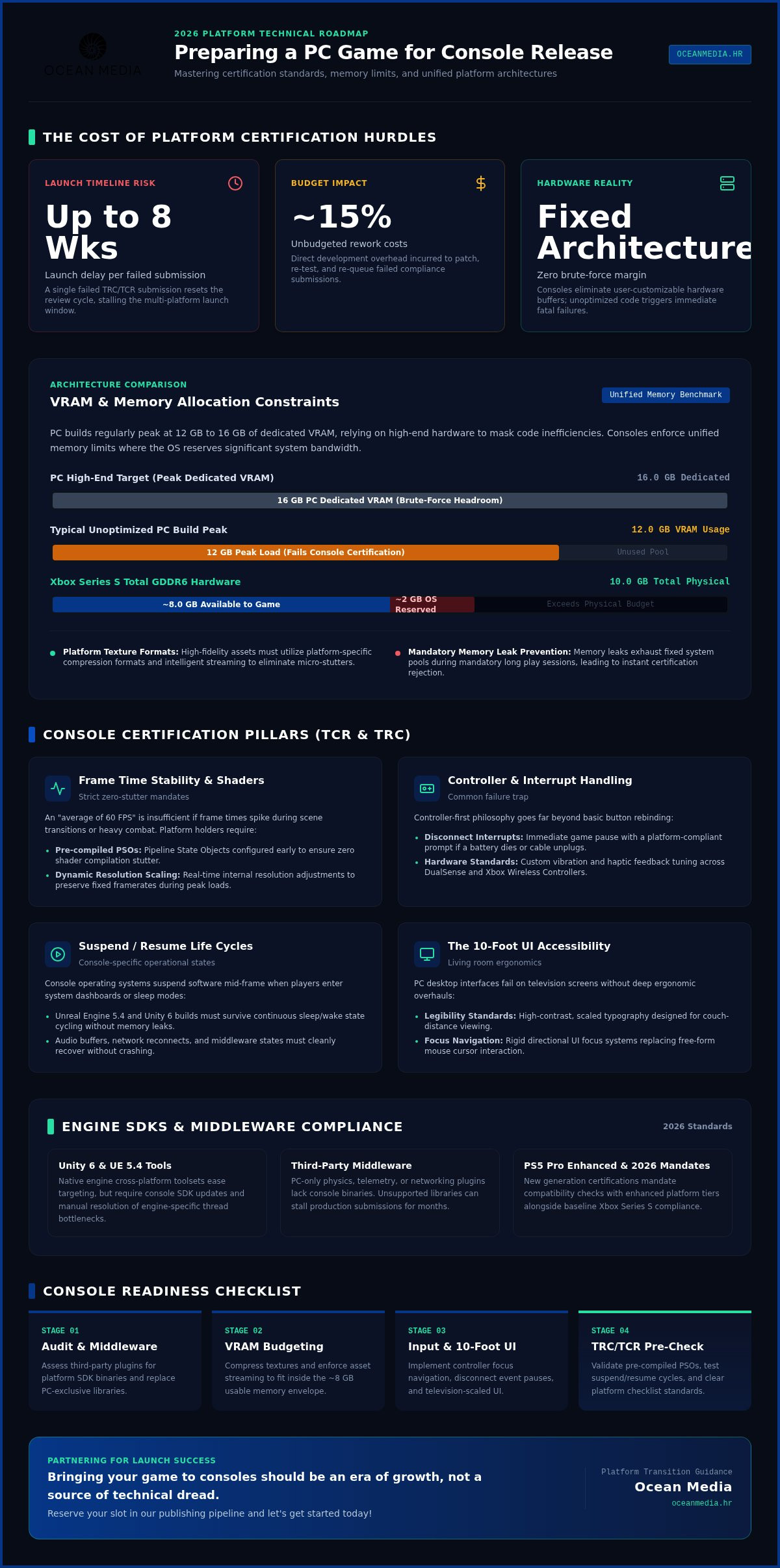
A single failed certification submission can reset your review cycle and delay your multi-platform launch by up to eight weeks, adding roughly 15% in unbudgeted rework costs. When you are preparing a pc game for console release, the shift from the flexible PC environment to the rigid standards of platform holders is often the most stressful phase of development. You have spent years perfecting your mechanics and narrative; seeing your vision stalled by a technical requirement checklist (TRC) or a memory crash on the Xbox Series S is a frustration we want to help you avoid.
We believe that bringing your game to consoles should be an era of growth, not a source of technical dread. Our 2026 guide provides a clear roadmap to master the certification hurdles and hardware optimization limits that define the current generation. We will cover everything from the PS5 Pro Enhanced mandates to the 10-foot UI accessibility standards. Let's work together to ensure your project hits its global launch date on the first attempt. Reserve your slot in our publishing pipeline and let's get started today!
Key Takeaways
- Grasp the technical shift from PC flexibility to fixed hardware standards, focusing on VRAM allocation and CPU threading for modern console architectures.
- Navigate the complexities of Technical Requirements Checklists (TRCs) to prevent certification failures and multi-week launch delays.
- Adapt your UI/UX for the 10-foot experience by ensuring font legibility and implementing a logical controller focus system.
- Implement our professional roadmap for preparing a pc game for console release to guarantee compliance with 2026 platform standards.
- Simplify the process of bringing your game to consoles by partnering with seasoned experts; reserve your slot in our publishing pipeline and let's get started today!
Technical Groundwork: Transitioning Your Game from PC to Console
Many developers assume that preparing a pc game for console release is as simple as hitting a 'build' button in Unity or Unreal. It isn't. Bringing your game to consoles requires a fundamental shift from a user-customizable mindset to a strictly standardized platform mindset. On PC, you can rely on the user having a beefier GPU or more RAM to brute-force through unoptimized code. Consoles don't offer that luxury. You are working with fixed hardware specs; for example, the Xbox Series S features a total of 10 GB GDDR6 memory, with only about 8 GB actually available to your game. If your PC build regularly peaks at 12 GB of VRAM, you have a significant architectural challenge ahead.
True success comes from re-optimizing rather than just porting. When preparing a pc game for console release, you must identify engine-specific bottlenecks early in the cycle. While Unity 6 and Unreal Engine 5.4 provide excellent tools for cross-platform development, they won't automatically fix a memory leak that only triggers during a console's unique suspend and resume cycle. Assessing your current build for console-specific middleware compatibility is equally vital. If your game relies on a PC-only library for physics or networking, you'll need to find a console-compliant alternative before you even think about your first submission attempt.
Controller Mapping and Input Handling
Designing for a controller is more than just mapping 'E' to 'X'. It's about a complete input philosophy. You must implement controller-first design, including haptic feedback and platform-specific vibration standards that vary between the DualSense and Xbox Wireless Controller. One of the most common certification failures involves handling 'controller disconnected' interrupts. If your game doesn't immediately pause and display a platform-compliant prompt when a battery dies or a cable is pulled, you'll face a full queue reset. This simple oversight can add weeks to your timeline and lead to frustrating delays.
Middleware and Engine Compatibility
Your engine version must support the latest console SDKs to even begin the submission process. Many third-party plugins lack console-specific binaries; they might work perfectly in your editor but fail to compile for PlayStation or Nintendo Switch. Check your plugin support early. We've seen projects stall for months because a critical middleware component didn't support the target platform's architecture. Transitioning to a professional console environment is a complex leap, but you don't have to navigate it alone. Our team acts as your seasoned guide, helping you bridge the gap between a finished PC build and a global console launch. If you're ready to move beyond these technical hurdles, reserve your slot in our publishing pipeline and let's get started today!
Performance Optimization: Meeting Strict Hardware Standards
PC development often relies on a "brute force" approach where high-end hardware masks code inefficiencies. When preparing a pc game for console release, this safety net vanishes. You're no longer developing for a moving target of specs; you're developing for a fixed, unified memory architecture. While your PC build might run comfortably on 16GB of dedicated VRAM, the Xbox Series S limits you to roughly 8GB for the entire game. This constraint makes VRAM management the primary hurdle for most studios during the porting process.
Certification requires more than just high performance. It demands absolute stability. An "average of 60 FPS" won't pass if your frame times spike during intense combat or scene transitions. Platform holders mandate zero shader compilation stutter, meaning you must use pre-compiled Pipeline State Objects (PSOs) to ensure smooth delivery. We often suggest implementing dynamic resolution scaling to keep your frame rate locked. This technology adjusts the internal rendering resolution in real-time to preserve performance during high-load scenes, ensuring you meet strict Technical Requirements Checklist (TRC) standards without sacrificing visual impact.
Memory Management and VRAM Constraints
Texture compression is your best friend on consoles. You must utilize platform-specific formats to fit high-fidelity assets into limited memory pools. Intelligent asset streaming is equally vital to prevent micro-stutters as players move between zones. Memory leaks are persistent failures to release allocated memory that eventually exhaust the console's fixed system pool and cause a mandatory certification rejection. Managing these technical optimization benchmarks early ensures your game remains stable during the long play sessions required by QA teams.
Loading Times and Data Throughput
- Optimize for proprietary SSD compression technologies like Kraken on PlayStation or BCPack on Xbox to maximize data throughput.
- Implement mandatory loading screens or interactive transitions that adhere to specific platform branding and progress bar requirements.
- Ensure your "time-to-game" meets the strict boot-up limits set by Microsoft and Sony to avoid immediate rejection during the submission phase.
Achieving this level of polish requires a methodical approach to your code and assets. We've spent two decades helping developers refine their projects for global digital storefronts, turning technical obstacles into seamless player experiences. Let's make sure your hard work isn't sidelined by a performance bottleneck or a memory crash. To secure your launch window, reserve your slot in our publishing pipeline and let's get started today!
Navigating Console Certification (TCRs and TRCs)
Certification is the most rigorous gatekeeper you will face. Unlike the open nature of PC storefronts, console platforms require every build to pass a strict set of standards. Sony utilizes the Technical Requirements Checklist (TRC), while Microsoft enforces Xbox Requirements (XR), often referred to as Technical Certification Requirements (TCR). These aren't suggestions. They are mandatory rules governing everything from how your game handles a network disconnection to how it reacts when a user signs out of their profile during a save routine. For a deeper look at these milestones, see our guide on Console Platform Submission Requirements Explained.
The stakes for first-time success are high. Current 2026 data shows that while initial turnaround for Sony or Microsoft takes between 5 and 10 business days, a single critical failure triggers a full queue reset. This often results in a compounding delay of 4 to 8 weeks for multi-platform launches. When you are preparing a pc game for console release, the most common failure points involve edge cases that PC developers rarely encounter. These include handling suspend and resume cycles, managing cloud synchronization conflicts, and ensuring the game doesn't freeze when background downloads complete.
The Compliance Checklist for Developers
Your interface must adapt to specific platform identities. This means dynamically switching button iconography; you cannot show an 'X' button prompt to a PlayStation user if it refers to the Xbox layout. Beyond graphics, you must implement system-level notifications for game invites and handle the "Safe Area" constraints of consumer televisions. Standards require that vital UI elements remain within the 90% title-safe zone to account for overscan variance on older displays. These small details are what separate a professional port from a rejected submission.
Age Ratings and Regional Metadata
Acquiring age ratings is a mandatory step in the publishing pipeline. For digital-only releases, the International Age Rating Coalition (IARC) offers a streamlined, $0 cost process via a storefront questionnaire. However, if you eventually pursue physical versions, be prepared for direct board fees that can exceed $12,500 for standard certifications. You can find more detail in our Global Console Game Age Rating Guide. Beyond ratings, you must localize your storefront metadata and screenshots to meet the cultural and linguistic requirements of each global territory you target.
Navigating these administrative complexities is where a seasoned partner becomes invaluable. We manage the entire submission lifecycle, allowing you to focus on the creative side of your project. To ensure you don't lose months to a certification reset, reserve your slot in our publishing pipeline and let's get started today!
UI/UX Adjustments for the '10-Foot Experience'
Designing for a monitor eighteen inches from a player's face is vastly different from designing for a television across a living room. When you are preparing a pc game for console release, you must account for the "10-foot experience." This isn't just a buzzword; it's a technical requirement for accessibility and usability. Most players sit between 6 and 10 feet away from their screens, meaning your high-density PC menus will likely be unreadable and frustrating to navigate without significant adjustments.
The biggest change is the removal of the mouse cursor. You must replace free-roaming interaction with a logical "focus" system that snaps between buttons, lists, and icons. Bringing your game to consoles requires simplifying complex nested menus into streamlined layouts that feel natural with a thumbstick. If your game relies on drag-and-drop inventory or precise clicking, you'll need to rethink these mechanics to ensure they don't become a barrier to entry for console players.
Font Legibility and Visual Hierarchy
Legibility is the cornerstone of a successful port. On a 1080p canvas, you should target a minimum font size of 24 to 28 pt to maintain compliance with modern accessibility standards. High-contrast designs are essential for ensuring that text remains readable against varied gameplay backgrounds. Safe Zones are a mandatory console UI standard that ensures vital information is kept within the inner 90% of the screen to prevent it from being cut off by TV overscan variance.
Controller-First Navigation Design
- Implement "wrap-around" navigation to let players move from the last item in a list back to the first without reversing direction.
- Utilize shoulder buttons (L1/R1 or LB/RB) for rapid tab switching between menu categories.
- Include "dead zone" settings in your options menu to allow players to adjust analogue stick sensitivity, preventing "stick drift" from ruining the experience.
Refining your UI is a critical step in our publishing pipeline that directly impacts your certification success. A clean, legible interface prevents player fatigue and ensures your game feels like a native console title rather than a hasty port. Let's make sure your interface is as polished as your gameplay. To get started with a professional review of your UI/UX, reserve your slot in our publishing pipeline and let's get started today!
Securing Your Slot in the Publishing Pipeline
The technical work is only half the battle. Once you've finished preparing a pc game for console release, you face a massive administrative lifecycle that self-publishing indies often underestimate. This final phase involves preparing your "Gold Master" build, the candidate for global distribution that undergoes the final, most rigorous platform review. Any error at this stage doesn't just mean a bug fix; it means a potential 4 to 8-week delay in your launch window. For a deeper dive into how this process works, read our guide on What Does a Game Publisher Do for Indie Devs?
Ocean Media acts as your seasoned guide through this maze. We manage the entire submission process, from technical compliance to the administrative paperwork required by Sony, Microsoft, and Nintendo. You've spent years on your code. We ensure that bringing your game to consoles is a victory lap rather than a logistical nightmare. We handle the heavy lifting of storefront metadata, regional age ratings, and the final communication with platform holders.
The Benefits of a Professional Partnership
Success in the console market often depends on who you know. We leverage 20+ years of platform relations to smooth out the certification process and anticipate potential roadblocks before they trigger a rejection. A professional partnership provides more than just technical help; it offers strategic launch timing and enhanced digital storefront visibility. We work with you to find the perfect window to maximize your reach. If you are ready to move into a professional environment, visit our developer portal to see how we can elevate your project.
Final Submission and Global Launch
- Coordinate release dates across multiple global territories to ensure a synchronized marketing impact.
- Manage the acquisition of IARC ratings for digital storefronts, which are currently $0 for digital-only submissions.
- Oversee the lifecycle of post-launch patches and platform-specific updates to keep your community engaged.
Coordinating a global launch requires a methodical and purposeful rhythm. We move quickly from high-level strategy to the granular details of your publishing pipeline, ensuring nothing is left to chance. Don't let your project stall at the finish line. We are here to act as the bridge between your creative vision and the global market. To secure your place in the 2026 release calendar, reserve your slot in our publishing pipeline and let's get started today!
Launch Your Vision on the Global Stage
Bringing your game to consoles is a milestone that transforms your studio's reach and influence. Success requires more than just a functional build; it demands a deep understanding of hardware-specific performance, rigorous TCR/TRC compliance, and a UI tailored for the living room. When you focus on these pillars, you move from a standard port to a native, high-quality experience that resonates with players worldwide. Preparing a pc game for console release is a complex journey, but you don't have to navigate the technical and administrative hurdles alone.
With 20+ years of console publishing expertise, we act as your seasoned guide. Our global digital distribution network and comprehensive TCR/TRC management ensure your project avoids the common pitfalls that lead to costly delays. We're ready to help you bridge the gap between development and a successful multi-platform launch. Reserve your slot in our publishing pipeline and let's get started today! Your game deserves a global audience, and we're excited to help you reach it together.
Frequently Asked Questions
How long does the console certification process typically take in 2026?
Initial certification takes between 5 and 10 business days for major platforms. However, a single critical failure in your Technical Requirements Checklist (TRC) triggers a full queue reset. This often results in a delay of 4 to 8 weeks for multi-platform launches. We help you audit your build before submission to avoid these compounding setbacks. Efficiency is key to hitting your target release window without expensive rework costs.
Can I use the same assets for PC and console, or do I need to downscale?
You must often downscale or re-optimize assets because consoles utilize a fixed, unified memory architecture. While high-end PCs have ample VRAM, consoles like the Xbox Series S offer only about 8 GB of available game memory. This requires aggressive texture compression and intelligent asset streaming. When you are preparing a pc game for console release, simply porting high-resolution PC files without optimization usually leads to out-of-memory crashes.
What is the most common reason for a game to fail TCR certification?
Handling user profile sign-outs and network interruptions is the most common reason for certification failure. Platform holders require your game to react gracefully if a player signs out of their account during a save routine or if a controller disconnects. These edge cases are rarely a priority on PC but are mandatory for bringing your game to consoles. Our team identifies these compliance gaps early to ensure a smooth first-round approval.
Do I need a dev kit to start preparing my game for console release?
You absolutely need dev kit hardware to finalize and test your build before submission. Standard retail consoles cannot run unsigned code or the specific SDK debugging tools required for certification. If you don't have access to these kits, partnering with an experienced publisher can bridge the gap. We help you navigate the administrative hurdles of acquiring hardware and ensure your build is tested on actual console silicon before it reaches the platform holders.
How much does it cost to port a PC game to consoles?
Costs vary significantly based on your game's complexity and the state of your original code. However, failing a certification cycle adds roughly 15% in unbudgeted rework expenses due to the time required for bug fixing and resubmission. When you are preparing a pc game for console release, investing in professional optimization early saves money by preventing these compounding delays. We focus on a streamlined process that minimizes technical debt and administrative overhead.
Is it better to self-publish on consoles or work with a partner like Ocean Media?
Self-publishing is possible but carries a massive administrative and technical burden that doesn't just distract from your next project. Working with Ocean Media provides you with 20+ years of industry expertise and a structured publishing pipeline. We handle the submission, certification, and global digital distribution, allowing you to focus on game development. To simplify your transition to the living room, reserve your slot in our publishing pipeline and let's get started today!
What are the mandatory UI requirements for PlayStation and Xbox?
Mandatory UI standards include maintaining a safe area and ensuring font legibility for the 10-foot experience. Your vital HUD elements must stay within the inner 90% of the screen to account for overscan on older televisions. Additionally, text must typically be at least 24 to 28 pt on a 1080p canvas to remain readable from a distance. These requirements are strictly enforced during the TRC and TCR review processes to ensure accessibility.
How do I handle updates and patches after the console launch?
Handling updates on consoles requires a different workflow than the instant patches seen on PC. Every update must go through a mini-certification process to ensure it doesn't break platform-level functionality. We coordinate these release dates across multiple territories, ensuring your global audience receives the same experience simultaneously. Our team manages the administrative side of these updates, making the post-launch lifecycle as smooth as the initial release for your studio.


